

A honeypot in cyber security is a decoy server or service that exists only to be attacked. Nobody has a legitimate reason to connect to it, so every connection it records is unsolicited, and most of them are hostile. That makes honeypots one of the cleanest sources of attack data there is. Below we explain how they work, the main types, their limits and what they are good for, with what Whatoblock's honeypot sensors recorded in the 31 days from 23 October to 22 November 2026.

The short version
- A honeypot is built to look like a real target but has no real users, so anything that touches it is suspect.
- Our sensors recorded 1.211.631 attacking addresses sending 2.289.415.187 events. Known scanners, such as research projects and search engines, made up the rest: 16.278 addresses, about 1% of everything that arrived.
- Most attackers are short lived. 822.075 of the 1.211.631 (68%) showed up on a single day, and 79% had not reached our sensors in the 60 days before.
- A few do most of the work: the busiest 1% of attacking addresses sent 96% of the events.
- Honeypots give early warning of new attack waves, show how attackers really behave and produce fresh, low noise IP data for blocklists.
- They only see attacks aimed at them, attackers can learn to spot them, and a badly built one can be abused.
What is a honeypot? The meaning in cyber security
The NIST glossary, which takes its wording from the IETF Internet Security Glossary (RFC 4949), defines a honeypot as "a system (e.g., a web server) or system resource (e.g., a file on a server) that is designed to be attractive to potential crackers and intruders, like honey is attractive to bears."
The UK National Cyber Security Centre puts it more bluntly: "Honeypots are systems set up for the sole purpose of being attacked."
A honeypot can be a single fake SSH server, a web application that appears vulnerable, a fake database or a whole network of decoys. What they share is that they have no production value. In the words of the Honeynet Project, a honeypot "has no production value, anything going to or from a honeypot is likely a probe, attack or compromise."
The word has a second meaning outside security. In crypto, a "honeypot" is a scam token that buyers cannot sell. This article is about the cyber security meaning only.
How does a honeypot work?
A honeypot listens on the internet, or inside a network, and answers like a real service would. It logs everything that reaches it: who connected, what they sent, which credentials they tried, what commands they ran and what files they tried to download.
The NCSC states the logic well: "unexpected connections can be assumed to be hostile activity (because genuine users have no need to access the honeypot)." A firewall or a web server has to tell attacks apart from real customers. A honeypot has no customers, so it does not have that problem.
"Unsolicited" is more precise than "malicious", though. Research projects and search engines scan the whole internet too, and they reach honeypots like everyone else. We flag these known scanners and keep them out of the attack counts. They were a small share:
- Attackers: 1.211.631 of the 1.227.909 addresses that reached our sensors (99%), and 2.289.415.187 of 2.310.912.742 events (99%).
- Known scanners: 16.278 addresses (1%) and 21.497.555 events (1%).
Honeypots do not stay quiet for long. AWS says new sensors in its MadPot honeypot network are discovered "within 90 seconds", and that exploitation attempts follow within about three minutes on average. On our sensors, even the quietest hour of the month brought 12.066 different addresses, and the median hour brought 18.979.
What our honeypot sensors recorded
1.227.909 addresses from 228 countries and territories and 21.734 networks reached our sensors. 1.211.631 of them were attackers, and they sent 2.289.415.187 events. Four patterns stand out.
Most attackers appear once and disappear
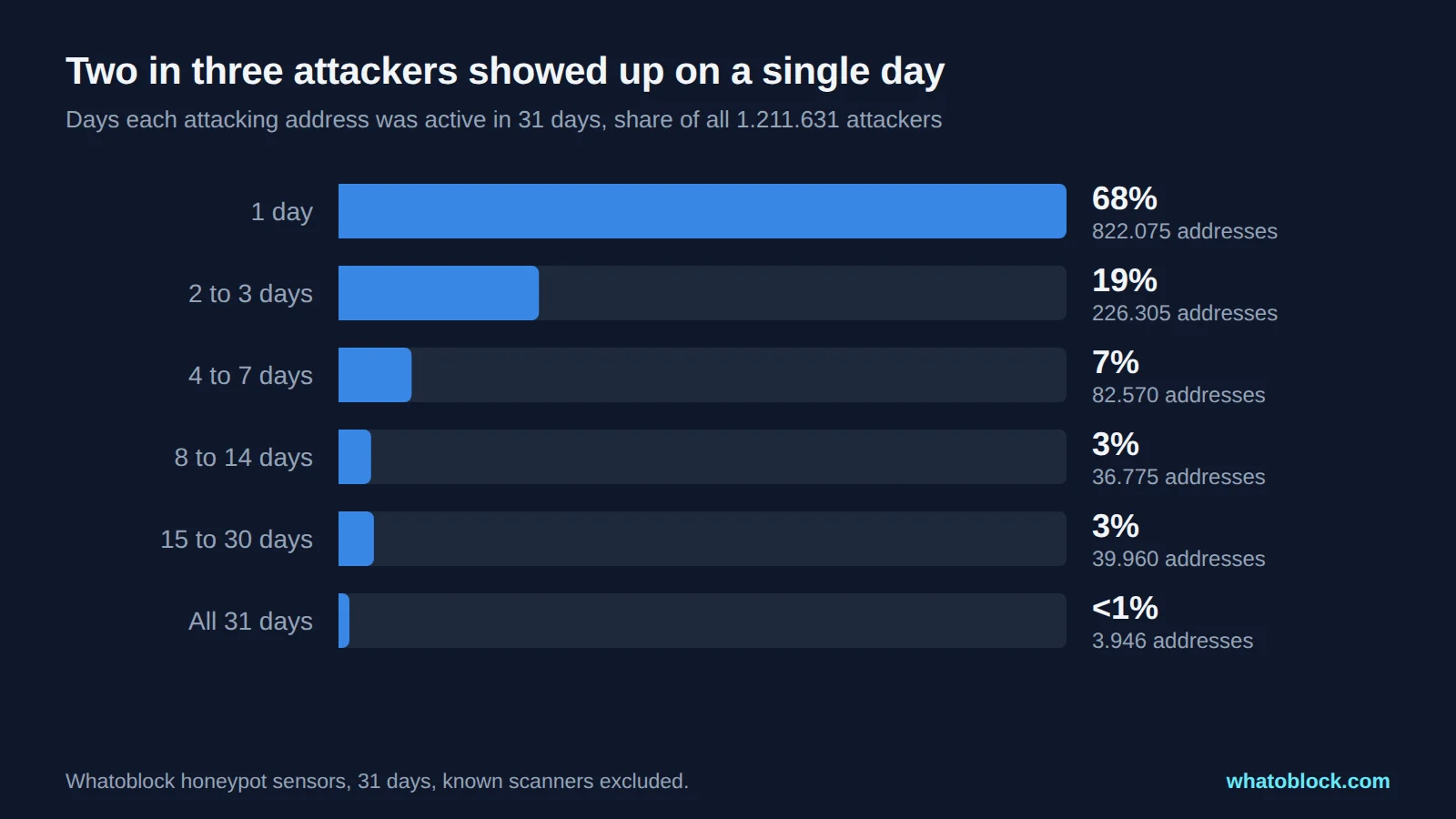
Days each attacking address was active in 31 days.
Two in three attacking addresses (822.075 of 1.211.631) showed up on a single day and never came back in the window. Only 3.946 (0,3%) attacked on all 31 days. And 955.207 of the 1.211.631 (79%) had not reached our sensors in the 60 days before the window started.
So an IP list built from honeypot data has to be fresh. Infected home devices change addresses, cloud servers get rented and returned, and botnets rotate. We look at what that means for blocking in our guide to IP reputation.
A small group sends almost all the traffic
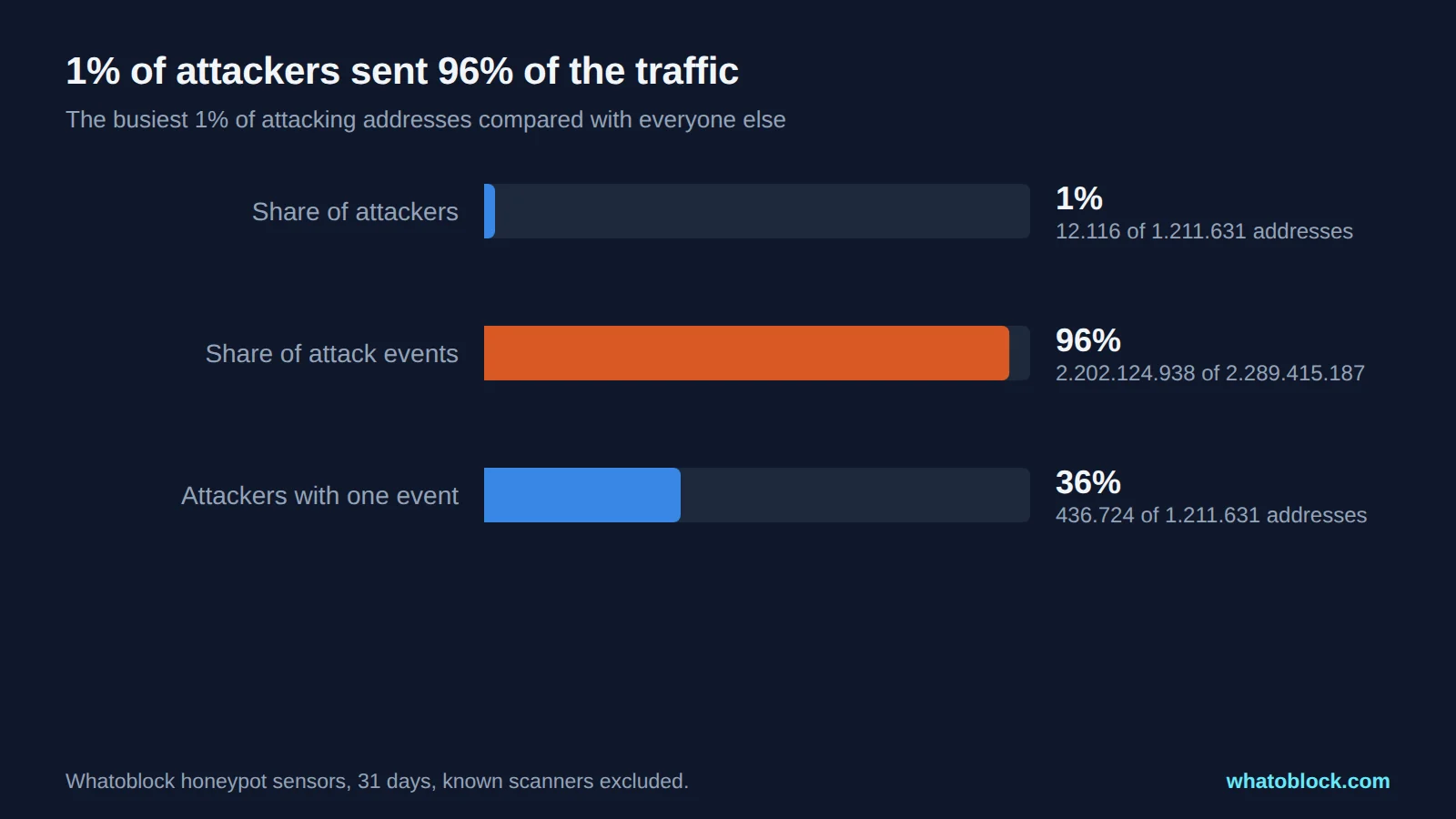
The busiest 1% of attacking addresses compared with everyone else.
The busiest 1% of attackers, 12.116 addresses, sent 2.202.124.938 of the 2.289.415.187 attack events (96%). At the other end, 436.724 attackers (36%) sent exactly one event, and the median attacker sent 3.
The heavy hitters include rented servers that hammer VNC and remote desktop logins around the clock. The long tail is infected home devices and scanners that try one thing and move on. A large sensor network records both groups, the few that make most of the noise and the many that barely show up.
What attackers looked for
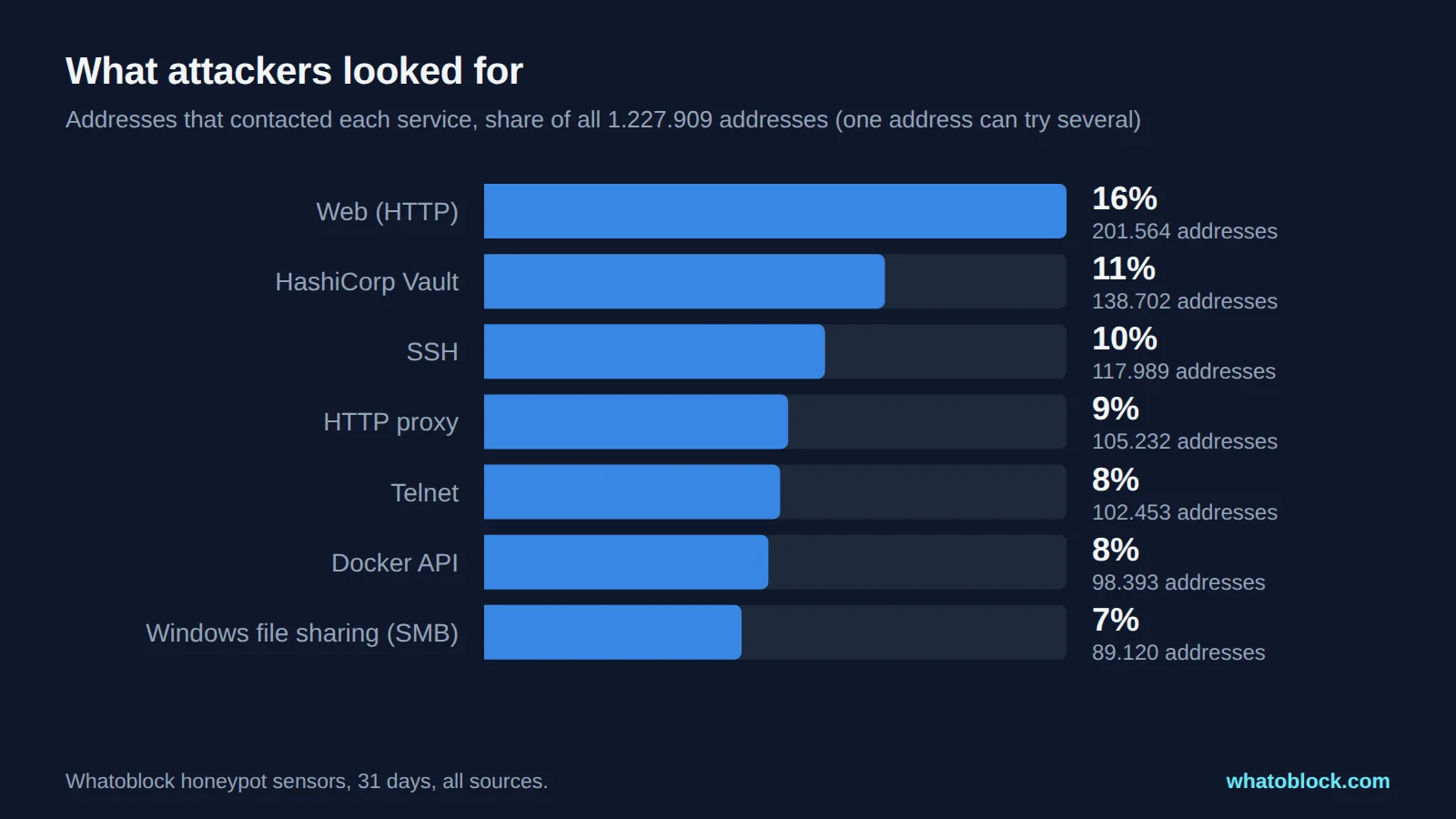
Addresses that contacted each service.
Web servers drew the most addresses (201.564). Second came HashiCorp Vault, the secrets manager, probed by 138.702 addresses, more than SSH (117.989) and Telnet (102.453). By volume the picture changes completely: VNC remote desktop logins made up 799.535.882 events, 35% of all 2.310.912.742, from just 24.178 addresses.
Newer targets were busy too. Docker APIs drew 98.393 addresses, and Jupyter notebooks, ScreenConnect, MLflow, Kubernetes and other AI and cloud tools were all probed. If a service runs on a well known port, attackers find it.
Old vulnerabilities still get exploited
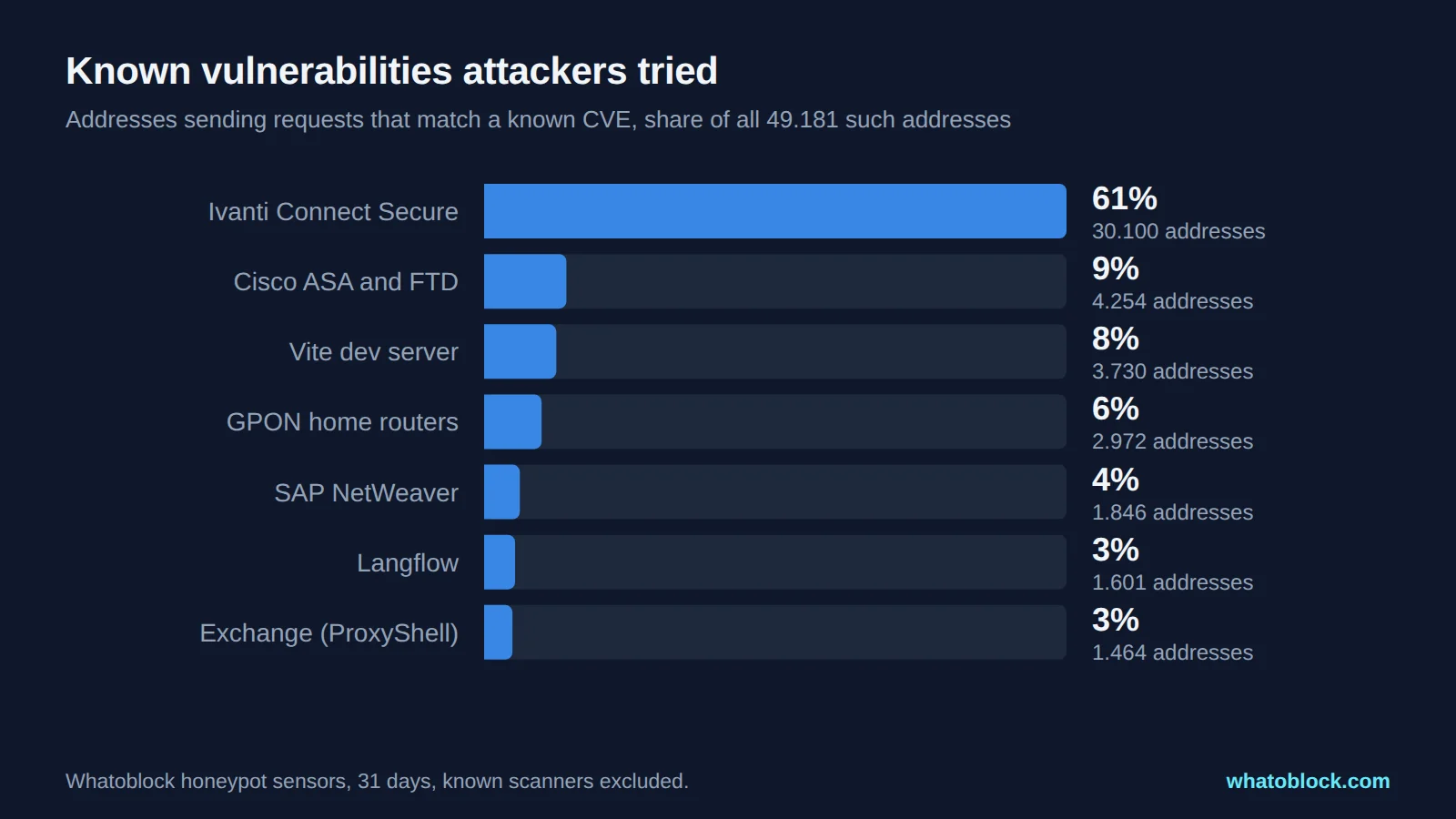
Addresses sending requests that match a known vulnerability.
49.181 attacking addresses sent requests that match a known vulnerability (CVE), across 386 different CVEs. The leaders:
| Vulnerability | Addresses |
|---|---|
| Ivanti Connect Secure (CVE-2025-0282) | 30.100 |
| Cisco ASA and FTD (CVE-2020-3452) | 4.254 |
| Vite development server (CVE-2025-30208) | 3.730 |
| GPON home routers (CVE-2018-10561) | 2.972 |
| SAP NetWeaver (CVE-2025-31324) | 1.846 |
| Langflow (CVE-2025-3248) | 1.601 |
| Microsoft Exchange ProxyShell (CVE-2021-34473) | 1.464 |
187 of the 386 CVEs (48%) were from 2023 or earlier. Shellshock (CVE-2014-6271), a bug from 2014, still came from 570 addresses, and Log4Shell (CVE-2021-44228) from 574. Attackers keep old exploits in their scripts because unpatched systems keep answering.
A real attack session, step by step
This is what attackers do once they get a shell on an SSH server, taken from two of the most common sessions on our sensors.
1. Lock the door behind them. The most common key implant deletes the user's SSH keys and replaces them with the attacker's own:
cd ~; chattr -ia .ssh; lockr -ia .ssh
cd ~ && rm -rf .ssh && mkdir .ssh && echo "ssh-rsa AAAAB3NzaC1yc2E... (attacker key)" >> .ssh/authorized_keys && chmod -R go= ~/.ssh && cd ~
From then on the attacker can log in with a key even if the password is changed. 7.529 addresses tried to add a key this way, and 7.144 of them (95%) used this very same key, in 14.197.789 attempts. One key on thousands of machines points to a single botnet at work.
2. Check whether the machine is worth mining on. A second common session reads the hardware before deciding what to install:
uname -s -v -n -r -m
nproc
lspci | egrep VGA && lspci | grep 3D
lscpu | egrep "Model name:"
curl ipinfo.io/org
nvidia-smi -q | grep "Product Name"
It asks for the processor, the number of cores, any graphics cards and the network owner. Graphics cards mean faster crypto mining, and 1.152 addresses ran nvidia-smi on our sensors.
3. Kick out the competition. The same script then removes scheduled tasks, wipes temporary folders and kills any process using more than 40% of the CPU, which on an infected server is usually someone else's miner:
crontab -r ; rm -rf /var/tmp/.* /var/tmp/* /tmp/.* /tmp/*
ps aux | awk '$3 > 40.0 && $11 !~ /sshd/ {print $2}' | while read pid; do ... kill -9 $pid; done
Telnet attacks are cruder. 40.712 of the 96.751 attacking addresses on Telnet (42%) ran /bin/busybox commands, the classic test IoT botnets use to check they are on a router or camera before downloading their malware.
All of this needs nothing more than a weak password and an SSH or Telnet port open to the internet.
Types of honeypots
Honeypots are usually grouped by how much an attacker can do with them.
- Low interaction honeypots emulate a service just far enough to log the connection and the first requests. ENISA notes they "tend to be easier to deploy and maintain", but they cannot catch exploits for flaws nobody has emulated yet.
- Medium interaction honeypots go further, for example with a fake shell that accepts logins and records the commands an attacker types. Cowrie, a widely used open source SSH and Telnet honeypot, works this way.
- High interaction honeypots are real systems that attackers can fully compromise. They reveal the most, including new exploits, and carry the most risk. ENISA warns that "the risk of compromising real systems, and losing control of the honeypot as a consequence, is higher."
They are also grouped by purpose:
- Production honeypots sit inside a company network as decoys. Any connection to them is an alert that someone is moving around inside. The NCSC calls them "valuable tools in detecting an intrusion into your network."
- Research honeypots sit on the internet to learn how attackers work. The NCSC notes they "do not benefit the network directly, but are set up to gather information about the latest techniques that attackers use." Threat intelligence providers and large cloud operators run them at scale.
Terminology varies. MITRE Engage, for example, uses "honeypot" only for low interaction decoys, while the NCSC and ENISA use it for every level.
Honeypot vs honeynet vs honeytoken
- Honeypot: one decoy system or service.
- Honeynet: a whole network of honeypots, built so attackers can move between systems while every packet is captured. The Honeynet Project described it as "a highly controlled network where every packet entering or leaving is monitored, captured, and analyzed."
- Honeytoken: a piece of data with no legitimate use, such as a fake password, API key, database record or document. If it is ever used, someone has stolen it. CISA defines honeytokens as data "with no legitimate business use" where "any interaction strongly suggests malicious or otherwise unauthorized activity." Canary tokens are a popular form.
CISA's September 2026 guidance on cyber decoys rates honeytokens as low complexity and honeypots as medium to high, which is why many organisations start with honeytokens inside their network.
Honeypot vs firewall and IDS
A firewall decides what traffic is allowed. An intrusion detection system (IDS) watches real traffic for signs of attack. A honeypot sits beside both and attracts attacks on purpose.
A firewall blocks, and it needs to know what to block. Honeypot data is one of the best inputs for that. An IDS has to find attacks hidden in legitimate traffic, which produces false positives. A honeypot has almost none, because it has no legitimate traffic. It also only sees attacks aimed at itself and will not detect an attack on your real servers. The NCSC says production honeypots "should be used to complement network monitoring and other intrusion detection techniques".
The most practical link between them is a blocklist: the honeypot records who is attacking right now, and the firewall blocks those addresses before they reach your real systems.
Why honeypots are useful
Early warning
Honeypots see a new attack wave as it starts, before victims report it. On 9 October 2026 the number of addresses a day sending Android Debug Bridge commands to our sensors jumped from 2.278 to 33.077, then to 40.186 the next day, as a worm spread through Android TV boxes. It was gone by 12 October. We covered it in our October 2026 honeypot threat report. AWS has published similar cases: in October 2026 its MadPot honeypots logged a PHP2Shell exploitation attempt four days before the flaws were disclosed, though AWS says it is unclear whether any of these attempts would have worked against real systems.
Real attacker behaviour
Honeypots show the commands, the malware, the download servers and the credentials attackers actually use, like the SSH sessions above. That feeds detection rules and incident response.
Botnet infrastructure
When an attacker tells a honeypot to download malware, the honeypot learns where the malware lives. Our sensors saw 31.942 bots point to 11.598 C2 and malware servers, and collected 23.631 distinct malware samples. Read more about what a C2 server is.
Clean, fresh data for blocking
Because nearly everything a honeypot records is unsolicited, an address list built from it has very little noise. AWS, for example, feeds MadPot data into its firewall and threat detection services. The catch is speed: with two in three attackers active on a single day, the list has to be rebuilt constantly.
Deception inside your network
A production honeypot or honeytoken inside a company network turns an attacker's reconnaissance into an alarm. MITRE Engage sums it up: with traditional defence the attacker only needs to be right once, "but with adversary engagement, the adversary only needs to be wrong once."
Limits and risks of honeypots
A narrow view
A honeypot only records what reaches it. ENISA is clear that honeypots "will not detect any attack that is directed at production resources." Attackers who pick their targets carefully, or only go after specific companies, may never touch one. A large sensor network spread across many countries helps, and honeypot data works best next to other sources.
Attackers can spot them
Low and medium interaction honeypots often give themselves away through banners, odd protocol behaviour or default settings. In 2018, Cambridge researchers identified 7.605 honeypots on the internet "with just one packet", and found that 27% of the SSH honeypots they checked had not been updated in 31 months. A honeypot needs constant maintenance to stay convincing.
They can be abused
A high interaction honeypot that an attacker fully controls could be used to attack others. NIST says decoys need "supporting isolation measures", and the NCSC warns that research honeypots "are inherently risky, as they encourage attackers to interact with them."
Legal questions
Entrapment is a defence about the conduct of law enforcement, so it is generally not seen as relevant to a company running its own honeypot. The Honeynet Project made this point as early as 2003. Data protection is the bigger question: honeypot logs contain IP addresses, which EU law can treat as personal data. GDPR recital 49 names network and information security as a legitimate interest, as long as the processing is "strictly necessary and proportionate". NIST also suggests talking to legal counsel before deploying decoys. None of this is legal advice.
Effort
Setting up a honeypot is easy. Keeping it believable, filtering out known scanners and turning raw logs into something usable takes ongoing work. The NCSC's 2025 deception trials found that "without a clear strategy organisations risk deploying tools that generate noise rather than insight."
A short history of honeypots
- 1986: Clifford Stoll, a system administrator at Lawrence Berkeley Laboratory, baited an intruder with fake files about the US Strategic Defense Initiative and kept him reading long enough to trace the call. He wrote it up in 1988 and in his book The Cuckoo's Egg. He called the technique "little more than catching flies with honey."
- 1991: Bill Cheswick at AT&T Bell Laboratories fed a cracker a fake password file and watched him inside a "jail", described in his 1992 paper "An Evening with Berferd".
- 1999: the Honeynet Project started as a mailing list and grew into the best known honeypot research group.
- 2003: Augusto Paes de Barros coined the word "honeytoken".
- 2004: Niels Provos presented Honeyd, a framework that simulates whole networks of virtual honeypots.
- Today: cloud providers, national CERTs, nonprofits such as Shadowserver and threat intelligence providers run honeypot networks at internet scale, and the NCSC is building a national evidence base for cyber deception.
From honeypot hits to an IP blocklist
This is how we turn what our sensors record into lists a firewall can use:
- We record every connection and payload that reaches our honeypot sensors.
- We leave out known scanners, AI crawlers and web crawlers by default, so blocking our lists does not cut off legitimate internet measurement or search engines.
- We classify each address by what it did, such as brute force logins, exploits and botnet infections, and track the C2 servers that bots download from.
- We score each address, so you can choose how strict your blocking should be.
- We publish lists of attacking addresses by industry and of botnet C2 servers, built from the last 24 hours, 7 days or 31 days and rebuilt every hour, so short lived attackers drop off and new ones appear quickly.
You can watch attacks live on our threat map and load the lists into a firewall through our blocklist integrations. Plans are on the pricing page.
Frequently asked questions
What is a honeypot in simple terms?
A fake computer or service put on a network to be attacked. Real users never touch it, so anyone who does is almost certainly up to no good, and the honeypot records what they do.
What does honeypot mean in cyber security?
It means a decoy: a system or piece of data that looks valuable to an attacker but has no real use, so any contact with it is a warning sign. The name comes from the idea of luring attackers the way honey lures bears.
Are honeypots legal?
Running a honeypot on your own systems is generally legal. The main questions are data protection, because logs contain IP addresses, and liability if a compromised honeypot is used to attack others. Check local law before deploying one.
Is a honeypot a form of entrapment?
Generally not. Entrapment concerns law enforcement inducing someone to commit a crime. Attackers find and attack honeypots on their own initiative.
Can hackers tell they are in a honeypot?
Sometimes. Simple honeypots can be fingerprinted from their banners and protocol quirks, and researchers have identified thousands this way. Well maintained, realistic honeypots are much harder to spot, and most automated attacks do not check at all.
How quickly does a new honeypot get attacked?
Within minutes. AWS reports that new MadPot sensors are discovered within 90 seconds. On our sensors, even the quietest hour of the month brought more than 12.000 different addresses.
What is the difference between a honeypot and a honeytoken?
A honeypot is a decoy system. A honeytoken is a decoy piece of data, such as a fake password or document, that raises an alarm when used.
Is a crypto honeypot the same thing?
No. In crypto, a honeypot is a scam token or contract that lets people buy but not sell. Only the name is shared.
About this data
- Period: 23 October to 22 November 2026, 31 days, UTC.
- What counts as an attacker: every address that sent traffic to our honeypot sensors, minus known scanners. Events are individual connections and requests.
- New addresses: not seen on our sensors between 24 August and 22 October 2026.
- Services: counted from all addresses, including known scanners, because an address can try several services.
- Vulnerabilities: requests matched to a known CVE. Two SSH protocol flaws (CVE-2023-48795 and CVE-2025-26465) are left out, because they are matched from the handshake, not from an exploit attempt.
- SSH and Telnet sessions: commands as received, known scanners excluded. The attacker's key is shortened.
- Botnets: bots and C2 servers identified by IP address. A bot is a distinct source address that told a sensor to download malware from a C2 server.
Sources
- NIST CSRC glossary, honeypot and RFC 4949, Internet Security Glossary, Version 2
- NIST SP 800-53 Rev. 5, control SC-26 Decoys
- NCSC, Preventing lateral movement
- NCSC, Cyber deception trials: what we have learned so far, 11 December 2025
- CISA, Using cyber decoys to strengthen detection and response, September 2026
- ENISA, Proactive detection of security incidents II: honeypots, 2012
- MITRE Engage and MITRE D3FEND, Decoy Environment
- Honeynet Project, Know Your Enemy, Black Hat USA 2003
- AWS, How AWS threat intelligence deters threat actors, 28 September 2023
- AWS, Real time malware defense with Network Firewall active threat defense, 8 January 2026
- AWS, PHP2Shell exploitation identified in MadPot before disclosure, 21 October 2026
- Vetterl and Clayton, Bitter Harvest: systematically fingerprinting low and medium interaction honeypots at internet scale, USENIX WOOT 2018
- Provos, A virtual honeypot framework, USENIX Security 2004
- Stoll, Stalking the wily hacker, Communications of the ACM, May 1988
- Cowrie SSH and Telnet honeypot
- GDPR, Regulation (EU) 2016/679
Check the live data
Open Scanner Recon with the last 24 hours selected.