
If you run a public server, your logs are probably full of strange connection attempts. An unknown IP tries SSH, another one touches your web server, and a few minutes later something checks DNS, Redis, RDP, or a random admin panel that does not even exist on your machine. Most of the time this is not a person manually choosing your server. It is an internet scanner.
An internet scanner is an automated system that probes public IP addresses and ports to discover exposed services. Some scanning is legitimate, but a significant amount of high volume scanning is reconnaissance, exposure discovery, or preparation for later activity.
What does an internet scanner do?
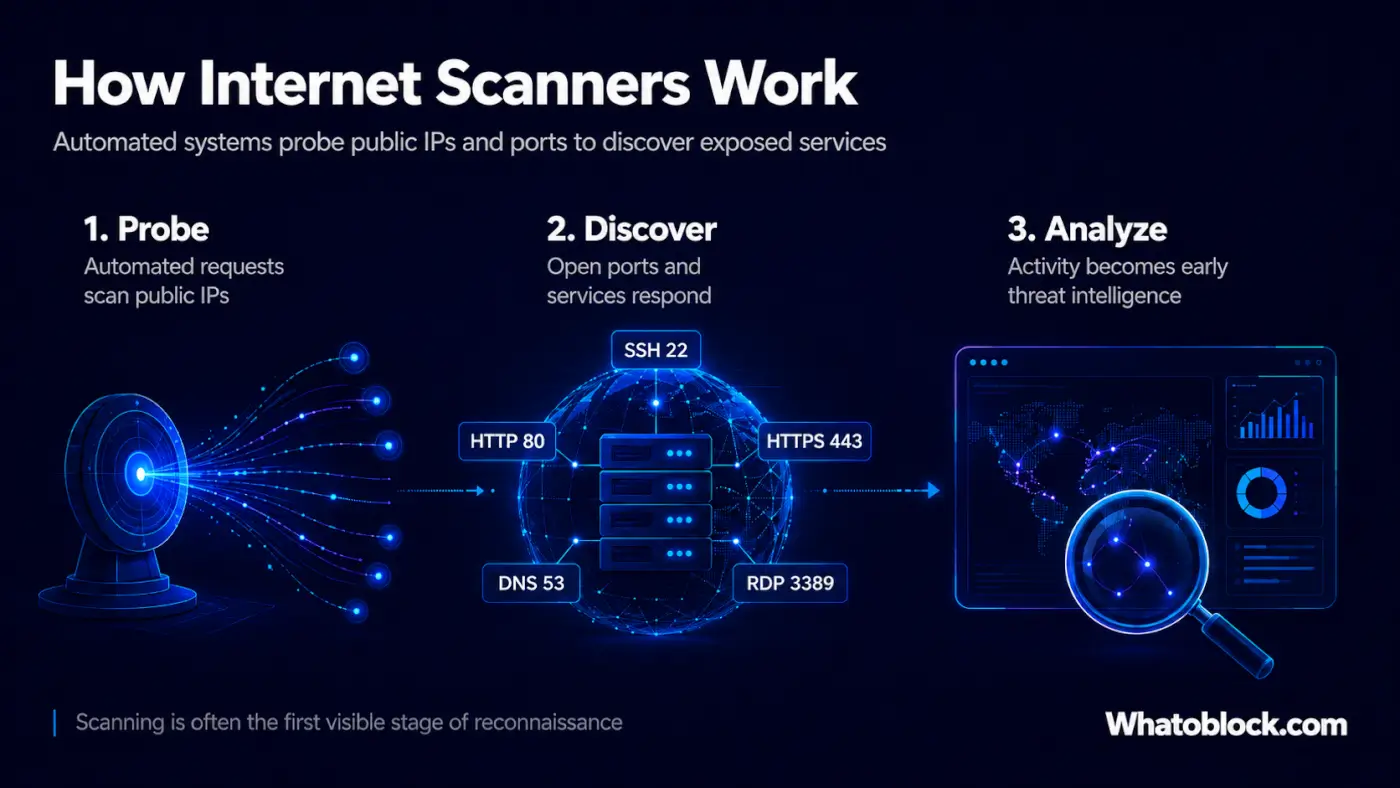
A scanner sends network requests to many IP addresses and checks what responds. It may ask questions like:
- Is SSH open?
- Is there a web server here?
- Is a database reachable?
- Is this router exposing an admin page?
- Is this UDP service responding?
The scanner records the response and moves on. At small scale this looks like a few connection attempts, but at internet scale it becomes a constant stream of reconnaissance across millions of systems. That is why even a small VPS, a forgotten test server, or a new cloud instance can receive scans very quickly, sometimes within minutes of being exposed online.
Is internet scanning always malicious?
Not always. Some scanning is legitimate: security researchers scan the internet to measure exposure, search engines for internet connected services scan public systems to build searchable datasets, and companies scan their own infrastructure to find forgotten assets.
There is a catch, though. Many of these legitimate scanning projects publish what they find in public, searchable databases that anyone can browse through a web interface. A visitor can look up which hosts have a given port open, identify the service running, and often see the exact software and version behind it. For defenders this is a way to audit their own exposure, but it cuts both ways. An attacker can skip scanning entirely and simply search for systems already known to run an outdated or vulnerable version, then go straight to a matching exploit. The reconnaissance has effectively already been done and indexed for them.
Attackers also scan directly, because it is efficient. They do not need to know who owns a server; they only need to find something open, outdated, weak, or misconfigured. That means exposed SSH, open databases, vulnerable web applications, routers, cameras, UDP services, old software, and forgotten cloud servers.
Scanning is often the first visible step in a larger attack chain. First comes discovery, then testing, then exploitation, malware delivery, proxy abuse, spam, or botnet activity. Scanner activity alone does not always prove malicious intent, but it becomes far more telling when combined with frequency, targeting behavior, persistence, ASN context, and whether the same IP appears across multiple sensors.
Why ports matter
Every service on the internet usually listens on a port. SSH often uses port 22, web traffic ports 80 and 443, DNS port 53, and remote desktop port 3389. When scanners focus on a specific port, they are usually looking for a specific opportunity.
A spike in scans against one service can mean attackers are searching for a known weakness, or that a botnet is trying to grow by finding devices that match its infection method. The port tells you what the scanner is interested in, and the pattern tells you how serious it may be.
The scanner may not be the final attacker
A scanner may only be doing reconnaissance, and it may not be the same system that later tries to exploit the target. In many cases, scanning infrastructure finds possible victims and other infrastructure follows up later, whether that is a botnet, a proxy network, another server, or command and control infrastructure.
That is why scanner data is useful even when there is no confirmed breach. It shows what attackers are looking for before the actual attack becomes obvious.
What defenders can learn from scanner activity
Scanner activity becomes useful when you stop treating it as random noise and start looking for patterns. Useful questions include:
- Which IPs are scanning aggressively?
- Which ports are being targeted?
- Which countries or networks are the scans coming from?
- Is the scanner active once, or does it return every day?
- Is it scanning one service, or many?
- Is it linked to botnet or proxy activity?
- Has it touched your own infrastructure?
A single scan may not matter, but a scanner that appears across many sensors, targets sensitive services, and keeps returning over time is far more interesting. That is where threat intelligence becomes useful.
How Whatoblock observes internet scanners
At Whatoblock, scanner activity is observed through a global HoneyBot sensor network. These sensors are deployed across different regions and networks to watch real internet traffic, and when scanners interact with them Whatoblock records details such as source IP, targeted port, protocol, country, ASN, organization, timing, and activity pattern. This turns raw scan traffic into something security teams can actually use.
Instead of only seeing one firewall log entry, you can ask better questions:
- Has this IP been seen scanning elsewhere?
- Is it one of the most aggressive scanners today?
- Which protocols does it target?
- Is it active over time, or only in short bursts?
- Does the activity match a wider trend?
This is the difference between seeing noise and understanding behavior.
Why a global view matters
A firewall only shows what touched your own network, which is useful but limited. A global sensor network gives more context: if the same scanner appears across different regions, providers, and services, it becomes easier to understand whether the activity is isolated or part of wider reconnaissance.
This matters for hosting providers, SOC teams, researchers, and network operators. A hosting provider may want to know whether systems inside its ASN are scanning the internet, a SOC team may want to enrich alerts with scanner reputation, and a researcher may want to study which protocols are being targeted over time. The value is not only in the IP address, but in the behavior around it.
How Whatoblock makes scanner data actionable
Whatoblock helps teams move from raw scanner logs to usable threat intelligence. Scanner activity can be searched, filtered, analyzed, and used in security workflows, so teams can investigate scanner IPs, review targeted ports and protocols, compare activity by country or ASN, and look for patterns over time.
Whatoblock Global Search also makes it easier to investigate scanner data alongside other threat intelligence sources, with lookups by IP, port, protocol, ASN, country, organization, and service. For automation, Whatoblock provides API access so scanner intelligence can be used in scripts, dashboards, SIEM workflows, firewall processes, and internal security tools. The goal is not just to collect scanner data, but to make it useful before it turns into a bigger security problem.
Should you block scanner IPs?
Sometimes, yes, but blocking every scanner without context can create problems. Some scanners are legitimate, some scans are low value, and some IPs may be temporary cloud systems or shared infrastructure.
A better approach is to combine scanner intelligence with behavior. Teams may want to prioritize scanners that are high volume, persistent, targeting sensitive ports, seen across multiple sensors, connected to suspicious infrastructure, or already visible in their own logs. This helps defenders decide what deserves attention and what can remain background noise.
Internet scanning is not going away
Scanning is now part of the normal internet. New servers come online every day, old systems stay exposed, developers open ports for testing and forget them, databases are published by mistake, and routers and cameras remain reachable. Attackers know this, so they keep scanning.
The internet is too large for manual discovery, and automation makes discovery cheap. That is why scanners will continue to exist, and why defenders need visibility into them.
Final thoughts
An internet scanner is an automated system that probes public IP addresses and ports to discover exposed services. Some of that scanning is legitimate, but a significant amount of high volume scanning is reconnaissance, exposure discovery, or preparation for later activity.
For defenders, scanner activity is early warning data. It can show what attackers are looking for, which services are being targeted, and which IPs are behaving aggressively across the internet. Whatoblock helps make this activity easier to understand by observing scanner interactions through its global HoneyBot sensor network and turning those observations into searchable, filterable threat intelligence. The scan itself may look small, but the pattern behind it is what matters.
Explore scanner intelligence
Use Whatoblock to investigate scanner activity, review suspicious IPs, search by port or ASN, and understand how reconnaissance activity is moving across the internet. Start with Whatoblock Global Search or explore the Whatoblock Global Network to see how distributed sensor visibility helps reveal scanner behavior at scale.
Check the live data
Open Scanner Recon with the last 24 hours selected.