

IP reputation is a judgement about how likely an IP address is to be dangerous, based on what that address has been seen doing. Firewalls, email filters, login systems and fraud tools use it to decide whether to allow, challenge or block a connection. This guide covers where reputation data comes from, how scores are built, how to check an IP yourself, and why reputation goes stale so quickly. The figures come from what Whatoblock's honeypot sensors and Heartbeat recorded in 31 days, 23 October to 22 November 2026.

The short version
- IP reputation is a score or label for an IP address, built from evidence of abuse such as attacks, spam, malware hosting or proxy use.
- It goes stale fast. Of 856.781 addresses that attacked our sensors in one month, 107.020 (12%) attacked again in a single week a month later.
- History helps, but only partly. Of the 99.003 addresses that attacked our sensors on 22 November, 39% had attacked the day before, and those repeat attackers sent 82% of the day's events. A quarter of the day's addresses had not attacked our sensors at any point since 24 August.
- Sources barely overlap. Of 7.135.638 addresses in the seven categories we compared, 95% appeared in only one. Independent studies have found the same between providers.
- To check an IP, look at the evidence and its date in more than one source, and find out what kind of network the address belongs to.
- To use reputation well, keep lists fresh, combine different kinds of sources, block outright only where real users never come from, and score or challenge everywhere else.
What is IP reputation?
Every device on the internet talks through an IP address. When an address sends spam, scans for vulnerabilities, brute forces passwords, hosts malware or relays traffic for someone else, that behaviour can be recorded. IP reputation turns those records into a verdict a security tool can act on: a score from 0 to 100, a label such as "malicious" or "proxy", or a place on a blocklist.
The phrase has two common meanings:
- Threat reputation asks whether an address is attacking, scanning or abusing services. Firewalls, web application firewalls and login protection use it, and it is the subject of this article.
- Email sender reputation asks whether mailbox providers trust mail from an address. Gmail, for example, says it "tracks volume, feedback, and limits per domain and IP address". The two overlap, but sender reputation also depends on how a legitimate mail server behaves.
An address is not a person or a device. The same address can be used by different people on different days, and some are shared by thousands at once.
Where IP reputation data comes from
The main sources of threat intelligence about IP addresses are:
- Honeypots, decoy systems that nobody has a reason to connect to, so every connection is unsolicited. They record attackers directly, along with what they tried. Read more in what is a honeypot.
- Abuse reports from administrators and automated tools about addresses that attacked them. Coverage is wide, and quality depends on who reports.
- Spam traps, email addresses that never signed up for anything, so any mail they receive is spam.
- Network telemetry from large networks, cloud providers and CDNs, which see huge volumes of traffic and flag addresses that misbehave across many customers.
- Malware analysis. Running malware in a sandbox shows which C2 and download servers it contacts.
- Network context: who owns the address, whether it belongs to a hosting provider, a mobile carrier or a home connection, and whether it is a Tor exit, VPN or proxy.
Providers describe their own mix differently. Microsoft says its reputation score "appears as a numerical score from 0 to 100" and comes "from proprietary data and machine learning rules". AWS says its WAF reputation list comes "from various sources, including MadPot", its honeypot network. Cloudflare says it combines "open source data" with the behaviour it sees on its own network.
How an IP reputation score is calculated
There is no standard formula, and most providers do not publish theirs. Most scores weigh the same questions:
- What did the address do? Hosting a C2 server or exploiting a vulnerability counts for more than a single port scan.
- How much? One failed login means little, while fifty thousand of them make a campaign.
- How recently? Activity from today matters far more than activity from last month, so good scores decay over time.
- How many independent sources saw it? An address seen by honeypots, abuse reports and network telemetry is a safer call than one seen by a single reporter.
- What kind of network is it? A server in a data centre has no ordinary users behind it. A mobile or home address may be shared by many people.
Scales differ between providers. Microsoft Defender, for example, labels 75 to 100 as malicious, 50 to 74 as suspicious and lower scores as neutral or unknown. Other tools use a confidence percentage, a range such as minus 10 to plus 10, or plain categories, so a score from one provider cannot be compared directly with a score from another.
Take two addresses that both attacked an SSH server today:
- Address A is a rented server in a data centre. It sent 40.000 login attempts to many different sensors today and yesterday, and it also points bots to a malware download server. Every question above points the same way, so it deserves a high score and an outright block.
- Address B belongs to a mobile carrier. It sent three login attempts once, and it is also on a residential proxy list. It may be one infected phone, or a proxy customer, behind an address that thousands of real users share. It deserves a lower score: block it on SSH, and leave your shop open to it.
How to check an IP's reputation
A reputation lookup, whether a tool calls it a malicious IP checker or an IP blacklist check, takes a few minutes if you know what to look at.
- Look the address up in more than one source. Free reputation lookups, abuse report databases and blocklist checkers each watch a different part of the internet, so one clean result proves little. For mail problems, check the DNS based blocklists that mail servers use, because those decide whether your mail gets through.
- Read the evidence behind the score. Find out what the address did (scanning, login attempts, malware hosting, spam, proxy traffic), how often, and when it was last seen. A listing from three months ago says much less than one from yesterday.
- Find out who owns the address. The network name and its AS number tell you whether it is a hosting provider, a mobile carrier or a home connection. A data centre server with attack history is an easy block. A mobile address with the same history is probably shared.
- Check whether it is a proxy, VPN or Tor exit. If it is, the traffic comes from whoever used the service at that moment, and the owner of the connection may know nothing about it.
- Decide per service. Use what you found to block, challenge or watch the address on each service, as described in how to use IP reputation on your network.
Whatoblock's IP Intelligence puts our side of this on one page: the scans our sensors recorded from an address, with dates and ports, its Heartbeat proxy sightings, any C2 activity, and its network context. A free account includes five lookups a day.
What does it mean when an IP is blacklisted?
A blacklisted IP (many providers now say blocklisted) is on a list that some service uses to block or distrust traffic. It means that a list owner saw or received evidence of abuse from that address within the time their list covers. It says nothing about who holds the address today. If your own address is listed, find out which list it is on and why, fix the cause (an infected device, an open proxy, a bandwidth sharing app, a misconfigured mail server), then follow that list's removal process. On a shared mobile or CGNAT address, other customers' traffic can get you listed, and your provider may be the only one who can fix it.
IP reputation vs an IP blocklist
An IP blocklist, often called an IP blacklist, is a yes or no answer: the address is on the list or it is not. IP reputation is the evidence and the score behind that answer. A blocklist is what you get when someone draws a line through a reputation score, for example "every address with a score of 80 or more in the last 7 days".
The IETF's best practices for DNS blocklists say a listing does not have to be "a pass/fail binary decision" and can be "one factor" in a decision that scores several things together. Where you draw the line depends on the service you protect: a strict line suits SSH, and a web shop needs a looser one.
Why one source is never enough: what we measured
Different sources see different addresses
We compared seven categories of risky addresses: attackers on our honeypot sensors, C2 servers, residential proxies, datacenter proxies, open proxies, DDoS sources and Tor exit nodes. In 31 days they held 7.135.638 different addresses. 356.615 of them (5%) appeared in more than one category.
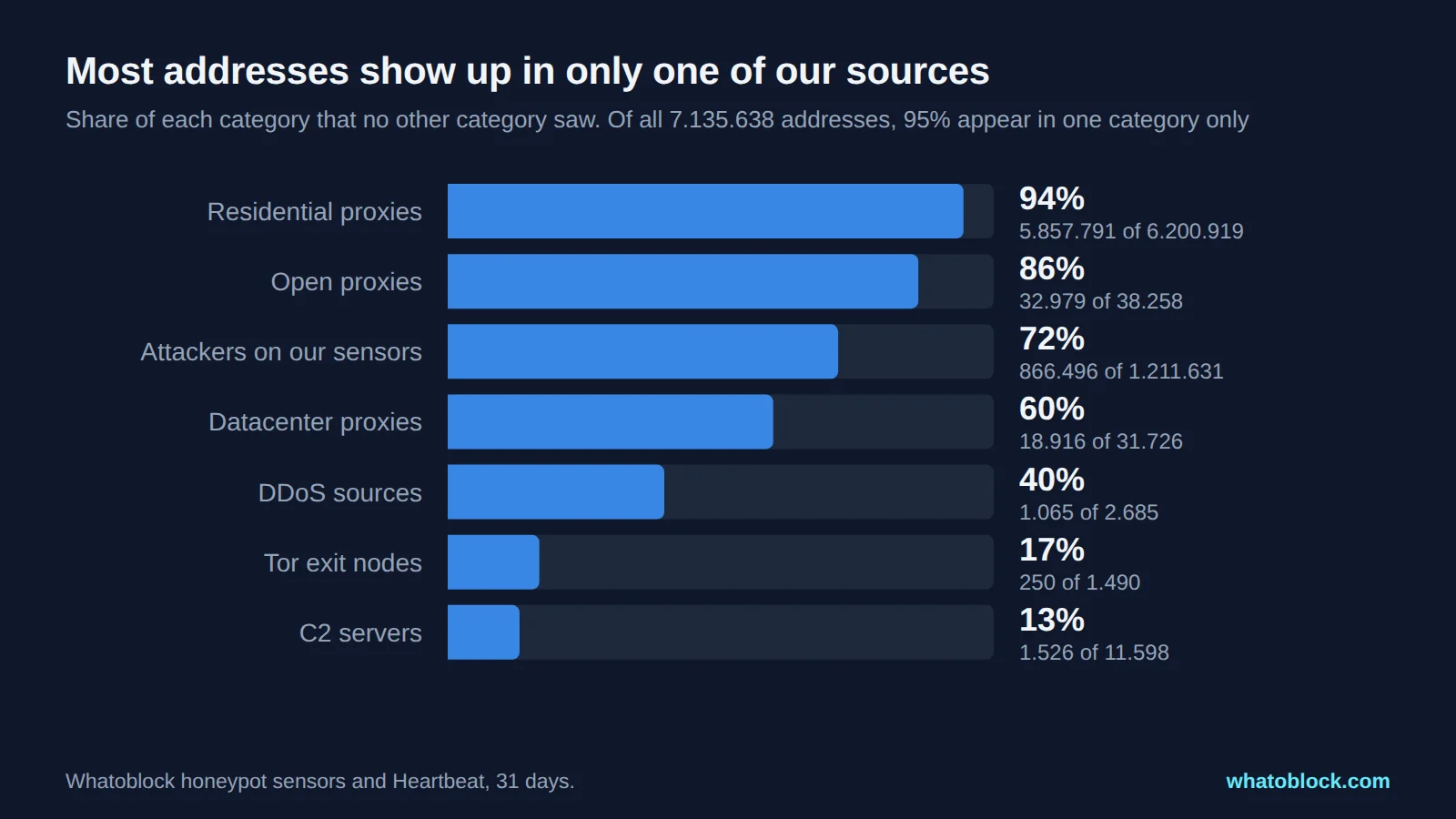
Share of each category that no other category saw.
- 866.496 of the 1.211.631 addresses that attacked our sensors (72%) were in no other category. A list built only from proxy or Tor data would have missed them.
- 5.857.791 of the 6.200.919 residential proxy addresses (94%) were in no other category. A list built only from attacks would have missed them, although 332.225 residential proxy addresses did attack our sensors. Our guide to residential proxies explains why.
- C2 servers overlap the most: 10.035 of 11.598 (87%) also attacked our sensors directly, because many infected machines both attack and serve malware. We found the other 1.563 only because a bot told our sensors where to download its malware from.
Other lists see different addresses too
We have compared our attacker data with AbuseIPDB's free blocklist, and our C2 data with the free C2 feeds URLhaus and ThreatFox. Each time, the sources agreed on a core of persistent addresses, and most of the rest turned up in only one of the two. The figures are in how the free AbuseIPDB list compares with our honeypot data and our test of free C2 feeds.
Independent research agrees
Every serious study of blocklists we found shows the same pattern:
- Carnegie Mellon's CERT team compared 85 blocklists and found that IP addresses were "unique to one list" between 82% and 95% of the time. Their advice: "obtain and evaluate as many lists as practical" (SEI, January 2015).
- UC San Diego researchers compared threat intelligence feeds with a network telescope that watched more than 16 million addresses in early 2018. All the scanning feeds together covered under 2% of the 20.674.149 scanners the telescope saw (USENIX Security 2019).
- Delft University researchers compared the feeds of two leading commercial providers and found an average overlap of at most 4%, even for 22 threat actors both said they tracked. The few shared indicators reached the second provider about a month later (USENIX Security 2020).
- The BLAG study of 157 public blocklists found that an average list covered about 3% of the networks that any list flagged (NDSS 2020).
These measurements are years old, and the exact numbers will have changed since. None of them found a single list that sees most of what is out there.
Why IP reputation goes stale
An IP address is not a fixed identity. Home connections get new addresses, cloud servers are rented and returned, infected devices get cleaned, and botnets rotate. A list that is not refreshed keeps blocking addresses that have gone quiet or changed hands.
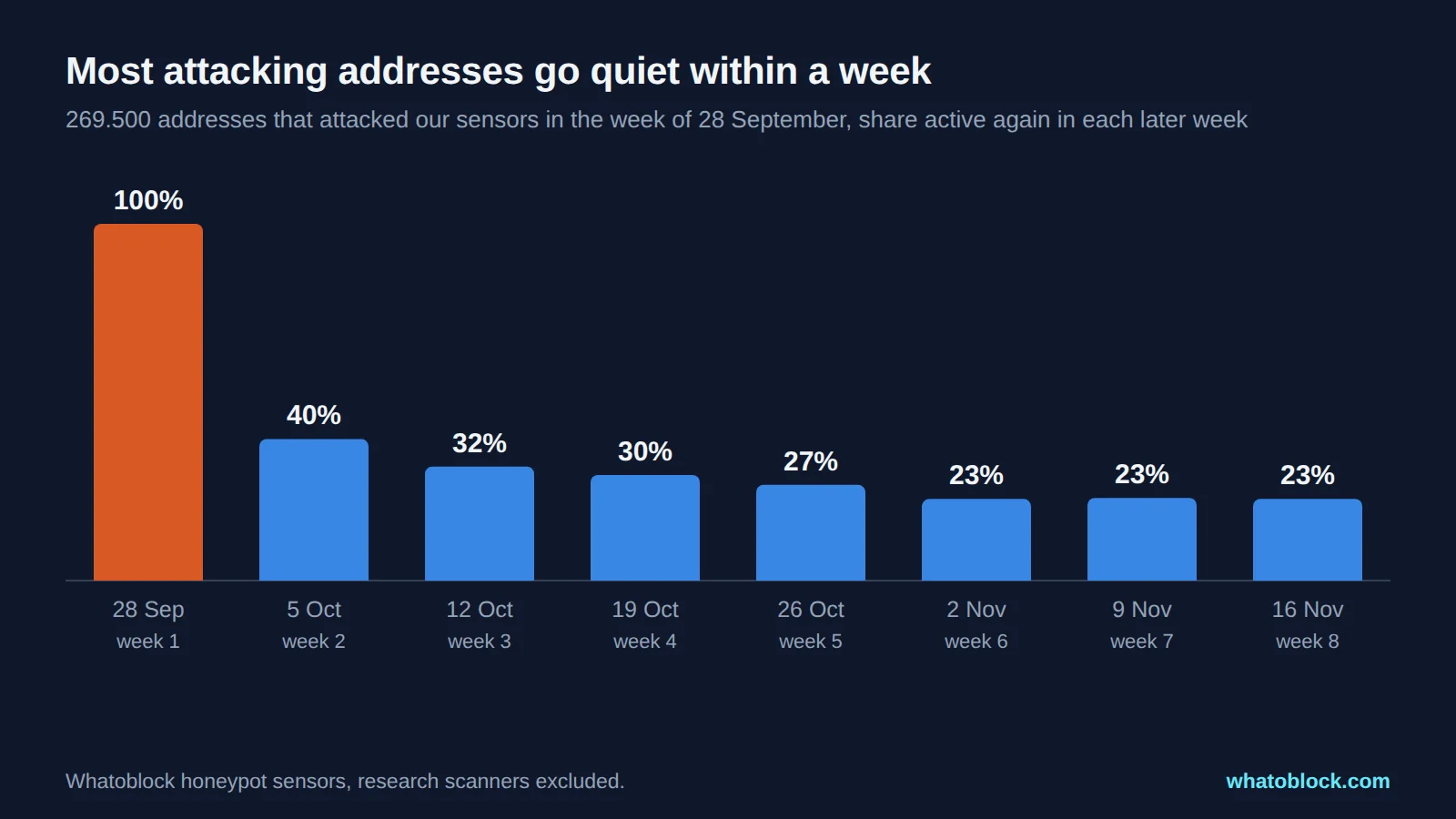
Addresses that attacked in the week of 28 September, share active again in each later week.
Of the 269.500 addresses that attacked our sensors in the week of 28 September, 40% attacked again the next week. From the sixth week on, 23% were active in any given week. Over a longer stretch, 856.781 addresses attacked our sensors between 23 September and 22 October, and 107.020 of them (12%) attacked again between 16 and 22 November. The other 88% of that month old list did not attack our sensors that week.
Fresh history does catch most of the traffic:
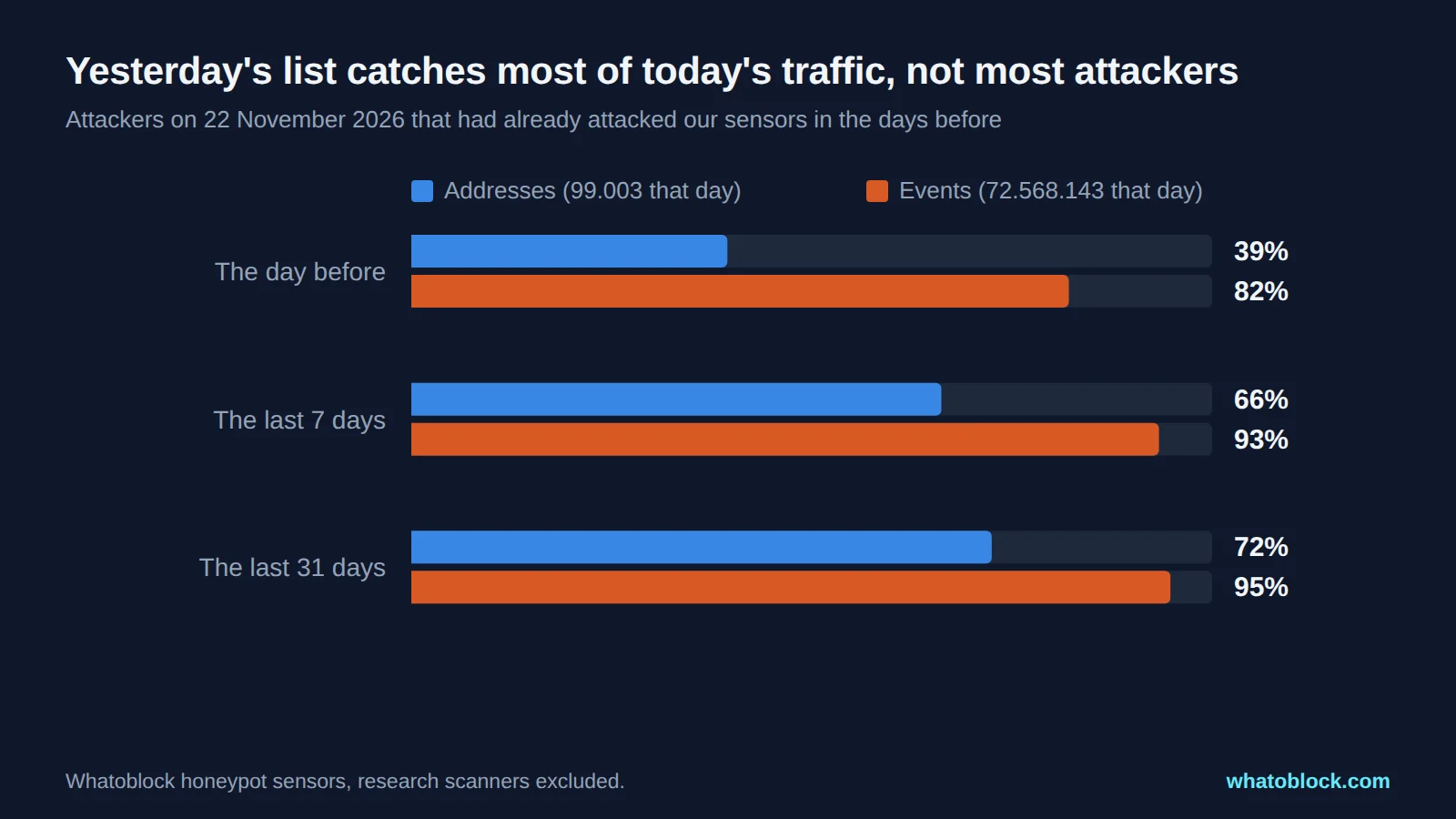
Attackers on 22 November 2026 that had already attacked our sensors in the days before.
On 22 November, 99.003 addresses attacked our sensors. 39.078 of them (39%) had attacked the day before, and they sent 82% of the day's 72.568.143 events. Looking back 31 days caught 72% of the addresses and 95% of the events. Persistent attackers are noisy, so a fresh list blocks most of the traffic. 24.656 of the day's addresses (25%) had not attacked our sensors at any point since 24 August, so only data collected that same day could have listed them.
Research agrees on both points. A Google study of 45 million abusive addresses found that "66% of abusive IP addresses remain active for a single day" before the device gets a new address (RAID 2016). The BLAG study found that 29% of addresses removed from blocklists came back, and about 91% of those returned within 30 days.
The IETF's blocklist best practices say listings "SHOULD be considered temporary", and that some automated lists "have increasingly higher error rates" as the last detection date gets older.
Why IP reputation gets it wrong
Shared addresses
Mobile carriers and many home internet providers put hundreds or thousands of customers behind one public address using carrier grade NAT (CGNAT). A 2016 study found CGNAT in more than 90% of the cellular networks it measured. The IETF warns that "IP blocking for abuse/spam will cause collateral damage" when addresses are shared. Apple asks sites to treat iCloud Private Relay addresses like those of a large carrier grade NAT, and Cloudflare reports that CGNAT addresses are rate limited three times more often than others.
Residential proxies
Proxy services rent out home and mobile connections, often from infected devices. Whatoblock Heartbeat recorded 6.200.919 residential proxy addresses in 31 days. 332.225 of them (5%) attacked our sensors, but the people who own those connections still use them, and blocking them everywhere hurts real customers.
Reused addresses
Cloud providers hand returned addresses to new customers, and address blocks change owners. A 2020 study found that 53% to 60% of 151 public blocklists listed addresses that were shared or reassigned. The American registry ARIN asks blocklist operators to drop "stale reputation" on address blocks it hands to new owners.
Lag
A source that lists an address only after many reports, or updates once a day, will always trail attackers who use an address for a few hours.
How to use IP reputation on your network
- Match the action to the service. Block known bad addresses outright on services ordinary users never reach from those networks: SSH, RDP, admin panels, databases. Corporate VPN gateways have to accept staff from home connections, so protect them with allow lists, MFA and device certificates rather than broad proxy lists. On public websites and logins, use reputation to score, challenge or rate limit.
- Use fresh data. Prefer lists rebuilt every hour or day over static lists. The NCSC and partner agencies warn that "static malicious IP block lists will be less effective" against covert networks, and recommend "dynamic blocklists".
- Combine different kinds of sources. Attack data, proxy and Tor data and C2 data catch different addresses. A 2012 study of spam feeds put it as "obtain a set that is as diverse as possible."
- Let entries expire. Each list should have a clear time window, with old entries dropping off on their own.
- Test before you block. Log matches for a while first. CISA and the FBI advise defenders to "investigate or vet IP addresses prior to taking action, such as blocking", because "many cyber actors are known to change IP addresses, sometimes daily".
- Keep an allow list. Your own offices, partners, monitoring services and payment providers should never be blocked by a third party list.
Whatoblock's blocklists cover two of these sources: the addresses our sensors saw attacking the services of your industry and, on paid plans, botnet C2 servers. You choose the last 24 hours, 7 days or 31 days, and the lists are rebuilt every hour. For proxies and Tor, combine them with a source that tracks those. You can load the lists into your firewall through our blocklist integrations or see the plans.
Frequently asked questions
How do I check the reputation of an IP address?
Look it up in more than one reputation source, read what the address did and when, and check who owns it and whether it is a proxy, VPN or Tor exit. A recent attack from a data centre server is a clear signal. An old listing on a shared mobile address is a weak one. The steps are in how to check an IP's reputation.
What is a good IP reputation score?
It depends on the provider, because every scale is different. On a 0 to 100 risk scale such as Microsoft's, a low score is good and 75 or more means malicious. On a trust scale, high is good. Check which way the scale runs before you set a rule.
How is IP reputation calculated?
From evidence of what the address did, how much, how recently, how many independent sources saw it, and what kind of network it belongs to. Most providers keep their exact formula private.
What is the difference between IP reputation and an IP blocklist?
Reputation is the evidence and the score. A blocklist is a yes or no list made by drawing a line through that score.
Why does my IP address have a bad reputation?
Usually because something on your network, or someone who used the address before you, sent attacks, spam or proxy traffic. On mobile and many home connections you share the address with other customers, so their behaviour can affect you. Check your devices for malware and bandwidth sharing apps, then ask the list owner to remove the address.
What does "IP reputation threat blocked" mean?
Your router or security software stopped a connection to or from an address its reputation list marks as dangerous. Often a device on your network tried to reach a known malicious server, or a scanner from the internet tried to reach you. One alert is normal. Repeated alerts from the same device are worth investigating.
How long does a bad IP reputation last?
That depends on the list. Good lists expire entries within days or weeks once the abuse stops. In our data, 12% of the addresses that attacked our sensors in one month attacked again in a single week a month later, so long expiry times mostly keep idle addresses listed.
Is one threat intelligence feed enough to block attackers?
No. Studies of dozens of blocklists, and our own comparisons, show that different sources see mostly different addresses. Combine sources that collect data in different ways, and keep them fresh.
About this data
- Period: 23 October to 22 November 2026, UTC, the same length as the longest window our blocklists offer, unless a figure gives other dates.
- Attackers are all addresses that sent traffic to our honeypot sensors, minus known research scanners. Events are individual connections and requests.
- The freshness tests look back to 24 August 2026 and use full Monday to Sunday weeks.
- Residential, datacenter and open proxies, DDoS sources and Tor exits are recorded by Whatoblock Heartbeat. All category sizes are distinct addresses.
- C2 servers are counted by IP address, from botnet infection attempts on our sensors. Bots that delivered malware are counted as attackers.
- Comparisons with other lists come from our earlier articles, linked above, with their own dates and methods. Academic figures are from the years stated.
Sources
- RFC 6471, Overview of best email DNS based list (DNSBL) operational practices
- RFC 6269, Issues with IP address sharing
- Metcalf and Spring, Blacklist ecosystem analysis update: 2014, CERT/SEI, January 2015
- Li et al., Reading the tea leaves: a comparative analysis of threat intelligence, USENIX Security 2019
- Bouwman et al., A different cup of TI? The added value of commercial threat intelligence, USENIX Security 2020
- Ramanathan, Mirkovic and Yu, BLAG: improving the accuracy of blacklists, NDSS 2020
- Ramanathan et al., Quantifying the impact of blocklisting in the age of address reuse, IMC 2020
- Thomas et al., The abuse sharing economy: understanding the limits of threat exchanges, RAID 2016
- Pitsillidis et al., Taster's choice: a comparative analysis of spam feeds, IMC 2012
- Richter et al., A multi perspective analysis of carrier grade NAT deployment, IMC 2016
- NCSC and partners, Defending against China nexus covert networks of compromised devices, 23 April 2026
- CISA and FBI, #StopRansomware: RansomHub, AA24-242A, 29 August 2024
- Microsoft Defender, entity page threat intelligence
- AWS WAF, IP reputation rule groups
- Cloudflare, New WAF intelligence feeds, July 2022 and Detecting CGNAT to reduce collateral damage, October 2025
- Apple, Prepare your network or web server for iCloud Private Relay
- ARIN, IPv4 addresses cleared for the waiting list
- Gmail sender guidelines
Check the live data
Open Scanner Recon with the last 24 hours selected.