

The best blocklist for an online store is an IP threat feed of addresses already seen attacking, updated every hour and enforced in front of the store: at the server firewall, the network firewall or the CDN. Block those addresses outright on the admin panel, the APIs and every server port. On customer login and checkout, block the clearly abusive traffic and challenge the rest. Known fraudsters go on a separate customer and order blocklist inside the shop. This guide covers what to block where, how to set it up on WooCommerce, Magento, Shopify and PrestaShop, and what our honeypot sensors saw web attackers do in 31 days, 23 October to 22 November 2026.

The short answer
- Use an IP feed of attacking addresses and botnet C2 servers, updated every hour, and enforce it before requests reach your shop software.
- It helps most on admin panels, login, account creation, checkout and APIs, and on every server port that is not your storefront.
- On admin, login and checkout, block known attackers and botnet C2 servers. If you also have a list of Tor exits and open or datacenter proxies, block those there too. Our feed does not contain them. Challenge residential proxies instead of blocking them, because real customers can share those addresses.
- It will not stop card skimming scripts in the browser, or slow card testing spread over thousands of fresh addresses. Those need checkout controls.
- With us, the retail and ecommerce feed with botnet C2 servers starts at 89€ a month billed yearly, VAT included.
Two kinds of blocklist a store needs
Search for an ecommerce blocklist and most results are about blocking customers: apps that refuse orders from a known fraudster's email, phone number, card or delivery address. Every store should have that, usually through its shop platform or payment provider.
The other kind works one step earlier. An IP threat feed stops connections from addresses that are attacking right now, before they reach your login form, your checkout or your server. It does not need to know who the person is, only what the address has been doing. A store needs both, and this article covers the second.
What attackers do to web servers
Our honeypot sensors are not shops, but they answer on the same web ports a shop does. In 31 days, 146.451 attacking addresses sent them web requests. Very few were after shop software. Most were looking for anything they could break into:
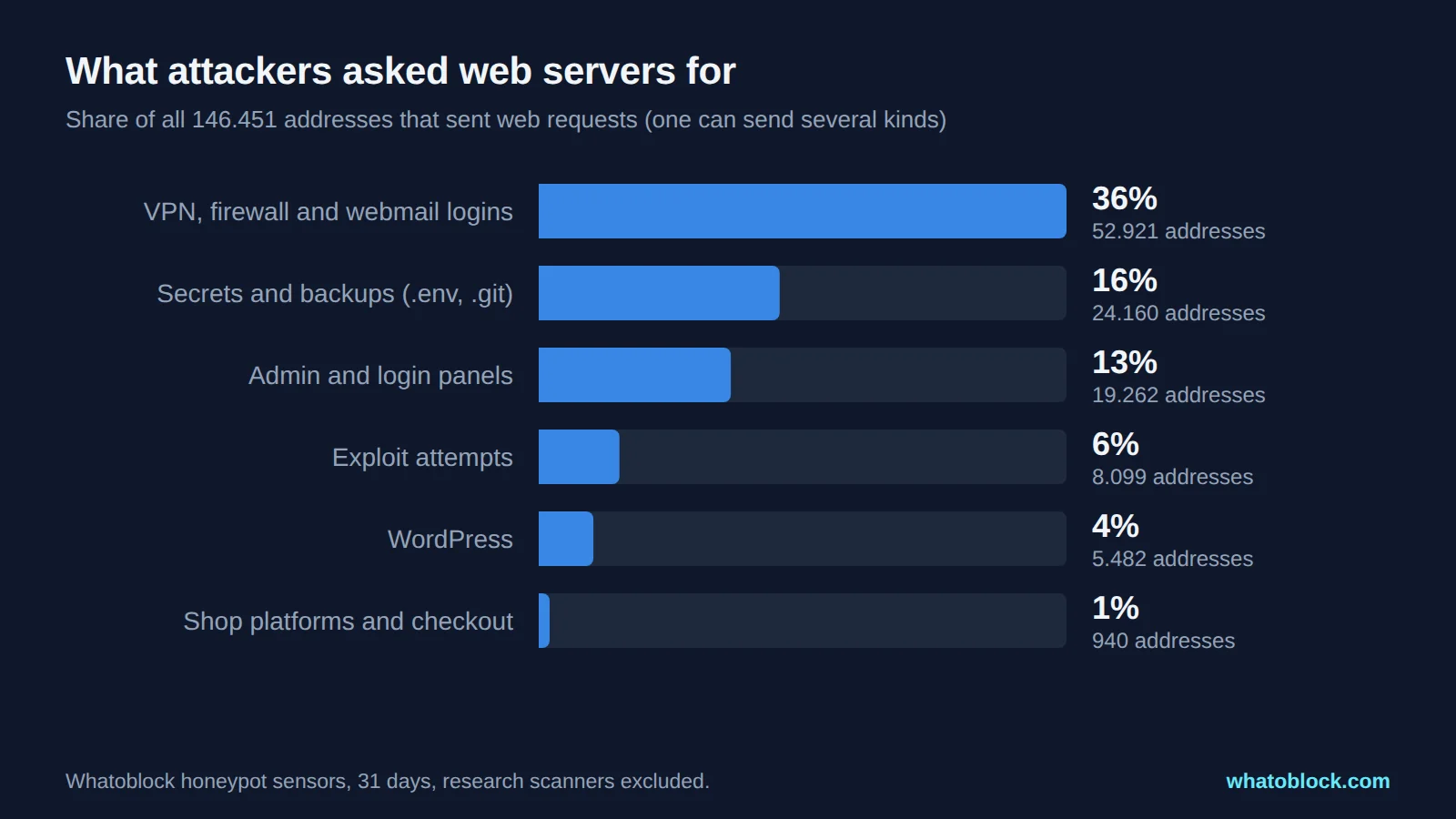
Addresses that sent each kind of web request.
- VPN, firewall and webmail logins: 52.921 addresses (36%) looked for login portals from Ivanti, Fortinet, Cisco, F5 and Microsoft Exchange.
- Secrets and backups: 24.160 addresses (16%) asked for files such as
.env,.git/configand.aws/credentials. A shop that leaves its.envfile readable hands over its database password and payment API keys. - Admin and login panels: 19.262 addresses (13%) went for
/admin,/login, phpMyAdmin and similar pages, and sent them 3.753.614 POST requests, the way a login form is submitted. - Exploit attempts: 8.099 addresses (6%) sent known exploit patterns such as PHPUnit remote code execution, path traversal and command injection.
- WordPress: 5.482 addresses (4%) probed
wp-login.php,xmlrpc.phpand plugin folders, which every WooCommerce store also has. - Shop platforms: 940 addresses (1%) targeted Magento, WooCommerce, PrestaShop, Shopware, OpenCart or cart and checkout pages directly. 283 addresses sent the CosmicSting exploit (CVE-2024-34102), an Adobe Commerce flaw on CISA's list of exploited vulnerabilities, to the Magento shipping estimate endpoint.
Most attacks on a store's server have nothing to do with the shop. They are automated sweeps for weak logins, leaked secrets and unpatched software, from addresses that hit thousands of servers a day, and an IP feed removes that traffic well.
Most of it also comes straight from the attacking machine. 126.502 of the 146.451 web attackers (86%) were never recorded by Whatoblock Heartbeat as a residential, datacenter or open proxy or a Tor exit node. A feed of attackers and botnet servers therefore does most of the work on the server side. Proxies matter most at login and checkout, where fraudsters need to look like ordinary shoppers.
When shop specific attacks come, they hit hard. Sansec reported that the CosmicSting campaigns hacked about 5% of all Adobe Commerce and Magento stores in summer 2024, and that probes for the 2025 SessionReaper flaw came "from dozens of IPs" within days of disclosure.
Most web attackers were already known the day before
A feed only helps if today's attackers were already seen yesterday. For web attacks, most were:
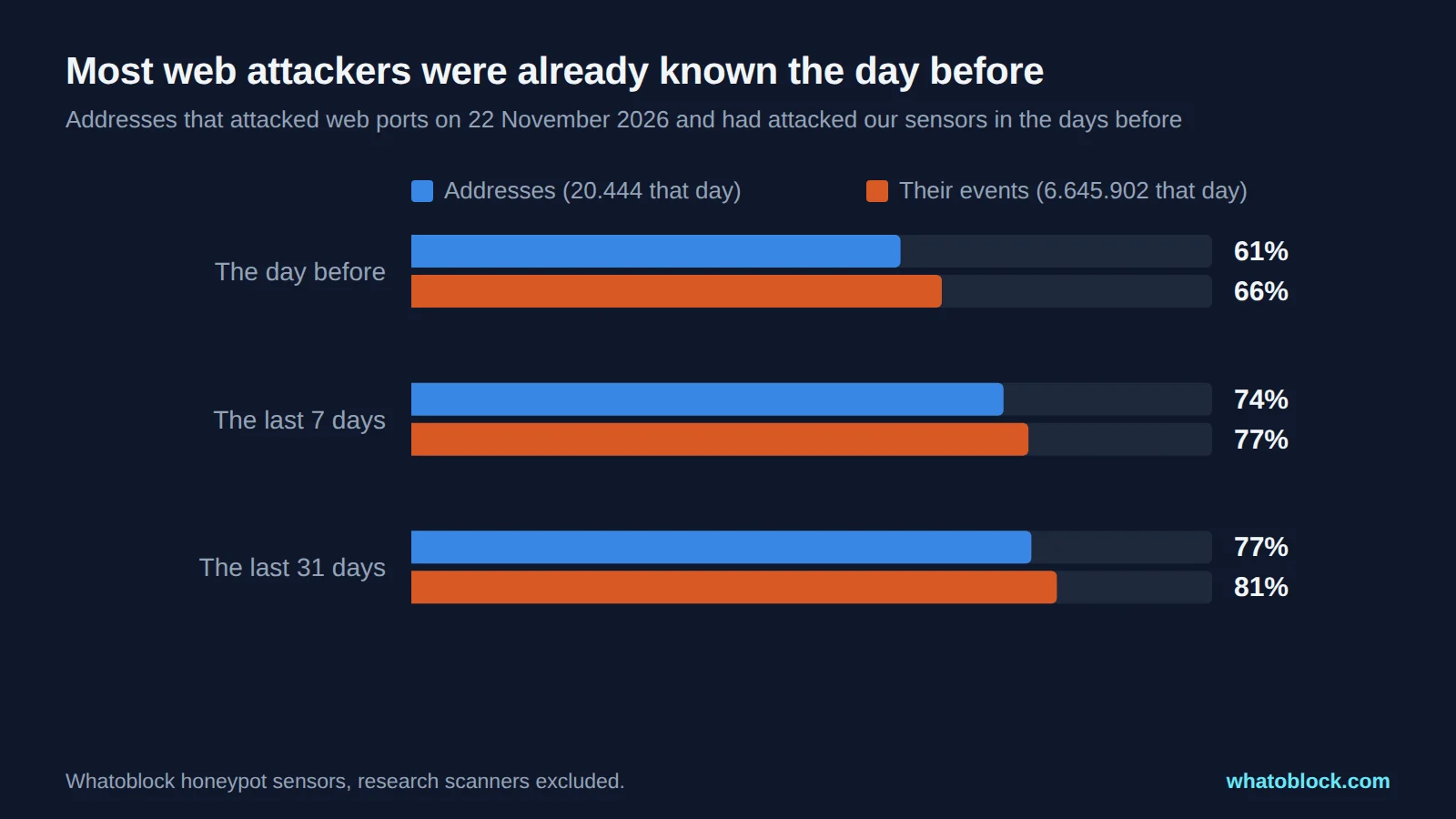
Addresses that attacked web ports on 22 November 2026 and had attacked our sensors in the days before.
On 22 November, 20.444 addresses attacked web ports on our sensors. 12.489 of them (61%) had attacked our sensors the day before, and 15.830 (77%) at some point in the previous 31 days. Those 15.830 sent 81% of the 6.645.902 events these attackers sent that day. A feed built from that history blocks most of them before they start.
The other 4.614 (23%) had not attacked our sensors in the previous 31 days. No list catches an address the first time it attacks, so the feed has to be rebuilt all the time and the checkout still needs its own controls.
What to block and what to challenge, path by path
| Part of the store | Block | Challenge or rate limit |
|---|---|---|
| Admin panel and staff logins | Everything on the feed, and ideally everything except your own staff and agency addresses | Not needed if you allowlist staff |
| Server ports (SSH, database, mail admin) | Everything on the feed | Not needed |
| Customer login and password reset | Attackers, C2 servers, Tor, open and datacenter proxies | Residential proxies |
| Account creation | Attackers, C2 servers, Tor, open and datacenter proxies | Residential proxies |
| Checkout, add card, coupon and gift card | Attackers, C2 servers, Tor, open and datacenter proxies | Residential proxies, plus per address rate limits |
| Shop APIs (REST, GraphQL, store API) | Attackers, C2 servers, Tor, open and datacenter proxies | Residential proxies |
| Catalog, search and product pages | Attackers and C2 servers | Everything else can browse |
| Payment provider webhooks | Never | Allowlist them before you block anything |
Our feed covers the attackers and C2 servers in this table. Tor exits and proxies need a separate list or your CDN's own bot controls.
Datacenter and open proxies, Tor and attacking servers have few or no shoppers behind them. Residential proxies do: they run through real households and phones, often without the owner knowing. OWASP's credential stuffing guidance makes the same distinction. It says IP blocking "should not be used as the sole or primary defense", that decisions should consider "IP address classification (ex: residential vs hosting)", and that "every request originating from a hosting provider could be required to solve CAPTCHA". Our guides to residential proxies and datacenter proxies explain the difference.
Visa's merchant guide on card testing asks merchants to set their web application firewall to "automatically ban visitors and users from known malicious origins", and OWASP lists "IP address block lists" as a countermeasure for both carding and credential stuffing.
What the feed holds for a store
A paid Whatoblock plan combines the addresses seen attacking your industry with botnet C2 servers. Current sizes for a 31 day window:
| Category | Addresses | After /24 aggregation |
|---|---|---|
| Retail and ecommerce attackers | 336.179 | 162.335 |
| Botnet C2 servers | 11.659 | 4.335 |
Every feed updates hourly, from a window of the last 24 hours, 7 days or 31 days, and you choose how strict it is with the Selective, Balanced, Strong or Maximum level. Known scanners, AI crawlers and web crawlers are left out at every level unless you choose to include them, so search engines can still crawl your product pages.
Where to enforce the list
The earlier a request is stopped, the cheaper it is. A connection blocked at the firewall costs nothing. A request that reaches PHP, loads your shop and queries the database costs CPU, and during an attack that adds up fast.
- Server firewall: for a self hosted shop, the fastest and cheapest place. Our Linux preset loads the feed into ipset or nftables, which handle hundreds of thousands of addresses without slowing the server.
- Network firewall: a FortiGate, Palo Alto, Sophos, OPNsense, pfSense or similar firewall in front of the shop can pull the feed directly. See the FortiGate guide and our blocklist integrations.
- CDN or WAF: Cloudflare and AWS WAF can block at the edge, but their lists are small. Outside Enterprise plans Cloudflare allows 10.000 list items in total, and an AWS WAF IP set holds 10.000 addresses, so the full retail feed does not fit. Push a smaller list there, such as the botnet C2 servers after /24 aggregation (4.335). We have no native Cloudflare or AWS preset, so use the plain or CIDR format with a short scheduled script that replaces the list through their API.
- Shop plugins: fine for a handful of addresses, but they check every request inside PHP and are not built for lists of 300.000 entries. Use them for manual blocks.
/24 aggregation shrinks a list by blocking whole small networks, which can include innocent neighbours. Use it at the CDN, not on your checkout.
Setup by platform
WooCommerce
WooCommerce runs on your own server, so you control everything in front of it. Load the feed into the server firewall with the Linux preset, or into your network firewall or CDN. Protect wp-login.php, xmlrpc.php, /wp-admin and the Store API checkout route, which card testers call directly. WooCommerce's own advice on card testing adds CAPTCHA (check that your plugin covers the checkout block and the Store API, which common plugins only did after updates in December 2024) and the Store API's built in rate limiting, which is off by default and switched on with a code filter.
Magento and Adobe Commerce
Self hosted Magento Open Source works like WooCommerce: host or network firewall first. Adobe Commerce on cloud runs behind Fastly, whose edge lists hold 1.000 entries by default, so push only a small list there. Adobe's security guidance recommends allowlisting the admin by IP address, a non default admin URL and two factor authentication. Protect the admin path, REST and GraphQL, and patch quickly: three Adobe Commerce flaws from 2026 are already on CISA's list of exploited vulnerabilities.
Shopify
Shopify is hosted, so there is no server firewall for you to configure and no store wide IP blocklist setting. Shopify blocks known bots itself, and its checkout bot protection is a Shopify Plus feature. An IP feed cannot sit in front of a Shopify checkout. It still helps on a headless storefront or custom app you host yourself, on your office and staff network, and on the mail and ERP systems around the shop.
PrestaShop
PrestaShop is self hosted, so use the server firewall or your CDN. PrestaShop renames the admin folder at install. Keep it that way and allowlist staff addresses for it. .htaccess rules are fine for a few addresses, not for a feed. Protect the webservice API if you use it.
What a blocklist will not stop
A blocklist does not solve ecommerce fraud on its own. Three problems need other controls:
- Card skimming in the browser. Magecart style skimmers run in the shopper's browser, from scripts on your checkout page. PCI DSS 4.0 handles this with requirements 6.4.3 and 11.6.1: control which scripts run on payment pages and detect changes. An IP list has no role here.
- Slow, spread out card testing. Visa reports that card testers now probe slowly and spread the work over many merchants, so each store stays under typical rate limits. Stripe says filters "based on a single heuristic such as IP addresses are usually not sufficient to prevent card testing on their own."
- Bots behind residential proxies. Cloudflare saw 22% of bot traffic on Black Friday 2024 come from residential proxy networks, which makes requests "look like legitimate customers browsing from their homes".
A feed removes the cheap, known infrastructure first: attacking servers and botnets. CAPTCHA, rate limits, two factor authentication, breached password checks and your payment provider's fraud rules then handle a much smaller remainder.
PCI DSS 4.0 also made requirement 6.4.2 mandatory on 31 March 2025: public facing web applications need an automated technical solution that detects and prevents web attacks, such as a WAF. A threat feed in front of the store is one input to that control.
Roll it out without blocking customers
- Allowlist first: payment provider webhooks and callbacks, shipping and ERP integrations, uptime monitors, your own servers, office and agency addresses.
- Run it in log only mode for a few days and look at what it would block.
- Go live in order: admin and server ports first, then login and account creation, then checkout.
- Leave known scanners and crawlers out of the feed, which is the default, and check the crawl stats in your search console after switching on.
- Keep a quick off switch. If conversion drops during a sale, you want to disable one rule, not debug a firewall.
What it costs
- Free sample: a small feed in every format, to test the URL and your firewall setup before you pay.
- Essential: 89€ a month billed yearly (1.068€ a year), or 109€ month to month. One industry, such as retail and ecommerce, with botnet C2 servers. Enough for most single stores.
- Business: 199€ a month billed yearly, up to three industries, for example retail plus financial for a store with its own payment stack.
- Complete: 259€ a month billed yearly, every industry.
- Custom: for agencies and hosting companies protecting many client stores, under a separate agreement.
Prices include VAT, and every paid plan includes botnet C2 servers. Compare plans on the pricing page.
Frequently asked questions
What is the best blocklist solution for ecommerce?
An IP threat feed of addresses already seen attacking, updated every hour and enforced at the server firewall, network firewall or CDN in front of the store. Add a customer and order blocklist inside the shop for known fraudsters.
Should I block residential proxies at checkout?
Challenge them instead. A residential proxy address is also somebody's home or phone connection, and blocking it can stop a paying customer. Datacenter proxies, open proxies and Tor exits can be blocked on login and checkout if you have a list of them. Our feed covers attackers and botnet C2 servers, not proxies.
Will an IP blocklist stop card testing attacks?
Not on its own. It removes known attacking servers and botnet infrastructure early. Pair it with CAPTCHA, rate limits on payment endpoints and your payment provider's fraud rules.
Can I use an IP blocklist on Shopify?
Not in front of the Shopify checkout, because Shopify hosts it. You can use one on anything you host around the shop, such as a headless storefront, custom apps, your staff network and mail.
Will a blocklist block Google or hurt my SEO?
Not with our default settings: known scanners, AI crawlers and web crawlers stay out of the feed at every level unless you include them. Test in log only mode first and check your crawl stats after switching on.
How often should an ecommerce blocklist update?
Every hour or faster. On 22 November, 23% of the addresses attacking web ports on our sensors had not attacked them in the previous 31 days. A stale list blocks yesterday's attackers and misses today's.
How do I protect my store's admin panel?
Allowlist your staff and agency addresses, block everything on the feed, turn on two factor authentication and move the admin path where your platform allows it.
Check the live data
- Top residential proxies, top datacenter proxies, top open proxies, top Tor exit nodes and top C2 servers
- Retail and ecommerce blocklist
- What IP reputation is and why one source is never enough
About this data
- Period: 23 October to 22 November 2026, UTC, 31 days, the longest window our blocklists offer.
- Web attackers: addresses that sent HTTP requests (GET, POST and the other standard methods) to web ports on our honeypot sensors, minus known research scanners. Request types come from the requested path. One address can fall into several types, so the shares do not add up to 100%.
- Proxies and Tor: an attacker counts as a proxy or Tor exit if Whatoblock Heartbeat recorded the same address in that role at any time in the period.
- Known the day before: addresses that attacked web ports on 22 November 2026, compared with every attack on our sensors in the 31 days before. Events count everything those addresses sent to web ports that day.
- Feed sizes: our published feed on 23 November 2026, 31 day window.
- Vendor limits and prices are from each vendor's documentation and our pricing page on 23 November 2026 and can change.
Sources
- OWASP, Credential stuffing prevention cheat sheet
- OWASP, Automated threats to web applications handbook
- Visa, Anti enumeration and account testing best practices for merchants
- Visa, Biannual threats report, fall 2025
- Stripe, Card testing
- PCI Security Standards Council, FAQ 1593 on requirement 6.4.2
- Cloudflare, Black Friday 2024 bot traffic, December 2024
- Cloudflare, Lists
- AWS WAF, quotas
- Fastly, resource limits
- WooCommerce, Card testing attacks and the Store API, December 2024
- WooCommerce, Store API rate limiting
- Adobe Commerce, security best practices
- Sansec, CosmicSting fallout, October 2024 and SessionReaper
- CISA, Known exploited vulnerabilities catalog
- Shopify, bot protection at checkout
- PrestaShop, connecting to the back office
Check the live data
Open Scanner Recon with the last 24 hours selected.