

A FortiGate external threat feed is a text file of IP addresses, domains, URLs or file hashes that the firewall downloads from a URL and keeps up to date by itself. Fortinet's newer documentation calls the feature External feeds, older releases call it Threat feeds, and many admins just call it an external block list. Whatever the name, it is the standard way to load a third party blocklist into a FortiGate without touching the policy every time the list changes.

This guide covers the setup in the GUI and the CLI, the file format, how to use a feed for inbound and outbound blocking, and the entry limits for each FortiOS version, which most guides still get wrong. It then answers the question the documentation leaves open: how big a feed needs to be. To find out, we built blocklists of different sizes from the attackers our honeypot network recorded from 28 September to 28 October 2026 and checked how much of the next day's attacks each one would have stopped.
The short version
- The well known limit of 131.072 entries or 10 MB per feed only applies to FortiOS releases before 7.4.4. Since then the limit is global for all IP feeds together: 300.000 addresses on entry level models, and since FortiOS 7.4.9 and 7.6.3, 1.000.000 on mid range and 5.000.000 on high end models.
- A small list goes a long way against attack volume. The 10.000 most active attackers of the previous 31 days accounted for 88% of the next day's 76.422.785 attack events, but only 6% of the 85.176 attacking addresses.
- A longer window catches more returning attackers. A list of everyone from the last day blocked 50% of the next day's attackers, a 7 day list 64% and a 31 day list 70%.
- 25.267 of the 85.176 attacking addresses (30%) were new that day. 4.187 of them were still attacking an hour later, which is why a feed that refreshes every hour beats one that refreshes once a day.
- Most feed problems come from five things: the default
curl/7.58.0user agent being rejected, the wrong source interface, certificate checks on a few FortiOS builds, deny policies that do not match VIP traffic, and entry limits that silently cut a feed short.
What an external threat feed is
The FortiGate fetches a plain text file over HTTP or HTTPS, one entry per line, on a schedule you set. There are five feed types:
| Feed type | CLI type | What it holds | Where you use it |
|---|---|---|---|
| IP address | address | IPs, subnets, ranges, IPv4 and IPv6 | Firewall, proxy and local-in policies, ZTNA rules, DNS filter |
| Domain | domain | Domain names, simple wildcards | DNS filter profiles, as a remote category |
| FortiGuard category | category | URLs | Web filter profiles, as a remote category |
| Malware hash | malware | MD5, SHA1 or SHA256 hashes | Antivirus profiles |
| MAC address | mac-address | MAC addresses or vendor prefixes | Firewall, proxy and ZTNA policies |
This guide is about IP address feeds, the type used for blocklists. The FortiGate keeps the entries as an address object that you can drop into any policy as source or destination.
An external feed is not the same as FortiGuard's own Internet Service Database (ISDB) objects such as Malicious-Malicious.Server or Botnet-C&C.Server. Those come with a FortiGuard subscription and are maintained by Fortinet. An external feed is any list you choose, and the two work fine side by side.
Set up an IP address feed in the GUI
- Go to Security Fabric > External Connectors and click Create New.
- Under External Feeds (Threat Feeds on older releases), choose IP Address.
- Give it a name, set Update method to External Feed and paste the URL of the list.
- If the provider needs a login, fill in HTTP basic authentication.
- Set the refresh rate (see below) and click OK.
- Open the connector again and click View Entries to check that addresses loaded.
The feed now appears under IP ADDRESS FEED (or Imported & Dynamic Address in FortiOS 7.6) when you pick a source or destination address in a policy.
Set up an IP address feed in the CLI
config system external-resource
    edit "blocklist"
        set type address
        set resource "https://example.com/blocklist.txt"
        set refresh-rate 60
        set server-identity-check full
    next
end
execute update-external-resource blocklist
A few settings are worth changing from their defaults:
- **
refresh-rate** is in minutes, from 1 to 43.200, and defaults to 5. The FortiGate also spreads the start of each refresh randomly between 0 minutes and the configured value. Several providers ask for less frequent downloads: Spamhaus and Emerging Threats ask for at most one an hour, and the free AbuseIPDB plan allows only 5 downloads a day. 60 minutes is a sensible default for most lists. - **
server-identity-check** defaults tonone, so the FortiGate does not check the server certificate. Fortinet recommendsbasicorfull. On FortiOS 7.4.5 to 7.4.8 and 7.6.1 to 7.6.3, a bug (1180555) makes the feed fail with "Server not reachable" when the check is on. It is fixed in 7.4.9, 7.6.4 and 8.0.0. - **
user-agent** defaults tocurl/7.58.0, which some CDNs and bot filters reject. If a feed never loads, tryset user-agent "Mozilla/5.0". - **
source-ipandinterface-select-method** decide which address and interface the FortiGate fetches from. On SD-WAN or multi WAN setups, set them so the request leaves where the provider expects it.
To force a download right away, run execute update-external-resource <name>.
File format
The IP feed format is simple, and most problems come from files that bend it:
- One entry per line: a single IP (
192.0.2.10), a subnet (192.0.2.0/24) or a range (192.0.2.10-192.0.2.20). - IPv4 and IPv6 can be mixed. IPv6 addresses do not need brackets.
- Lines starting with
#are comments. A comment after an entry on the same line is only supported from FortiOS 7.2.6 and 7.4.1, so strip it for older firmware. Spamhaus DROP has one on every line. - The file has to be plain UTF-8 text. A UTF-16 file downloads without an error but loads no entries.
- The FortiGate does not remove duplicates. Two lists that overlap count both copies towards the limit.
Use the feed in a policy
Inbound, to block attackers from reaching your servers. Create a firewall policy from the WAN interface to the internal network, set the feed as Source, set action Deny and move it above the policies that allow traffic. If your servers sit behind a virtual IP (VIP), the deny policy needs match-vip enabled, because the destination address translation happens before the policy lookup. New deny policies have it enabled by default since FortiOS 7.2.3, but older policies may not.
config firewall policy
    edit 0
        set name "block-feed-inbound"
        set srcintf "wan1"
        set dstintf "internal"
        set srcaddr "blocklist"
        set dstaddr "all"
        set action deny
        set schedule "always"
        set service "ALL"
        set match-vip enable
        set logtraffic all
    next
end
Outbound, to stop infected devices from calling home. Use the feed as Destination in a deny policy from the internal network to the WAN. This is where a list of botnet command and control (C2) servers belongs.
The FortiGate itself. Firewall policies do not cover traffic to the FortiGate's own interfaces, such as the admin login or the VPN. For that, use a local-in policy with the feed as source. Feeds work in local-in policies from FortiOS 7.2.4 in the CLI and 7.6.0 in the GUI, where you find them under Imported & Dynamic Address. A local-in policy without an action denies by default, and an external feed cannot share one local-in policy with ISDB objects.
config firewall local-in-policy
    edit 0
        set intf "wan1"
        set srcaddr "blocklist"
        set dstaddr "all"
        set service "ALL"
        set schedule "always"
    next
end
FortiOS 7.6.3 removed SSL VPN tunnel mode, so on current firmware this protects the admin interface, IPsec and the agentless VPN portal.
DNS filter. A DNS filter profile can drop any DNS answer that points to an address in the feed, with set external-ip-blocklist "blocklist" under config dnsfilter profile.
Existing connections. When a feed adds an address, sessions that are already open are checked again after the refresh rate or 30 minutes, whichever is shorter. To change this behaviour, look at ext-resource-session-check under config system settings (FortiOS 7.2.1 and later, disabled by default).
Entry limits by FortiOS version
This is where most guides are out of date. The limits changed twice:
| FortiOS version | IP address limit | File size limit |
|---|---|---|
| 7.0 to 7.4.3 | 131.072 entries per feed | 10 MB per feed |
| 7.4.4 to 7.4.8, 7.6.0 to 7.6.2 | 300.000 for all IP feeds together, on every model | 32, 64 or 128 MB by model class |
| 7.4.9 and later, 7.6.3 and later, 8.0 | 300.000 entry level, 1.000.000 mid range, 5.000.000 high end, for all IP feeds together | 32 MB entry level, 64 MB mid range, 128 MB high end |
Since FortiOS 7.4.4 the limit is shared by every IP feed on the device. Feeds in the global VDOM are counted first, then the other VDOMs in alphabetical order. When the total goes over the limit, the FortiGate shows a warning, logs event 22224, and does not load the rest, starting with the most recently added feed. You can change the order with move.
Fortinet's feed documentation names the FortiGate 601E as a mid range model but does not publish a full list. If you are not sure which class your model is in, load the feeds and check diagnose sys external-resource stats: it reports how many lines were truncated.
The number of feeds is limited too. The documentation for 7.4.4 to 8.0.2 gives 256 feeds per VDOM and 511 in total, while the FortiOS 8.0 overview says there is no global limit. Run print tablesize on your model to see the real figure.
How big does a feed need to be?
Fortinet's documentation tells you how much fits, not how much you need. To answer that, we took every address that attacked our honeypot sensors over 31 days, ranked them by activity, and checked how much of the next day's traffic lists of different sizes would have blocked. On the test day, 85.176 addresses sent 76.422.785 attack events.
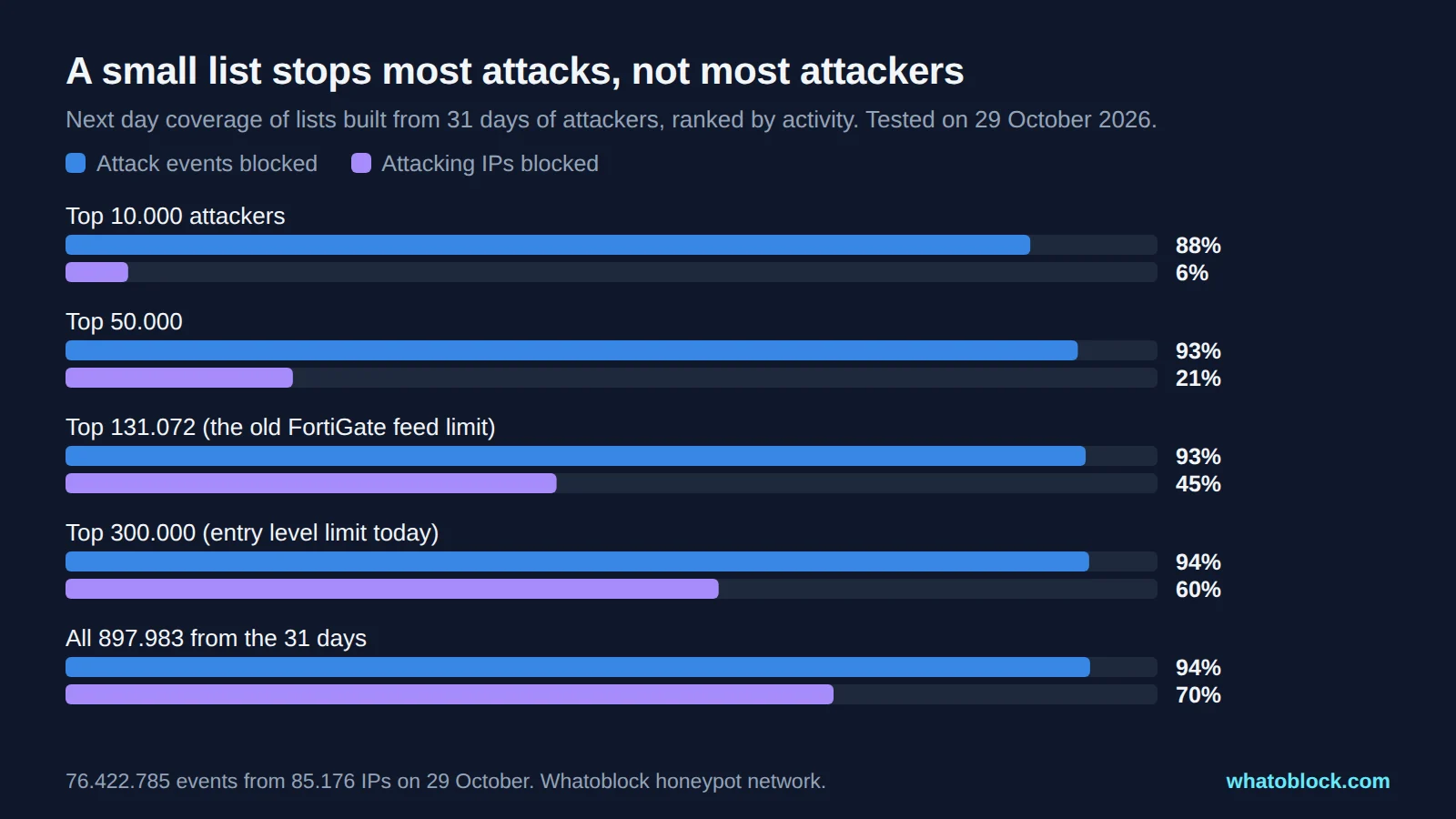
Next day coverage of lists built from 31 days of attackers, ranked by activity.
Two things stand out.
Volume is concentrated. The top 10.000 attackers produced 67.517.941 of the next day's 76.422.785 events (88%). That list fits on any FortiGate ever sold. If your goal is to cut log noise and load, a small list does most of the work.
Attackers are not. The same 10.000 addresses were only 4.887 of the 85.176 attackers that day (6%). Most attackers send a handful of connections each, and one connection is enough to find a weak password or an unpatched service. Covering them takes a much bigger list: the top 300.000, the limit of an entry level FortiGate, blocked 50.944 of them (60%), and all 897.983 addresses blocked 59.909 (70%).
The window the list covers matters as much as its size:
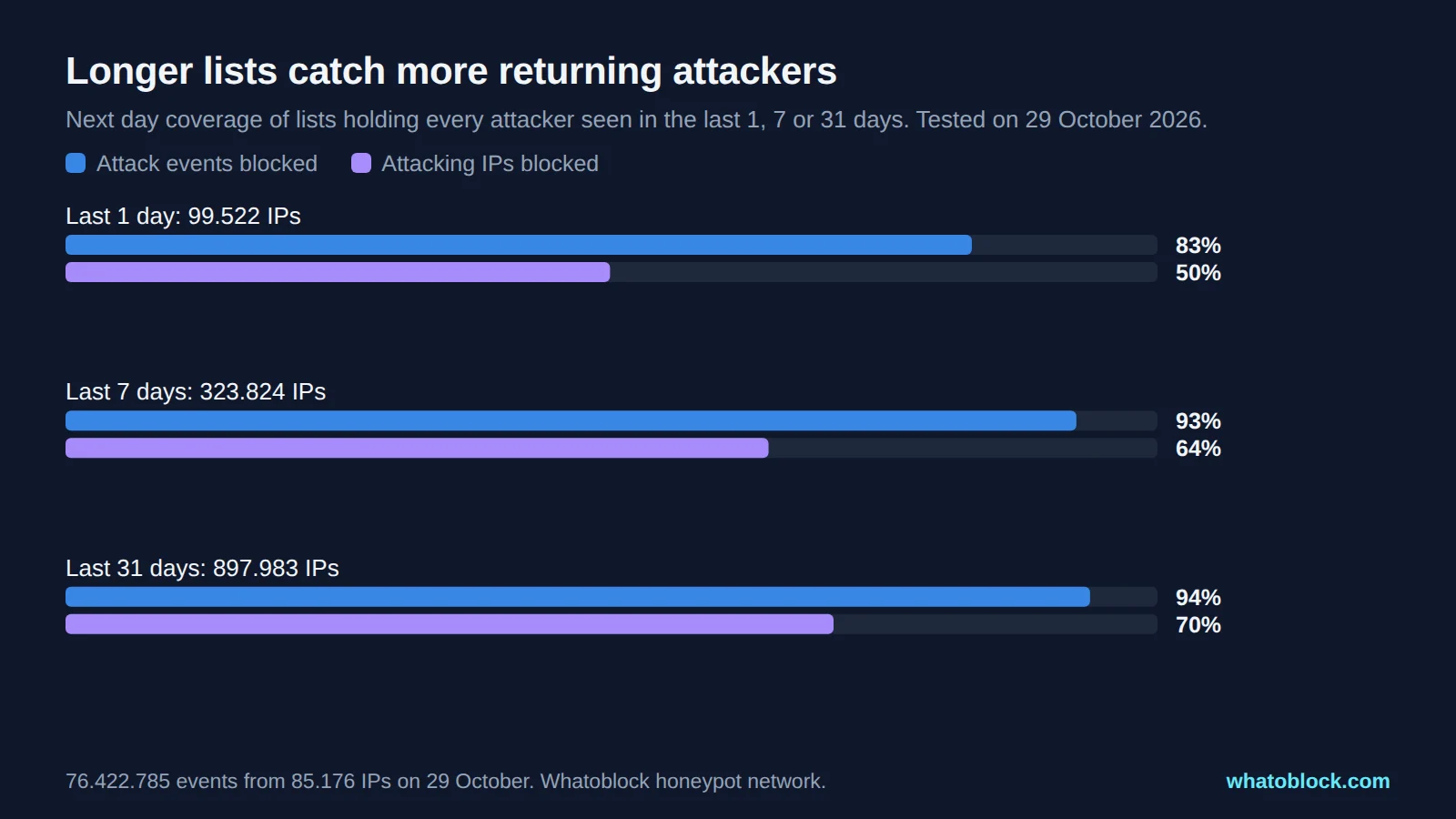
Next day coverage of lists holding every attacker seen in the last 1, 7 or 31 days.
| List holds every attacker from | List size | Attackers blocked the next day | Events blocked |
|---|---|---|---|
| Last 1 day | 99.522 | 42.473 of 85.176 (50%) | 63.427.103 of 76.422.785 (83%) |
| Last 7 days | 323.824 | 54.837 of 85.176 (64%) | 70.746.281 of 76.422.785 (93%) |
| Last 31 days | 897.983 | 59.909 of 85.176 (70%) | 71.702.667 of 76.422.785 (94%) |
No list catches everything. 25.267 of the day's 85.176 attackers (30%) had not been seen in the previous 31 days. Most of them attacked for less than an hour, so no list could have them in time. But 4.187 of them kept going after their first hour and sent 3.080.718 of the 4.720.118 events that new attackers produced (65%). A feed that refreshes every hour can add those addresses while they are still active. A feed that updates once a day cannot.
These numbers come from one sensor network, and the lists were tested against the same network that built them, so treat them as the shape of the trade off rather than a promise. A firewall elsewhere sees a different mix of attackers.
What we would do with these numbers:
- If you can hold a few hundred thousand addresses, use a list that covers several weeks of attackers, not just the last day.
- If you are on an entry level FortiGate or an older release, prioritise: a list of the most active attackers gives the most per entry.
- Set the refresh rate to about an hour, and pick a provider that updates at least that often.
Which categories go where
Not every list belongs on every policy. Here are the categories Whatoblock publishes and their sizes, so you can see what fits your model:
| Feed | Addresses | Use it as | Fits entry level (300.000)? |
|---|---|---|---|
| Scanners and attackers, all industries | 532.721 | Inbound source | No, use an industry feed or a mid range model |
| Industry feeds, for example hosting 259.184, retail 188.132, financial 72.791 | 9.483 to 259.184 | Inbound source | Yes |
| Botnet C2 servers | 11.198 | Outbound destination, and inbound source | Yes |
| Tor exit nodes | 1.556 | Inbound source | Yes |
| DDoS sources | 10.815 | Inbound source | Yes |
| Open proxies | 48.602 | Inbound source | Yes |
| Datacenter proxies | 266.245 | Inbound source, on login and signup paths | Yes, on its own |
| Residential proxies | 4.175.184 | Login and fraud protection only | Only on high end models |
Remember that the limit is shared. A 259.184 address industry feed and a 48.602 address proxy feed together already exceed the 300.000 of an entry level model.
Every feed can also be grouped into /24 networks, which shrinks it a lot: the all industries feed goes from 532.721 entries to 224.506. The trade off is that a /24 also blocks the neighbours of each listed address, so use it for inbound blocking where that is acceptable, not for outbound rules that could cut off a shared hosting provider.
Whatoblock feeds use FortiGate's plain format, one address or network per line, and update every hour. The API key is part of the feed URL, so no user agent change or basic authentication is needed. A free sample feed of 112.626 scanner addresses fits every model and is a good way to test the setup. Threat categories such as botnet C2, Tor, proxies and DDoS sources come with every blocklist purchase.
Free IP feeds that work with FortiGate
Plenty of free lists load into a FortiGate. We downloaded each one on 30 October 2026 and counted the entries:
- Spamhaus DROP: 1.757 networks in CIDR form, with a comment on each line. Hijacked and criminal networks. Free to use with credit, download at most once an hour. EDROP was merged into DROP in 2024.
- Spamhaus DROPv6: 92 IPv6 networks, same terms as DROP.
- FireHOL level1: 4.653 networks. Combines several lists, including DROP and private ranges such as 10.0.0.0/8, so never use it as an outbound destination.
- FireHOL level2: 19.243 entries, mostly single IPs. Attacks from the last 48 hours, combined from several sources.
- blocklist.de all: 26.079 IPs reported by fail2ban users over the last 48 hours.
- CINS Army: a fixed size list of 15.000 IPs, served over plain HTTP.
- Emerging Threats compromised IPs: 536 IPs. Download at most once an hour.
- IPsum: addresses that appear on several public lists. Level 3 (on at least 3 lists) has 18.482, level 1 has 143.409. Use a
levels/N.txtfile, because the main file has a count column. - Tor bulk exit list: 1.227 current Tor exits. See our Tor exit node guide.
- AbuseIPDB blocklist: up to 10.000 IPs on the free plan, with an API key. The free plan allows 5 downloads a day, so set the refresh to 360 minutes.
A few lists people often suggest need care:
- Feodo Tracker (abuse.ch) returned 1 address on its recommended list and 5 on its standard list when we checked, after the takedowns of the botnets it tracked. Its aggressive list has 7.607, but abuse.ch advises against using it for blocking.
- DShield's top 20 is a tab separated table, not a plain list, so it will not load without converting it.
- ThreatFox and URLhaus no longer offer plain IP text exports, and need a free API key.
Lists overlap, and the FortiGate does not remove duplicates, so loading several of them counts the same addresses more than once against the limit. Our comparison of AbuseIPDB with live honeypot data shows how much two lists can differ.
Can you host a feed on GitHub?
Many lists live on raw.githubusercontent.com. It works for a few downloads an hour, but GitHub tightened its limits on downloads without a login in May 2025 without publishing the numbers, and users have reported HTTP 429 errors since. GitHub also caches raw files for up to 5 minutes. For anything you rely on, a provider hosted URL or your own copy on a web server you control is more predictable.
What happens when a feed fails
- The server cannot be reached: the FortiGate keeps using the last list it loaded and stops updating. The status shows an error and View Entries may look empty, but the CLI still lists the stored entries.
- The server answers with an empty or shortened file: the FortiGate loads it. An empty feed means the deny policy matches nothing and traffic falls through to the allow policies. Choose a provider that returns an error code when something goes wrong rather than an empty list, and keep an eye on the entry count.
- High availability: only the primary unit downloads the feed and syncs it to the others. If the provider restricts downloads by IP address, allow the addresses of both units.
Troubleshooting
The ten problems that come up most in Fortinet's own knowledge base, with their fixes:
- The status stays at "Not Start" or "Server not reachable" because the server rejects the default user agent. Set
set user-agent "Mozilla/5.0". - The URL returns 404 or a redirect. Use the exact final URL that returns the file directly.
- The FortiGate fetches from the wrong interface or address. Set
source-ip, orinterface-select-method sdwanorspecify. - HTTPS fails with the certificate check on. Upgrade to 7.4.9, 7.6.4 or 8.0.0, where bug 1180555 is fixed, or turn the check off until you can.
- The deny policy never matches traffic to a VIP. Enable
match-vip, or set the VIP as the destination. A local-in policy does not cover VIPs. - The feed sits in the wrong place. Put the deny policy above the allow policies, use the feed as source for inbound and as destination for outbound, and check with Policy Match.
- Entries are cut off at the limit. Check
diagnose sys external-resource statsfor truncated lines and event log 22224, reorder feeds withmove, or upgrade to a release with the higher limits. - The file loads but has few or no valid entries. Serve plain UTF-8 text, one entry per line, and check the error count in the stats.
- Connections that were open before the update keep running. Wait for the session check, enable
ext-resource-session-check, or clear the sessions. - The status says Unavailable and no download is attempted. Check that
update-extdbis enabled underconfig system fortiguard.
The commands that help most:
diagnose debug application forticron -1
diagnose debug enable
execute update-external-resource blocklist
diagnose sys external-resource stats
diagnose sys external-address-resource list blocklist
The forticron debug shows each download with the HTTP response code and errors such as DNS fail or Resource not found. The stats show how many lines were valid, invalid and truncated, and the list command shows what was actually loaded.
Check that an address is blocked
Search the loaded list:
diagnose sys external-address-resource list blocklist | grep 192.0.2.10Check which policy a connection would hit with Policy Match in the GUI (Policy Lookup before FortiOS 7.4.1), or follow a real connection with the debug flow:
diagnose debug flow filter addr 192.0.2.10
diagnose debug enable
diagnose debug flow trace start 10
A blocked connection shows Denied by forward policy check, or iprope_in_check() check failed for a local-in policy. Traffic offloaded to NP6 or NP7 processors does not show up in the debug flow, so test with ICMP. In the traffic log, the fields srcthreatfeed and dstthreatfeed name the feed that matched.
Frequently asked questions
How many entries can a FortiGate external threat feed hold? Since FortiOS 7.4.4 the limit covers all IP feeds together: 300.000 addresses on entry level models, and since 7.4.9 and 7.6.3, 1.000.000 on mid range and 5.000.000 on high end models. Before 7.4.4 it was 131.072 entries or 10 MB per feed.
What file format does a FortiGate IP feed need? Plain UTF-8 text with one IP, subnet or range per line. Lines starting with # are comments.
How often should the FortiGate refresh a feed? About every 60 minutes for most lists. The default of 5 minutes is more often than many providers allow.
Does a deny policy with a feed block traffic to my VIPs? Only with match-vip enabled, which is the default for new deny policies since FortiOS 7.2.3.
Can a feed protect the admin interface and VPN? Yes, with a local-in policy that uses the feed as source, from FortiOS 7.2.4.
What happens if the feed URL is down? The FortiGate keeps the last list it loaded. An empty file that downloads successfully, however, replaces the list.
Should I use an external feed or FortiGuard's ISDB objects? Both. ISDB objects such as Malicious-Malicious.Server and Tor-Exit.Node come with a FortiGuard subscription. An external feed adds lists that Fortinet does not maintain, with sizes and update times you choose.
Can I use a list hosted on GitHub? Yes for a few downloads an hour, but GitHub limits downloads without a login and does not publish the limits.
Methodology
- Coverage test: every address that sent traffic to our honeypot sensors from 28 September to 28 October 2026, ranked by the number of events, tested against the addresses and events recorded on 29 October 2026. The lists and their ranking were built only from the days before the test day: 28 September to 28 October for the 31 day list, 22 to 28 October for the 7 day list and 28 October for the 1 day list. Nothing from 29 October was used to build them. An event is one recorded connection or request. "Blocked" means the address was on the list.
- Feed sizes: Whatoblock's published feeds on 30 October 2026, with the default 31 day window.
- Free feeds: downloaded on 30 October 2026, counted without comments and blank lines. Sizes change daily.
- FortiGate behaviour: taken from Fortinet's administration guides, CLI references and release notes for FortiOS 7.0 to 8.0.2, and from Fortinet staff articles in the Fortinet Community knowledge base. We did not test every release ourselves, so check the documentation for your version.
Sources
- Fortinet documentation: External feeds, FortiOS 8.0.2, IP address external feed, Configuring an external feed, External feed connectors per VDOM, CLI reference, config system external-resource, Firewall policy and match-vip
- Fortinet knowledge base: External threat list entry limits, Feed contains more entries than supported, Behaviour when the connection fails, Text encoding problems, Updating sessions when a feed changes
- Feed providers: Spamhaus DROP, FireHOL, blocklist.de, abuse.ch Feodo Tracker, IPsum, Tor Project
- GitHub: Updated rate limits for unauthenticated requests, May 2025
Check the live data
Open Scanner Recon with the last 24 hours selected.