

AI tools are often set up quickly on a GPU server and opened to the internet so a team can reach them. Many of them have no login by default. Researchers have counted how many are exposed, but not who comes looking or what they do once they find one. This report answers that with what our honeypot sensors recorded on the ports of the most common AI tools in 31 days, 7 October to 6 November 2026.

Key findings
- 74.994 attacking addresses connected to at least one of eight AI tool ports. 9.466 of them tried three or more.
- Jupyter is the most targeted. 48.688 addresses connected to port 8888. 4.388 tried to start a code kernel, and 3.173 sent code that prints every environment variable, where API keys and cloud credentials usually live.
- Exposed Ollama servers are tested, then used. 1.161 addresses sent prompts to port 11434. Most only checked that a model answers ("hi", "Reply with exactly: ALIVE"). 25 addresses sent real workloads to our sensors, 39.070 requests in 31 days.
- Known exploits are in daily use. 694 addresses sent path traversal requests to port 5000 in the style of MLflow's CVE-2023-1177, 189 hit Langflow's code execution endpoint and 135 tried to submit jobs to the Ray jobs API.
- The same sources also attack classic infrastructure. 27.021 of the addresses that probed AI tools also attacked Docker, Redis, Kubernetes or databases.
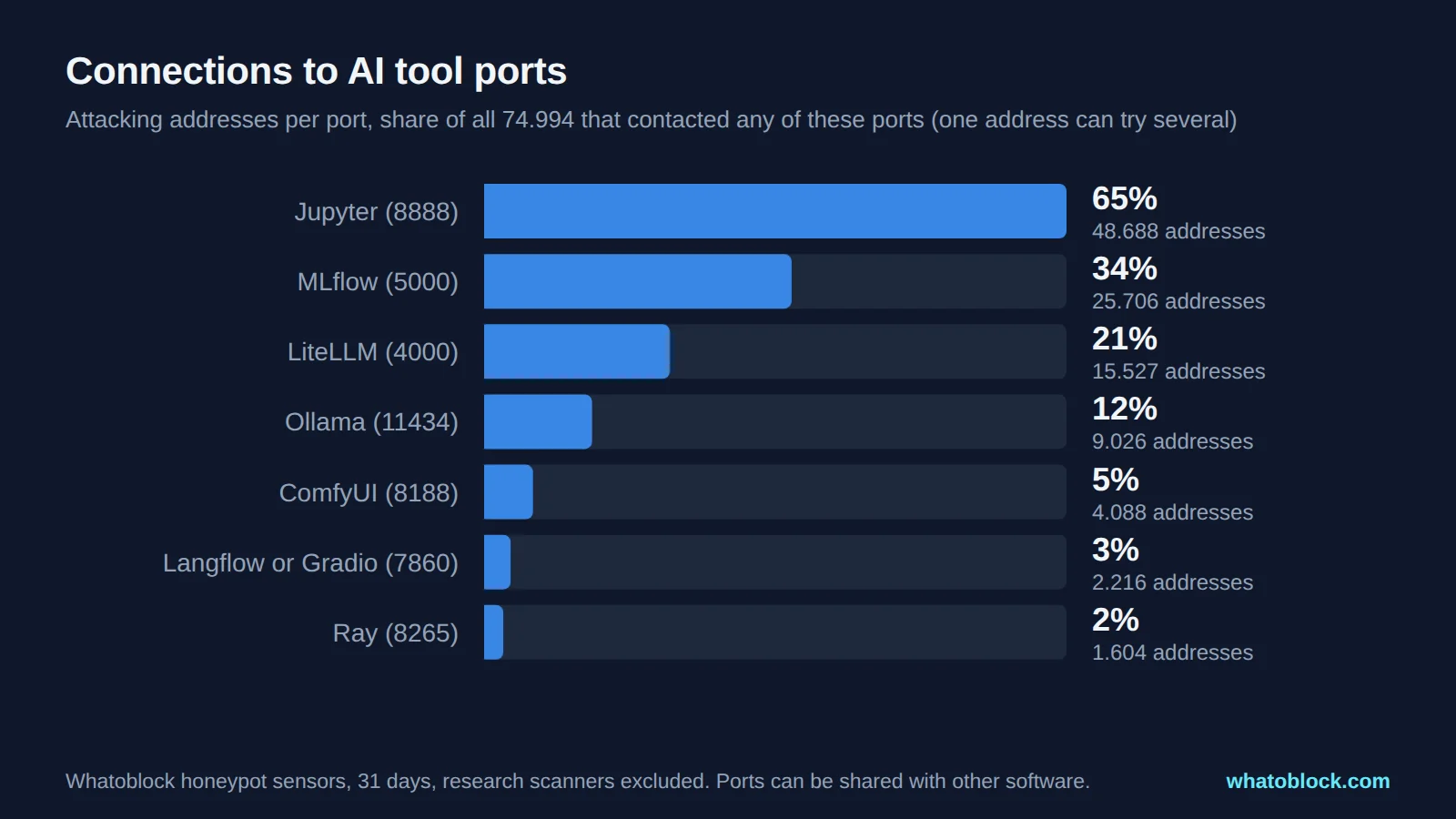
Attacking addresses per AI tool port.
| Tool and port | Attackers in 31 days | Went beyond looking |
|---|---|---|
| Jupyter, 8888 | 48.688 | 4.625 tried to start kernels or terminals |
| MLflow, 5000 | 25.706 | 694 tried path traversal |
| LiteLLM, 4000 | 15.527 | 15 tried key generation or completions |
| Ollama, 11434 | 9.026 | 1.228 sent prompts or model changes |
| ComfyUI, 8188 | 4.088 | 153 tried to queue jobs or use the manager |
| Langflow or Gradio, 7860 | 2.216 | 189 hit code execution endpoints |
| Ray, 8265 | 1.604 | 135 tried to submit jobs |
| Qdrant, 6333 | 2.024 | 2 tried to create collections |
How many are exposed, from published research:
| Tool | Exposed on the internet | Source |
|---|---|---|
| Jupyter | about 15.000 | Aqua, 2024 |
| MLflow | over 800 | Protect AI, 2023 |
| LiteLLM | 3.074 | Wiz, February 2026 |
| Ollama | about 10.600 | Censys, September 2025 |
| ComfyUI | over 1.000 | Censys, April 2026 |
| Langflow | over 300 | Intruder, 2026 |
| Ray | over 230.000 | Oligo, November 2025 |
Across all AI products, Censys counted about 268.000 internet facing systems in October 2026, up 63% in nine months.
How we measured
- Attackers: every address that connected to these ports on our honeypot sensors in 31 days, minus known research scanners. Per day figures are averages for 1 to 7 November 2026.
- By port, not by product. Ports such as 5000, 8888 and 4000 are also used by other software, so the attacker counts include generic scanners. Only the "went beyond looking" column counts requests that are specific to each tool, such as starting a Jupyter kernel or sending a prompt to Ollama.
- Exposure counts come from the published research linked below. They use different methods and dates and are not directly comparable with each other or with our numbers.
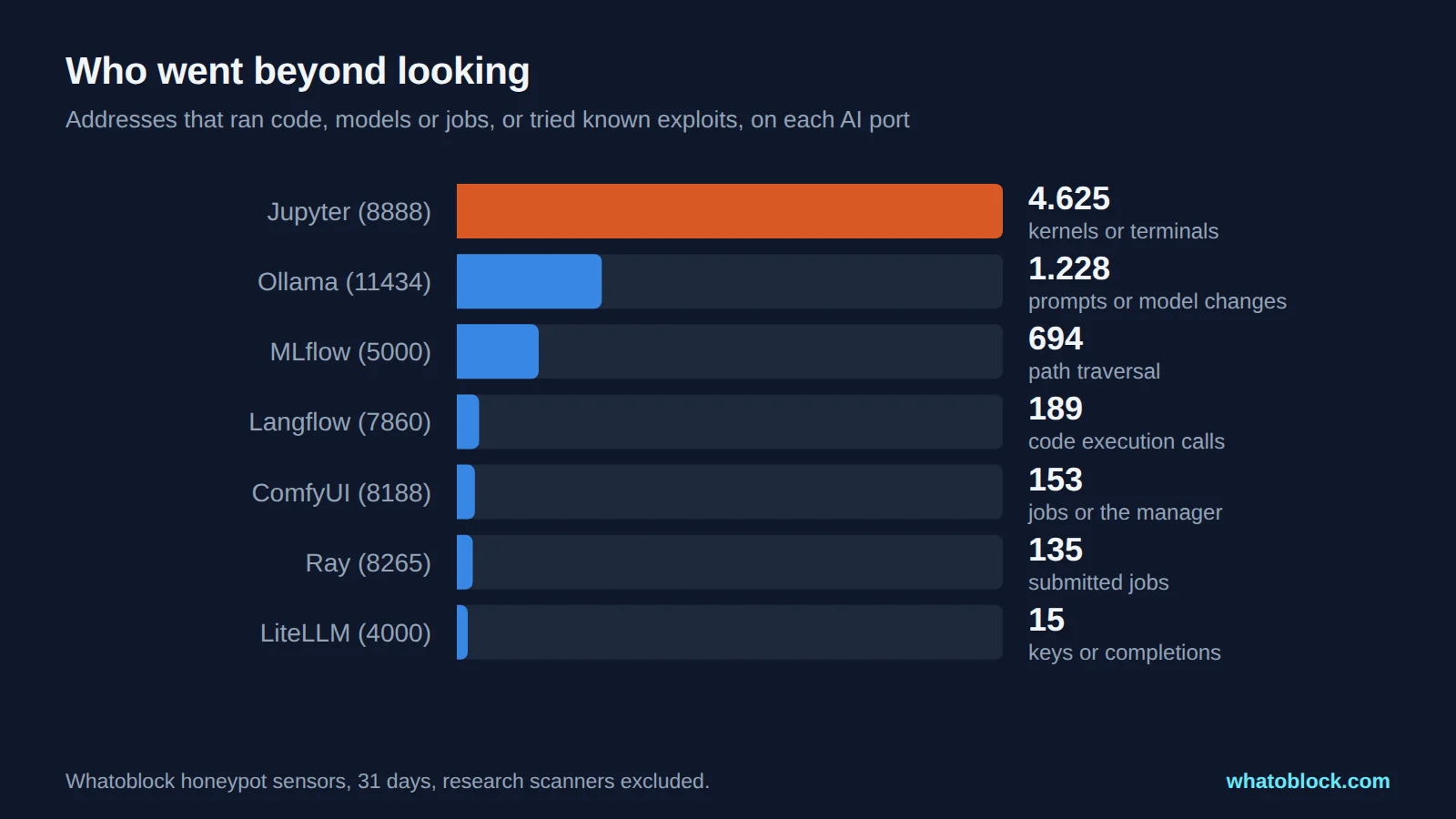
Addresses that tried to run code, models or jobs, or tried known exploits.
Jupyter Notebook on port 8888: the most targeted AI port
Short answer: Jupyter runs code. Anyone who can open a notebook or terminal on your server can do anything you can. Jupyter turns on token authentication by default, because, as its documentation says, access to the server "means access to running arbitrary code". Notebooks started with the token switched off are what attackers look for.
What we saw: 48.688 addresses connected to port 8888, 2.515 on an average day. 16.919 listed kernels, sessions or files. 4.388 tried to start a kernel, and 484 tried to open a terminal.
What they ran: the code is short and goes straight for secrets and hardware:
import os
for k,v in sorted(os.environ.items()): print(f'{k}={v}')
import subprocess; print(subprocess.run(["nvidia-smi","-L"], capture_output=True, text=True).stdout)3.173 addresses sent code that prints every environment variable, where notebooks often keep API keys for model providers and cloud accounts. 106 sent GPU checks. 32 tried to start crypto miners. Earlier research found the same: Qubitstrike stole credentials and mined from Jupyter servers in 2023, and Aqua saw open notebooks used to rebroadcast pirated sports streams in 2024.
What to change: keep token or password authentication on, never start Jupyter with authentication disabled on a public address, and reach it through SSH tunnels or a VPN.
MLflow on port 5000: experiment servers with no login by default
Short answer: MLflow listens on 127.0.0.1 by default, and authentication only exists if you turn it on (--app-name basic-auth). Teams that open it to the network often skip that step.
What we saw: 25.706 addresses connected to port 5000, 2.390 a day. Port 5000 is also used by many web frameworks, so most of those are generic scans. 3.454 used MLflow's own API to list experiments, runs and models.
What they tried: 694 addresses sent requests that try to read files outside MLflow's storage. 203 used a public vulnerability scanner template that registers a model version whose source is a local file path (file:///tmp/...), the standard check for CVE-2023-1177. 28 pointed the source straight at ../../../../etc, and others asked for /get-artifact?path=../../../../../../etc/passwd. An MLflow server can hold cloud storage credentials, so reading local files can lead to the whole model registry.
What to change: update MLflow, enable authentication, and never expose the tracking server to the internet.
LiteLLM on port 4000: the proxy that holds every API key
Short answer: LiteLLM sits in front of paid model APIs and stores their keys. If the master key is the default or missing, anyone can generate keys and spend your credits.
What we saw: 15.527 addresses connected to port 4000, but only 524 used LiteLLM's API, and 15 tried to generate keys or send completions. LiteLLM is a smaller target on our sensors than in the news. Wiz found 3.074 exposed LiteLLM servers in February 2026, 294 of them with the default key or no authentication, and three LiteLLM flaws are on CISA's list of exploited vulnerabilities.
What to change: set a strong master key, keep the admin interface private and update quickly. Sysdig observed the first exploitation attempt against a 2026 LiteLLM SQL injection 36 hours after the advisory reached the GitHub Advisory Database.
Ollama on port 11434: what attackers ask exposed Ollama servers
Short answer: Ollama listens on 127.0.0.1:11434 by default, and its documentation says the local API "does not require authentication". Setting OLLAMA_HOST=0.0.0.0, which the official Docker image does, opens it to anyone who can reach the port.
What we saw: 9.026 addresses connected to port 11434, 629 a day. 1.365 asked for model details, and 1.161 sent prompts.
What they asked: almost all prompts were checks, not questions:
| Prompt | Models tried |
|---|---|
| hi | phi3, gemma2:9b, qwen2.5:7b, mistral, llama3.2 |
| Reply with exactly: ALIVE | phi3, mistral, llama3.2, qwen2.5:7b, gemma2:9b |
| What is 2+2? Answer with one digit. | gemma2:9b, phi3, llama3.2 |
| Say the single word: pong | phi3, qwen2.5:7b, llama3.2 |
820 addresses sent checks like these. They test whether a server answers and which models it has, the way a reseller tests stock. Pillar Security described exactly this in early 2026: exposed AI endpoints are checked, then access is sold on.
Then there is the other 2%. 25 addresses tried to use our sensors as free compute, 39.070 requests in 31 days: classifying Russian classified ads for a CRM, writing Python unit tests, summarising arXiv papers and chatting in Spanish. That is what an open Ollama server becomes: somebody else's free model. 279 addresses also tried to pull, create or delete models, and 22 tried to create a model from /etc/passwd, a way to read files from the server.
What to change: keep Ollama on localhost, put an authenticating reverse proxy in front if others need it, and update: the Probllama flaw (CVE-2024-37032) allowed remote code execution through /api/pull before version 0.1.34.
ComfyUI on port 8188: image generation servers
Short answer: ComfyUI listens on 127.0.0.1 unless started with --listen, and has no login. The popular ComfyUI Manager extension can install custom nodes, which are code, from the internet.
What we saw: 4.088 addresses connected to port 8188, 243 a day. 153 tried to queue image generation jobs, check the manager version or use the upload API. Censys reported in April 2026 on a campaign that installs crypto miners and proxy software through exposed ComfyUI managers.
What to change: do not start ComfyUI with --listen on a public address, and restrict or disable the manager.
Langflow, Ray and vector databases
- Langflow (port 7860): 189 addresses called the code validation or run endpoints, the target of CVE-2025-3248, which CISA lists as exploited and which has been used to spread a DDoS botnet. Port 7860 is shared with Gradio apps.
- Ray (port 8265): 135 addresses tried to submit jobs to the Ray jobs API. Ray's documentation is blunt: "anybody who can access the associated ports can execute arbitrary code on your Ray Cluster." Oligo counted more than 230.000 exposed Ray servers in late 2025.
- Qdrant (port 6333): 2.024 addresses connected, but almost none went further. Qdrant's documentation warns that self hosted instances are not secured by default.
Do the same addresses scan every AI service?
Many do. 9.466 addresses connected to three or more of the eight AI ports, and 663 to six or more. 27.021 also attacked Docker, Redis, Kubernetes or database ports, covered in our report on exposed vs attacked services. AI tools are not attacked by a separate group of AI specialists. They are one more set of ports in the same scanners' lists.
How to protect exposed AI services
- Keep them on localhost or a private network. Most of these tools default to
127.0.0.1. The exposure usually comes from a flag or a Docker setting. - Turn on authentication where it exists, and put an authenticating reverse proxy in front where it does not. The joint guidance from the NSA, CISA, FBI and partners on deploying AI systems says it plainly: "secure them by implementing authentication and authorization mechanisms for API access."
- Keep secrets out of environment variables on notebook servers, or limit what those keys can do.
- Patch fast. Exploitation attempts against new Langflow and LiteLLM flaws began within two days of disclosure in 2026.
- Block known scanners at the firewall. Most of the addresses above hit many ports and services. Our AI infrastructure blocklist is built from the addresses attacking these tools, with setup for every major firewall on the integrations page.
Frequently asked questions
What port does Ollama use?
Port 11434 by default. Ollama only listens on localhost (127.0.0.1:11434) unless you change it.
Is it safe to expose Ollama to the internet?
Not without protection. Ollama's API has no built in authentication, so anyone who finds it can use your models and GPU. In our data, more than a thousand addresses a month sent prompts to port 11434.
Does Ollama have authentication?
The local API does not. Put a reverse proxy with authentication in front of it, or reach it through a VPN or SSH tunnel.
What is LLMjacking?
Using someone else's AI access without permission, by stealing cloud API keys or by finding open model servers, and running prompts at their expense.
What port does Jupyter Notebook use and is it safe to expose?
Port 8888 by default, and it listens only on localhost unless you change it. It is safe to expose only with authentication on and behind a VPN or SSH tunnel, because anyone with access can run code on the server.
What port does MLflow use?
5000 by default. It listens only on localhost unless you change it, and has no login unless you enable basic authentication.
How do I block scanners that target AI services?
Keep the services private, require authentication, and load a blocklist of known attacking addresses into your firewall.
About this data
- Period: 7 October to 6 November 2026, UTC. Per day figures use 1 to 7 November 2026.
- Attackers: addresses that connected to these ports on our honeypot sensors, minus known research scanners. Labels are by port.
- Actions: classified from the requests, such as starting a kernel, sending a prompt or submitting a job. They show what each address tried to do, not whether it would have worked on a real server. Prompts and code are shown as received.
- Exposure counts: from the published research below, with their own methods and dates.
Sources
- Censys, State of the Internet 2026 and Ollama Drama
- Censys, ComfyUI servers used for cryptomining and a proxy botnet, April 2026
- Wiz, Off Guard: LiteLLM research
- Oligo, ShadowRay 2.0
- Pillar Security, Operation Bizarre Bazaar
- Sysdig, LiteLLM CVE-2026-42208 and LLMjacking
- Trend Micro, Langflow vulnerability and the Flodrix botnet and Sysdig, Langflow CVE-2026-33017
- Aqua, misconfigured servers hijacked for sports streaming and Darktrace, Qubitstrike
- Ollama, API authentication and FAQ
- Jupyter Server security
- MLflow, network security and basic authentication
- Ray security
- Qdrant security
- CISA, NSA, FBI and partners, Deploying AI systems securely, April 2024
- CISA, Known exploited vulnerabilities catalog
Check the live data
Open Scanner Recon with the last 24 hours selected.