

You need a feed of command and control (C2) and botnet indicators that your firewall can act on, and you need to know what the licence lets you do with it. This page answers both for the Whatoblock Botnet C2 feed: what it contains, how fresh it is, how it is licensed, what it costs and how to load it. All threat figures come from our honeypot sensors from 5 October to 3 November 2026, unless a different snapshot is named. Prices and licence terms are as published on 5 November 2026.

Where to subscribe to an actionable C2 and botnet feed, and how it is licensed
Whatoblock sells a Botnet C2 feed built from the C2 servers seen in live attacks on our honeypot sensors:
- What you get: up to 11.212 C2 server addresses (5 November 2026), rebuilt every hour.
- How it is delivered: one feed URL that your firewall pulls over HTTPS. Presets for FortiGate, Palo Alto, pfSense and other firewalls, plus plain, TXT, CIDR, MikroTik, Check Point, F5, Wazuh, Zeek, RPZ, CSV and JSON.
- How it is licensed: a monthly or yearly subscription for your organisation's own security use, with no limit on the number of your own firewalls, subject to fair use.
- What it costs: included in every paid blocklist plan, from 89€ a month billed yearly, VAT included.
- MSSPs that protect client networks use a Custom plan under a separate agreement.
What is in the feed
In 30 days our sensors recorded 10.965 C2 servers in 100 countries, used by 31.271 bots. Every entry in the feed was seen handing out malware or commands in a real attack.
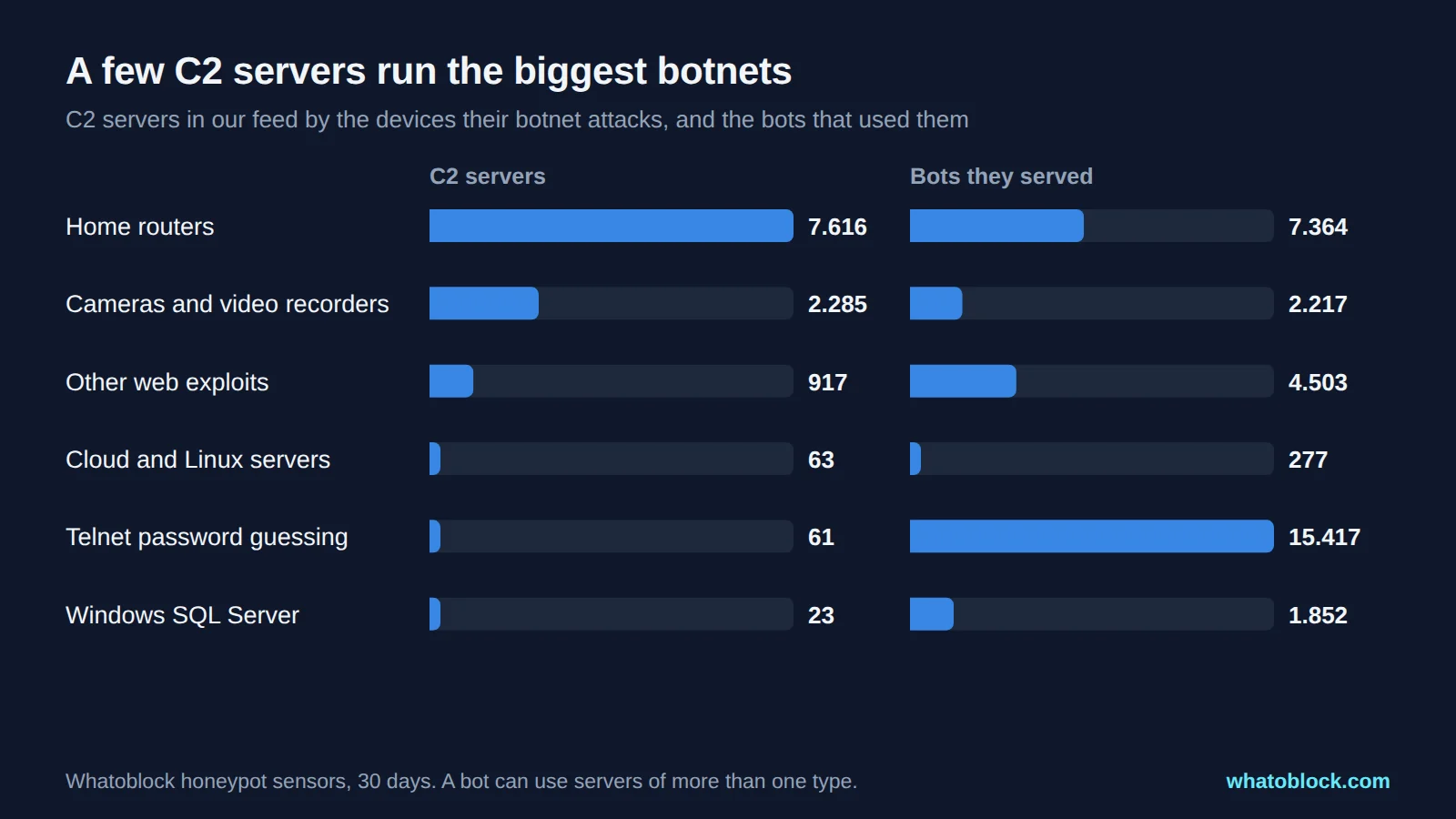
C2 servers by the devices their botnet attacks, and the bots that used them.
- Home routers and cameras make up most of the feed. 7.616 servers spread malware through router exploits and 2.285 through cameras and video recorders. Most of them are infected devices that pass the malware on to the next victim.
- A few servers run the biggest botnets. 61 servers behind Telnet password guessing were used by 15.417 bots. Blocking those few addresses cuts a large botnet off from its controllers.
- Server botnets are in the feed too: 23 servers spreading malware to Windows SQL Servers, used by 1.852 bots, and 63 targeting Docker, Hadoop and SSH.
The servers that served the most bots were hosted on a few networks:
| Network | C2 servers | Bots |
|---|---|---|
| Storm Industries, Netherlands | 25 | 13.170 |
| Sapinet, France | 2 | 1.609 |
| HostPapa, United States | 15 | 1.333 |
| ZhouyiSat Communications, United States | 3 | 1.242 |
| SWISSNET, Netherlands | 10 | 987 |
The table shows where these servers were hosted, not who is responsible for them. Hosting providers serve many legitimate customers alongside rented or compromised servers. The live C2 server list shows the busiest servers right now, and the live cyber attack map shows the last 24 hours of their botnet traffic. We walk through one day on the map in numbers.
Why the feed is rebuilt every hour
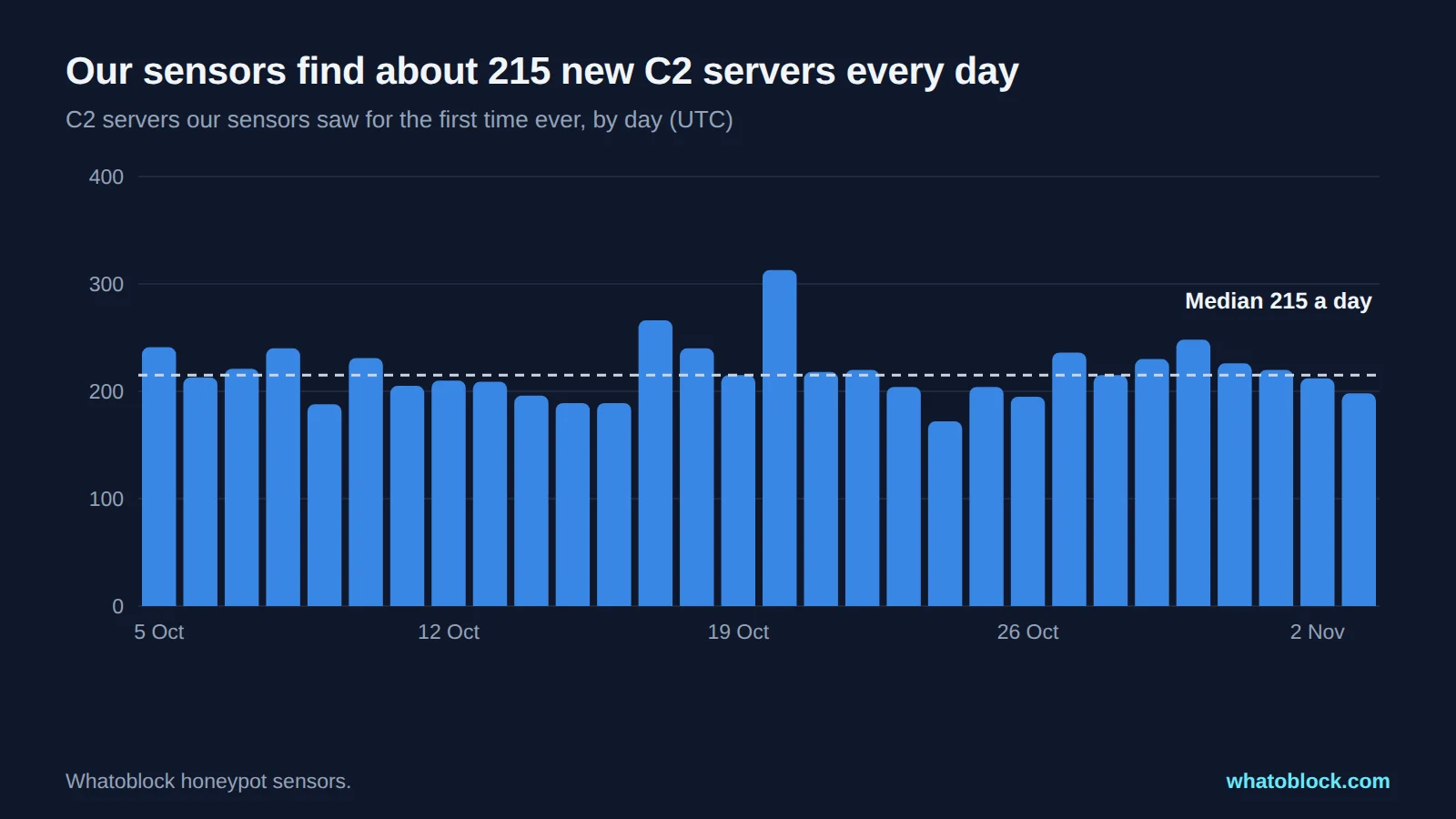
New C2 servers our sensors saw each day.
Our sensors find a median of 215 new C2 servers a day. 6.564 of the 10.965 servers (60%) were seen for the first time in these 30 days, and most of them did not last:
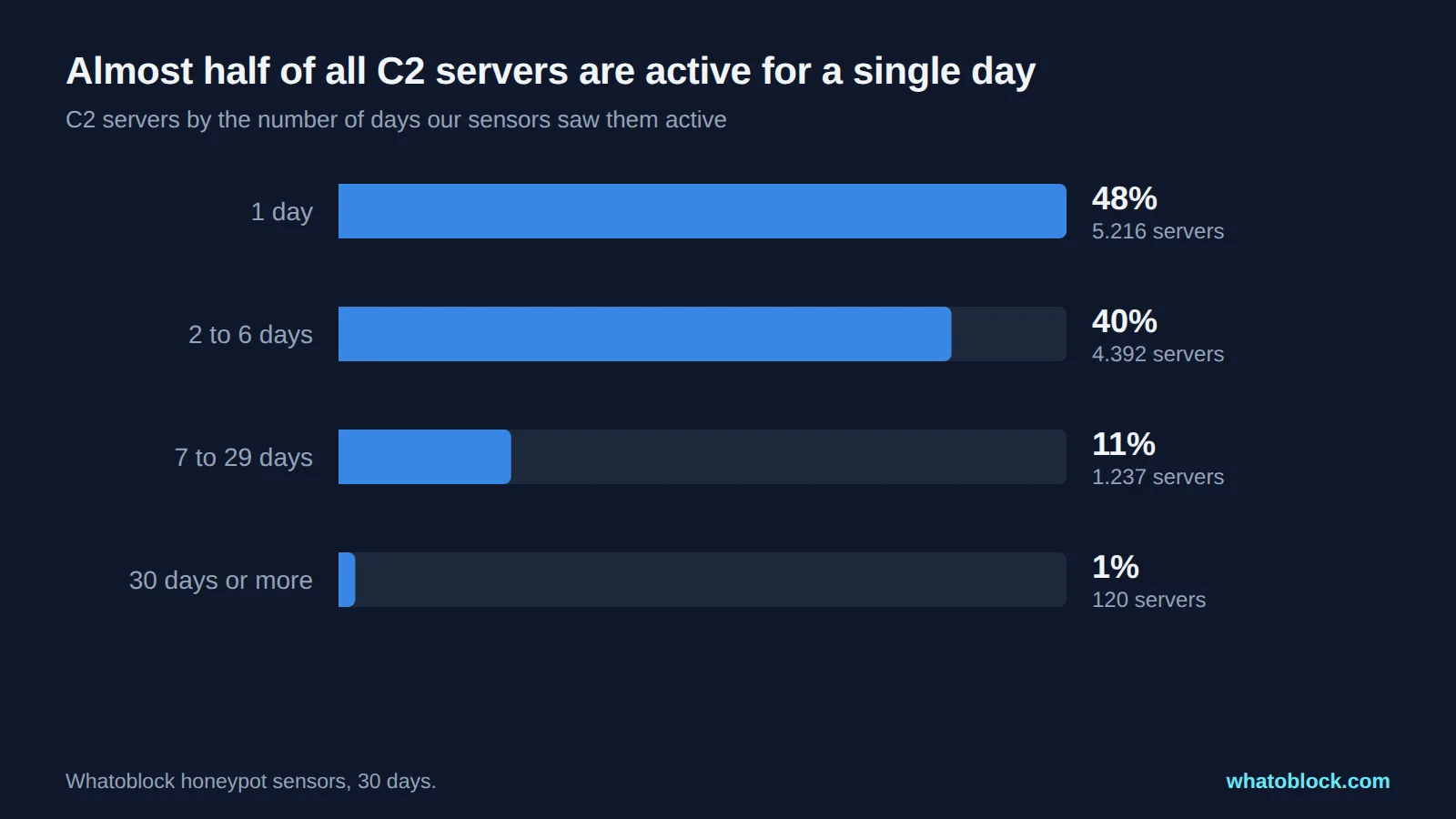
C2 servers by the number of days our sensors saw them active.
5.216 servers (48% of 10.965) were active on a single day, and 88% on six days or fewer. C2 infrastructure changes fast, which is why the feed is rebuilt every hour. That is what makes the feed actionable:
- Hourly rebuild. At the maximum blocking level, a new C2 server joins the feed at the next hourly rebuild after our sensors first see it, as long as it falls within your time frame.
- In the feed before most bots arrive. 93% of bot contacts with dedicated C2 servers came after the server was already in the hourly feed. Your firewall starts blocking it at its next refresh, so set the refresh to hourly.
- Your time frame. Choose 24 hours, 7 days or 31 days. A server leaves the feed once it has been quiet for longer, so your firewall does not fill up with dead entries.
- Your blocking level. Stricter levels keep the C2 servers we are most sure of, the maximum level includes every C2 server we observed.
- Only C2, or everything. Build a feed with only the Botnet C2 source, or combine it with scanners, proxies, Tor and DDoS sources in one feed.
- It fits your firewall. At up to 11.212 addresses, a C2 only feed fits even the per feed limit of older FortiGate firmware. Our FortiGate threat feed guide shows the limits by version.
How the feed is licensed
| Licence question | Whatoblock Botnet C2 feed |
|---|---|
| Who may use it | Your organisation, for its own security and business purposes |
| Commercial use | Yes, to protect your own business |
| Number of firewalls | No limit for your own network, subject to fair use |
| Use for clients (MSSP) | Custom plan under a separate agreement |
| Resale or redistribution | Not allowed |
| Billing | Monthly or yearly, renews automatically, cancel at any time |
The Botnet C2 category is part of every paid blocklist plan, together with every other threat category. The plans differ by how many industries your scanner coverage includes:
| Plan | Industries | Billed yearly | Billed monthly |
|---|---|---|---|
| Essential | 1 | 89€ a month (1.068€ a year) | 109€ a month |
| Business | Up to 3 | 199€ a month (2.388€ a year) | 239€ a month |
| Complete | All current and future | 259€ a month (3.108€ a year) | 309€ a month |
| Custom | Agreed with you, including MSSP use | On request | On request |
Prices include VAT. Full details are on the pricing page.
How to subscribe and load the feed
- Pick a plan on the pricing page. Every paid plan includes the Botnet C2 category.
- Build your feed in the dashboard. Select the Botnet C2 source, your time frame, blocking level, firewall preset and output format.
- Copy the feed URL and add it to your firewall as an external list, for example a FortiGate external threat feed or a Palo Alto external dynamic list. The integration guides show each firewall step by step.
- Start in logging mode. Watch what the feed matches in your own traffic for a few days, then switch the rule to block.
Set your firewall to refresh the feed every hour to match the rebuild.
Frequently asked questions
Can I use the C2 feed in my business?
Yes. The licence covers your organisation's own security and business use, including commercial companies. Reselling or passing the feed on to others is not allowed.
Can an MSSP use one subscription for all of its clients?
No. MSSPs that load the feed onto client firewalls need a Custom plan under a separate agreement.
Is the feed licensed per firewall?
No. One subscription covers as many of your own firewalls as you need, subject to fair use.
How often is the C2 feed updated?
Every hour. You choose whether it covers the last 24 hours, 7 days or 31 days of C2 activity.
Which formats does the feed support?
Firewall presets for FortiGate, Palo Alto, pfSense and others, plus plain, TXT, CIDR, MikroTik, Check Point, F5, Wazuh, Zeek, RPZ, CSV and JSON.
Does the feed include C2 domains?
Not yet. The feed lists IP addresses only, because our domain tracking is new.
Is there a free version of the C2 feed?
The free sample feed covers scanner activity so you can test the format and your firewall setup. The Botnet C2 category is part of the paid plans.
About this data
- Period: C2 servers seen by our honeypot sensors from 5 October to 3 November 2026, IP addresses only.
- Feed size: 11.212 addresses in the published C2 category on 5 November 2026, 02:00 UTC, with the 31 day time frame.
- Bot contacts: a contact counts as covered when it came more than one hour after our sensors first saw that C2 server, the time it takes to reach the hourly feed. These figures come from our own sensors and describe our network. The best test of any feed is your own firewall logs.
- Prices and terms as published on the pricing page and in the terms on 5 November 2026.
Check the live data
Open Botnet C2 Servers with the last 24 hours selected.