

A Tor exit node is the last relay a Tor connection passes through before it reaches a normal website or server. To that server, every Tor user arrives from an exit node's IP address. That is why most "block Tor" advice comes down to one thing: a current list of exit IPs and a firewall rule that uses it.

This guide shows where the official list lives and how to check a single IP. It then shows how to block or challenge Tor on FortiGate, Palo Alto Networks, pfSense, OPNsense and Cloudflare. Before the setup steps, it answers the question most guides skip: what Tor exits actually send to exposed servers. We matched every Tor exit address tracked by Whatoblock Heartbeat against the traffic our honeypot network recorded from 30 September to 29 October 2026.
The short version
- On 30 October 2026, 2.761 Tor relays carried the Exit flag, but they shared only 1.227 exit IPv4 addresses. Those 1.227 addresses are the official exit list.
- 1.182 of the 1.546 exit IPs we tracked over 30 days (76%) sent traffic to our honeypots. Together they produced 1.134.176 of the 2.353.474.395 events our sensors recorded, about 1 in every 2.000.
- One exit network, Church of Cyberology (the nothingtohide.nl relays), sent 664.300 of those 1.134.176 Tor events (59%) from 68 exit IPs. Quintex, with 100 exit IPs, sent 388.
- 670.181 of the 1.134.176 Tor events (59%) went to PostgreSQL. The traffic shows a database takeover routine that rotated through about 318 exits: create a hidden superuser, delete accounts other attackers left behind, change the password.
- 88 of the 1.182 exits that reached our sensors were no longer on the official list by 30 October. A list fetched once is out of date within days.
- Blocking Tor makes sense in front of services Tor users have no reason to reach, such as databases, SSH, admin panels and VPN portals. For public websites, challenging Tor or limiting it on login and checkout pages usually works better than a full block.
What a Tor exit node is
Tor sends each connection through three relays. The first (guard) relay sees who you are but not where you are going. The last (exit) relay sees where the traffic goes but not who sent it. Only the exit connects to the website, so a website only ever sees exit IPs.
Three numbers get mixed up in most articles about Tor exits. Tor's own data for 30 October 2026 shows how far apart they are:
| What is counted | Count on 30 October 2026 | Source |
|---|---|---|
| Running Tor relays, all types | 9.254 | Onionoo |
| Relays with the Exit flag | 2.761 | Onionoo |
| Unique exit IPv4 addresses | 1.227 | Tor bulk exit list |
Several relays can run on one IP address. Tor allows up to eight per IP, and 41 exit IPs on 30 October hosted eight. For a firewall, the number that matters is the third one: the addresses traffic actually comes from.
The count also moves a lot. Tor Metrics shows the number of relays with the Exit flag ranging from 1.788 to 4.704 over the past year. An exit count without a date is not worth much.
The Exit flag itself is a loose label. Tor's directory gives it to any relay that allows exits to port 80 and 443 on at least part of the internet. Each exit then follows its own exit policy, which lists the ports it will connect to. Tor's default exit policy rejects ports 25, 119, 135 to 139, 445, 563, 1214, 4661 to 4666, 6346 to 6429, 6699 and 6881 to 6999 and accepts the rest. Many operators choose something stricter. The 600 Quintex relays accept only seven ports, among them 53, 80 and 443. Others accept everything: on 30 October, 574 exit relays allowed even port 25, and they carried about a quarter of Tor's exit capacity.
That detail explains most of what our honeypots saw.
Where to get the Tor exit node list
The Tor Project publishes the list itself, for free, in several forms.
| Source | What you get | Notes |
|---|---|---|
| Bulk exit list | One IPv4 address per line | The list to feed a firewall. Updated at most every 40 minutes. |
| Exit addresses | Each exit relay with the address it was last seen exiting from, and a timestamp | Useful when you want to know when an exit was last tested |
| DNS lookup (dnsel.torproject.org) | A DNS answer for one IP | Quick single lookups, see the next section |
| Onionoo | Full relay details, exit policies, operators | For analysis, not for firewalls |
| ExoneraTor | Whether an IP was a Tor relay on a past date | For incident reviews and abuse reports |
A few practical points:
- The bulk list is built by actually testing exits, not by copying the relay directory. Some exits leave the network from a different IP than the one they advertise, and a list scraped from the directory misses them. A directory scrape also adds the roughly 6.500 guard and middle relays, which never connect to websites, so it blocks the wrong addresses as well.
- The Tor Project says the bulk list changes at most every 40 minutes and that fetching it once an hour is reasonable.
- The old
TorBulkExitList.py?ip=address still works but redirects to the plain list. The filter by destination IP has not worked since 2020. - The list only contains IPv4 addresses. On 28 October, 2.392 relays allowed exiting over IPv6. If your service is reachable over IPv6, an IPv4 list does not cover it, and a vendor object such as Cloudflare's T1 country code is the safer choice.
Exits come and go every day. In the hourly lists Tor published for September 2026, 1.738 different exit IPs appeared over the month, while any single list held about 1.410. Only 1.075 addresses stayed for the whole month. On an average day, 16 addresses were new compared with the day before.
Whatoblock's own Tor exit feed keeps every address that was an exit in the last 31 days, refreshed every hour, in the formats FortiGate, Palo Alto, pfSense and OPNsense read. On 30 October its 31 day window covered 1.557 addresses: all 1.227 on the official list plus 330 that had been exits earlier in the month. It is included with every Whatoblock blocklist purchase. If you only need the current exits, the official list above is free and good.
How to check if an IP is a Tor exit node
DNS lookup. Reverse the four parts of the IP and ask dnsel.torproject.org. An exit answers with 127.0.0.2. Any other address gets no answer (NXDOMAIN).
dig +short 25.193.25.171.dnsel.torproject.org
127.0.0.2
That checks 171.25.193.25, which was an exit when we tested it on 30 October.
Search the bulk list.
curl -s https://check.torproject.org/torbulkexitlist | grep -x '171.25.193.25'Check a past date. Logs are often days old by the time someone looks at them. ExoneraTor tells you whether an address was a Tor relay on a given date, which the live list cannot.
Check it against attack data. Whatoblock search shows whether an IP appears in our Heartbeat records, including the Tor exit category, and whether it also hit our honeypot sensors.
If the address you are checking is your own and you do not use Tor, the usual reasons are a relay or bridge running on your connection, an IP that previously belonged to an exit operator, or a list that mixes Tor with VPNs and proxies. Running a Tor relay at home publishes your IP as part of the network, and some blocklists include every relay, not just exits.
Where Tor exits are
Over the 30 days, Whatoblock Heartbeat tracked 1.546 Tor exit IPs in 59 countries and 259 networks.
| Country | Exit IPs |
|---|---|
| United States | 528 |
| Germany | 252 |
| Netherlands | 195 |
| Sweden | 78 |
| Switzerland | 37 |
| Romania | 34 |
| Seychelles | 31 |
| United Kingdom | 31 |
Counting IPs hides how concentrated Tor really is. Tor clients pick exits in proportion to the bandwidth they offer, so a few large operators carry most of the traffic. On 30 October, Tor's own figures gave the nothingtohide.nl relays 23% of all exit capacity, and the five largest exit operators about half of it. Most of these operators are non profit privacy groups. The live Tor exit network ranking shows the networks with the most exit IPs, updated daily.
What Tor exits sent to our honeypots
Our honeypots are not public services. Nobody visits them on purpose, so everything that reaches them is scanning, probing or an attack. That makes them a useful way to see what Tor exits carry towards exposed servers.
Most exits showed up, but they were a tiny share of the traffic. 1.182 of the 1.546 exits (76%) sent at least one connection to our sensors in the 30 days. Yet they were only 1.182 of the 877.633 addresses our sensors saw (about 1 in 740), and their 1.134.176 events were about 1 in 2.000 of the total. Blocking Tor does not remove much of the background noise any exposed server gets.
The traffic was very uneven. The 100 busiest exits sent 874.371 of the 1.134.176 Tor events (77%). The median exit sent 47 events in a month.
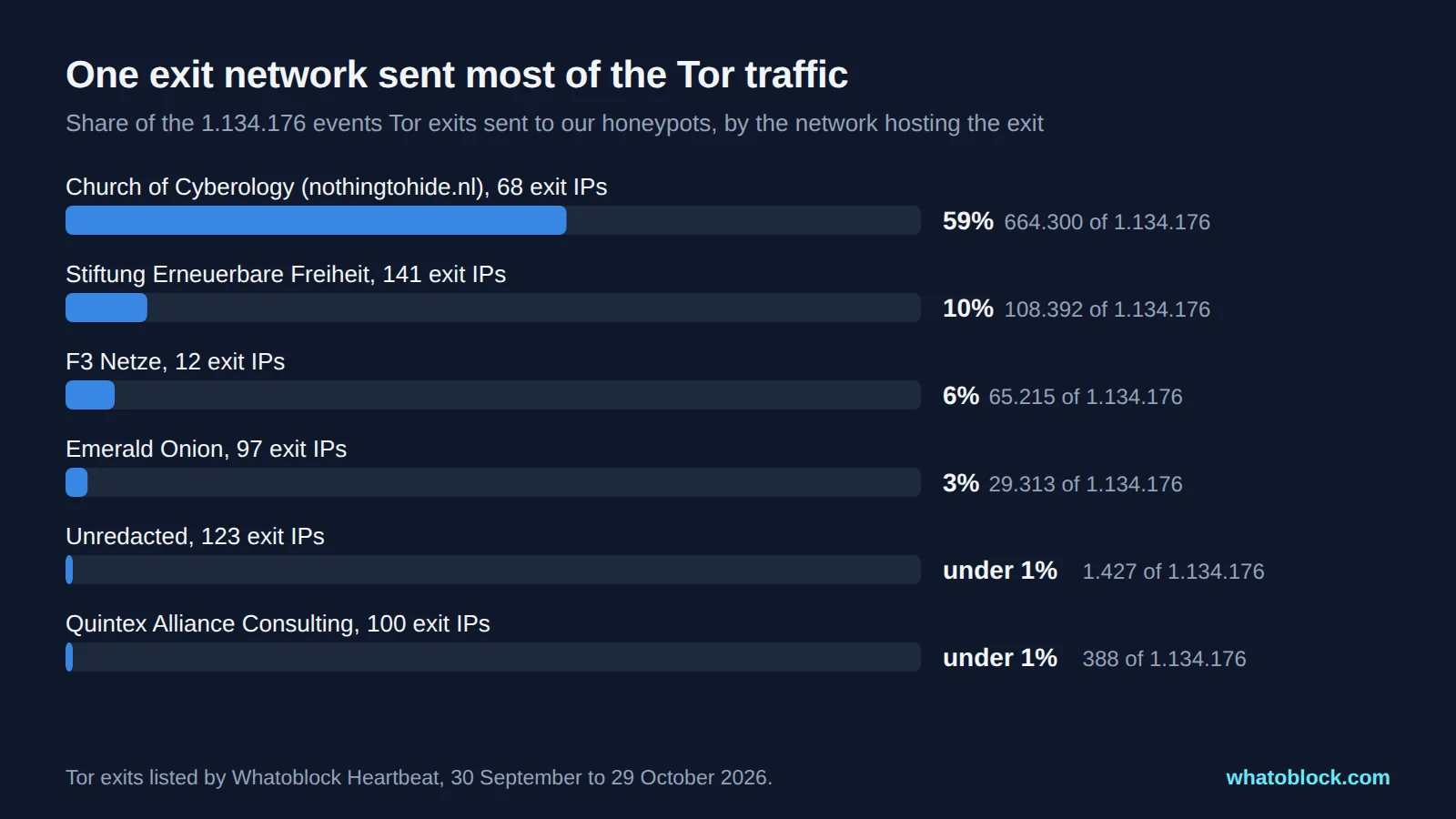
Share of the 1.134.176 events Tor exits sent to our honeypots, by the network hosting the exit.
This lines up with exit policies. The networks that accept every port, such as the nothingtohide.nl relays and Emerald Onion, carried almost all of the traffic. Quintex allows only a handful of ports, mostly web and DNS, so its 100 exit IPs sent just 388 events. Anyone scanning databases or remote access ports through Tor ends up on the permissive exits. That is not a judgement of those operators: they run the exits on behalf of Tor's users, and the traffic comes from those users.
Most of it went to PostgreSQL.
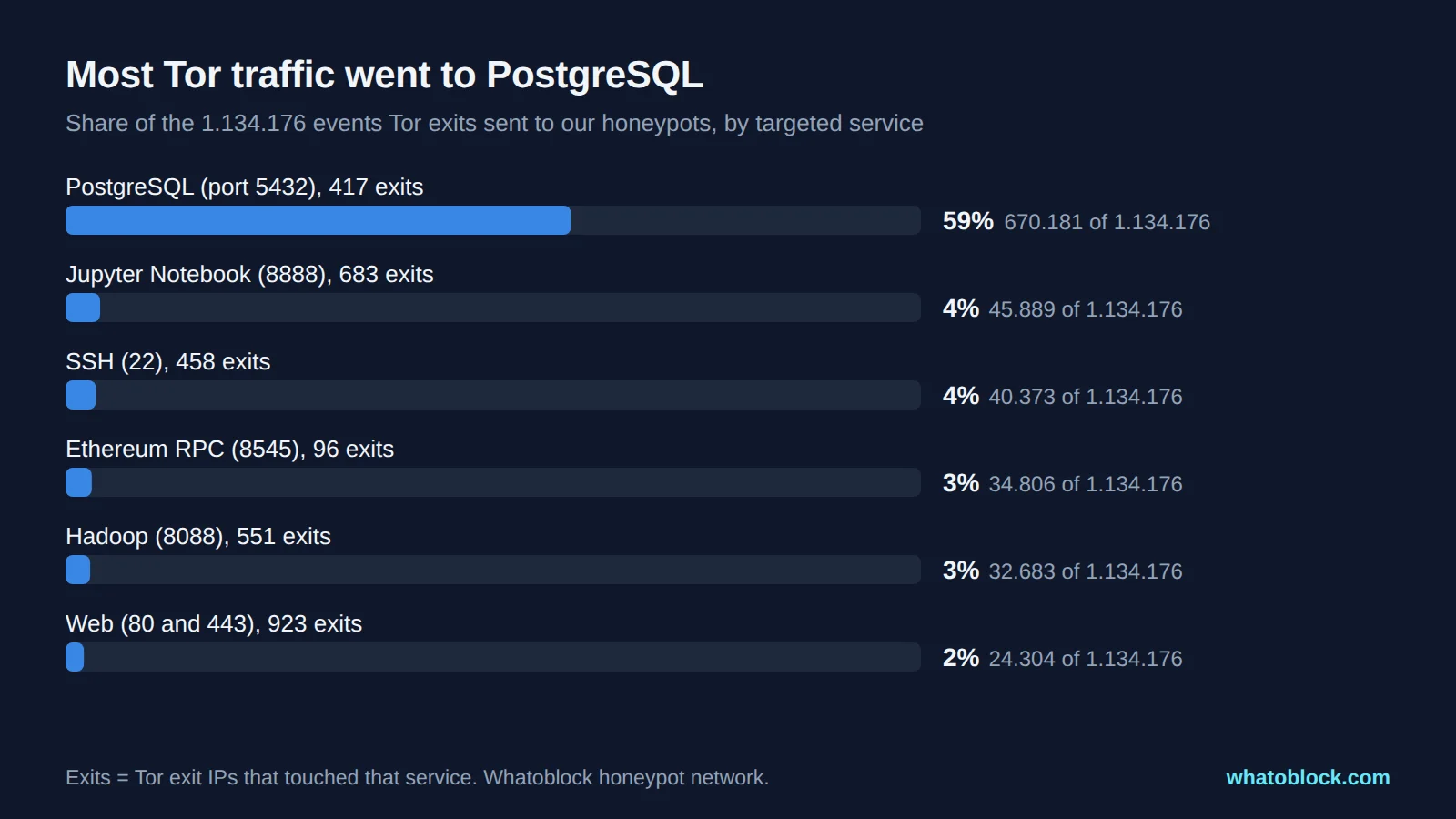
Share of the 1.134.176 events Tor exits sent to our honeypots, by targeted service.
670.181 of the 1.134.176 Tor events (59%) targeted PostgreSQL on port 5432, from 417 exits. The commands repeat the same routine:
- Log in to the database.
- Create a new superuser called
"postgres ", with a trailing space so it looks like the real account in a quick listing. - List the existing roles.
- Drop two accounts,
soandpsql_sys. Neither is a standard PostgreSQL account, so this looks like removing access left by competing attackers. - Change the
postgrespassword to a random value.
Each of the four main statements arrived from about 318 different exits in the last ten days of October. It is one automated routine, rotating its circuit and so its exit address. Blocking the few exits you happen to notice in your logs does little against this. You need coverage of the wider exit network, not just the addresses you have already seen. The activity faded towards the end of October, from between 25.000 and 37.000 PostgreSQL events a day in early October to 839 on 29 October.
The rest was spread thinly: Jupyter Notebook servers on port 8888 (683 exits), SSH (458 exits), Hadoop (551 exits), Ethereum RPC (96 exits) and ordinary web ports 80 and 443 (923 exits). 68 exits probed 40 or more different services each.
A list fetched once falls behind. 88 of the 1.182 exits that reached our sensors (7%) were no longer on the official list on 30 October. They had sent 72.765 events during the month. If your firewall loaded the list once in early October, it would have missed the newer exits instead.
Should you block Tor exit nodes?
It depends on what you protect. The evidence on both sides is older than most guides admit, so here it is with dates.
The case for blocking:
- Cloudflare reported in 2016 that 94% of the requests it saw from Tor were automated abuse such as scanning, spam and login attacks. The Tor Project disputed the method, and Cloudflare has not published a newer figure.
- Akamai's security report for the second quarter of 2015 found 1 in 380 requests from Tor exits was malicious, against 1 in 11.500 from other addresses, while 99% of the attacks it saw still came from outside Tor.
- A 2017 study of complaints sent to exit operators found most were about copyright. Of the rest, network abuse, unauthorised access attempts, scans and spam made up the bulk.
- CISA and the FBI's 2020 advisory says attackers use Tor for reconnaissance, breaking into systems, stealing data and denial of service, and that the risk "is unique to each organization". It offers three options: block all Tor traffic, block it for some resources and monitor the rest, or tailor monitoring and blocking.
- Our own data agrees on one point: the Tor traffic that reached our sensors was scanning and attacks against services like PostgreSQL, SSH and Jupyter.
The case against:
- About 3 million people use Tor directly every day, according to Tor Metrics for October 2026, many of them journalists, activists and people in censored countries.
- A 2016 study found that nearly 4% of the top 1.000 websites blocked Tor users outright, and that blocking often hits users who did nothing, because many people share one exit address.
- The same 2015 Akamai report found Tor visitors bought from online shops at about the same rate as other visitors.
- A 2020 study found more sites blocking Tor than earlier measurements, and a 2026 study found blocks and CAPTCHAs were still the problems Tor users reported most.
What we recommend:
| Service | Suggested action |
|---|---|
| Databases, SSH, RDP, admin panels, VPN portals | Block. Legitimate Tor users have no reason to reach them, and this is where most of the Tor traffic in our data went. |
| Login, signup, password reset, checkout | Challenge or rate limit Tor, or require an extra check |
| Public content, documentation, blogs | Allow, or read only access |
| Outbound from your own network | Block the Tor client with application control if your policy forbids it (see below) |
The Tor Project's own guidance is similar. It suggests making decisions at the application level where possible, for example letting Tor users read but not post, and a Tor developer wrote that the exit list exists to help sites that want to block Tor do it "with minimal damage to the Tor network".
Inbound and outbound are different problems
An exit list only stops Tor users from reaching you. It does nothing to stop someone inside your network from using Tor, because a Tor client connects to guard relays and unlisted bridges, never to exits.
- Inbound: use the exit list, or a vendor object built from it, as the source address in a deny or challenge rule.
- Outbound: use application control (App-ID on Palo Alto, Application Control on FortiGate) or a relay list as the destination. Bridges are designed not to appear on public lists, so IP lists alone will not stop a determined user.
Do not use a list of all Tor relays for inbound blocking. Guard and middle relays never connect to websites, and blocking them only hurts relay operators.
Block Tor on FortiGate
FortiGuard maintains Tor objects in the Internet Service Database (ISDB). Tor-Exit.Node works as a source, for inbound rules. Tor-Relay.Node works as a destination, for outbound rules.
Inbound to a published server. Create a firewall policy from WAN to the server, set Source to Internet Service Tor-Exit.Node, action Deny, and move it above the policy that allows the traffic. If the destination is "all" and the server sits behind a virtual IP, make sure match-vip is enabled on the deny policy. It is enabled by default on releases after FortiOS 7.2.3.
The FortiGate itself. Admin access and VPN portals on the WAN address need a local-in policy. ISDB objects work in local-in policies from FortiOS 7.4.4. FortiOS 7.6.1 adds this default policy, but only on factory default units and new VDOMs, so an upgraded firewall needs it added by hand:
config firewall local-in-policy
    edit 1
        set intf "any"
        set dstaddr "all"
        set internet-service-src enable
        set internet-service-src-name "Malicious-Malicious.Server" "Tor-Exit.Node" "Tor-Relay.Node"
        set service "ALL"
        set schedule "always"
    next
end
Using an external list instead. Go to Security Fabric > External Connectors, click Create New, choose IP Address under External Feeds, set the update method to External Feed and paste the list URL. In the CLI:
config system external-resource
    edit "tor-exit"
        set type address
        set resource "https://example.com/tor-exit.txt"
        set server-identity-check full
        set refresh-rate 60
    next
end
execute update-external-resource tor-exit
The feed then appears as an address you can use as source or destination in firewall and local-in policies. Address objects and ISDB objects cannot share one local-in policy, so create separate ones.
Limits. The often quoted limit of 131.072 entries per feed applied before FortiOS 7.4.4. Current releases use a global limit per device class: 300.000 IP entries on entry level models, 1.000.000 on mid range and 5.000.000 on high end models (FortiOS 7.6.3 and later). A Tor list of about 1.500 addresses fits easily either way.
Check it.
diagnose internet-service match root 171.25.193.25 255.255.255.255
diagnose sys external-address-resource list tor-exit
The first command shows which ISDB objects contain an IP. The second lists what the feed loaded. The GUI equivalent is Policy & Objects > Internet Service Database > IP Address Lookup.
FortiOS 7.6.3 removed SSL VPN tunnel mode, so on current firmware the local-in policy protects the admin interface and the remaining VPN portals.
Block Tor on Palo Alto Networks
Built in list. With an active Threat Prevention license, PAN-OS includes a read only external dynamic list (EDL) called Palo Alto Networks Tor Exit IP Addresses, updated through content updates. Use it as the source address of a deny rule from your untrust zone, placed above the rules that allow traffic to your servers. Built in lists do not count towards the EDL capacity limit.
Custom list. Go to Objects > External Dynamic Lists, click Add, choose type IP List, enter the source URL, select a certificate profile for HTTPS, and set Check for updates (every five minutes at the most frequent). Commit, then use the list as the source in an inbound deny rule. The file can hold single IPs, subnets or ranges, one per line, with an optional comment after a space.
Outbound. Deny the tor and tor2web applications from your internal zones. Palo Alto's own community guidance notes that App-ID alone is not enough against a determined user, so combine it with URL filtering and a rule against unknown traffic.
Limits. A firewall can use up to 30 custom EDLs. The total number of addresses depends on the model, so check Objects > External Dynamic Lists > List Capacities on your device.
Check it.
request system external-list show type ip name tor-exitIn the GUI, open the list and use List Entries and Exceptions to filter for an IP. One caveat from Palo Alto's documentation: if certificate or client authentication to the list server fails, the firewall stops enforcing policy based on that list. Monitor the EDL status.
Block Tor on pfSense and OPNsense
Neither has a built in Tor list. Both use a URL table alias that downloads a list.
pfSense.
- Go to Firewall > Aliases, click Add and choose type URL Table (IPs). Enter the list URL and an update interval in days.
- On the WAN rules tab, add a Block rule with the alias as source and move it to the top.
- Check the loaded addresses under Diagnostics > Tables.
Use URL Table (IPs), not the plain URL (IPs) type. The plain type reads at most 3.000 entries and is only fetched once. pfSense checks URL tables once a day, so the shortest refresh is a day. With a list of current exits only, new exits can be missing for up to a day. A list that keeps the last few weeks of exits loses less between refreshes. Firewall Maximum Table Entries (System > Advanced > Firewall & NAT, default 400.000) should be at least double the total of all aliases.
OPNsense.
- Go to Firewall > Aliases, add an alias of type URL Table (IPs), enter the URL and set the refresh frequency.
- Add a block rule on WAN with the alias as source.
- Check that an IP is included under Firewall > Diagnostics > pfTable.
Two OPNsense details catch people out. Existing connections survive an alias update until their state is cleared. And a port forward whose filter rule association is set to Pass skips your block rules entirely, so link port forwards to a normal filter rule instead.
Block or challenge Tor on Cloudflare
Cloudflare tags Tor traffic with the special location code T1, so you do not need a list at all. Cloudflare's documentation gives this custom rule expression:
(ip.src.continent eq "T1")Go to Security rules, create a custom rule with that expression, and choose Block or Managed Challenge. Custom rules are available on every plan (5 rules on Free). Cloudflare suggests starting with Managed Challenge, checking the matches in Security Events, then switching to Block if you want to. To limit Tor only on sensitive pages, add a path condition, for example and starts_with(http.request.uri.path, "/login").
Three details:
- IP Access rules can only block by country on Enterprise plans. Other plans can challenge
T1there, or block it with a custom rule as above. - If you block or challenge Tor, Cloudflare says to turn off Onion Routing on the zone. Onion Routing serves Tor Browser users through an onion service without an exit node.
- Custom IP lists hold 10.000 items on Free, Pro and Business plans, but Cloudflare does not fetch them from a URL. If you want your own list, replace it through the Lists API on a schedule.
Keep the list fresh
- Refresh about once an hour. The official list changes at most every 40 minutes.
- Expect churn. Dozens of exits appear each week, and in our data 7% of the exits that hit our sensors had dropped off the list within the month.
- Block exits, not all relays.
- Remember IPv6. The official list is IPv4 only.
- Watch for failed downloads. A FortiGate keeps using the last list it loaded, while a Palo Alto firewall with a failed authenticated download stops enforcing it.
Frequently asked questions
How many Tor exit nodes are there? On 30 October 2026, 2.761 relays had the Exit flag and they used 1.227 unique exit IPv4 addresses. The number changes every hour, and over the past year the count of exit relays ranged from about 1.800 to 4.700.
How do I check if an IP is a Tor exit node? Ask dnsel.torproject.org with the reversed IP, search the official bulk list, or use ExoneraTor for a past date. The steps are above.
Does blocking Tor exit nodes stop my employees using Tor? No. Exit lists only stop incoming Tor traffic. To stop the Tor client leaving your network, use application control and block relays as a destination.
Should I block Tor guard and middle relays too? Not for inbound traffic. They never connect to websites. Blocking them only affects people who run relays.
Can I challenge Tor users instead of blocking them? Yes. Cloudflare's Managed Challenge on T1 does this, and on other platforms you can limit the block to login, admin and checkout paths.
How often should my firewall update the Tor list? About every hour. pfSense can only refresh URL tables daily, which is a good reason to use a list that keeps recent exits rather than only current ones.
Does Cloudflare block Tor by default? No. Tor traffic is labelled T1, and you decide what to do with it. Cloudflare's normal bot and reputation checks can still challenge Tor users.
Methodology
- Tor exit addresses: every IP in the Tor exit category of Whatoblock Heartbeat from 30 September to 29 October 2026 (1.546 addresses). All figures in this article use that window unless a date says otherwise.
- Honeypot traffic: every event our sensors recorded from those addresses in the same window, matched by IP. An event is one recorded connection or request. "Exits that reached our sensors" means at least one event.
- Official list and network figures: the Tor bulk exit list, Onionoo and Tor Metrics, fetched on 30 October 2026 around 14:00 UTC. Churn figures come from the hourly exit lists Tor published for September 2026.
- Firewall steps: taken from current vendor documentation for FortiOS 7.4 to 8.0, PAN-OS 11 and 12, pfSense, OPNsense and Cloudflare. Interfaces change between versions, so check the documentation for your release.
- Limits: an IP that was an exit during the month may have been used for other things before or after. We counted events by the exit address, which tells us the traffic left through Tor but not who sent it.
Sources
- Tor Project: bulk exit list, exit list service changes, 2020, Onionoo, Tor Metrics, ExoneraTor, exit relay flag rules, banning Tor
- Research: Khattak et al., NDSS 2016, Singh et al., USENIX Security 2017, Zhang et al., DSN 2020, ReporTor, PoPETs 2026
- Industry and government: Cloudflare, 2016, Tor Project reply, 2016, Akamai Q2 2015 report coverage, CISA and FBI advisory AA20-183A
- Vendor documentation: FortiGate IP address external feed, FortiGate external feed limits, FortiOS default local-in policy, Palo Alto built in EDLs, pfSense alias types, OPNsense aliases, Cloudflare block Tor traffic, Cloudflare IP Access rules
Check the live data
Open Scanner Recon with the last 24 hours selected.